

-
We are excited to announce two major capability upgrades for Agent Lee, the AI co-pilot built directly into the Cloudflare dashboard. Agent Lee is designed to understand your specific account configuration, and with this release, it moves from a passive advisor to an active assistant that can help you manage your infrastructure and visualize your data through natural language.
Agent Lee can now perform changes on your behalf across your Cloudflare account. Whether you need to update DNS records, modify SSL/TLS settings, or configure Workers routes, you can simply ask.
To ensure security and accuracy, every write operation requires explicit user approval. Before any change is committed, Agent Lee will present a summary of the proposed action in plain language. No action is taken until you select Confirm, and this approval requirement is enforced at the infrastructure level to prevent unauthorized changes.
Example requests:
- "Add an A record for blog.example.com pointing to 192.0.2.10."
- "Enable Always Use HTTPS on my zone."
- "Set the SSL mode for example.com to Full (strict)."
Understanding your traffic and security trends is now as easy as asking a question. Agent Lee now features Generative UI, allowing it to render inline charts and structured data visualizations directly within the chat interface using your actual account telemetry.
Example requests:
- "Show me a chart of my traffic over the last 7 days."
- "What does my error rate look like for the past 24 hours?"
- "Graph my cache hit rate for example.com this week."
These features are currently available in Beta for all users on the Free plan. To get started, log in to the Cloudflare dashboard ↗ and select Ask AI in the upper right corner.
To learn more about how to interact with your account using AI, refer to the Agent Lee documentation.
Cloudflare Containers and Sandboxes are now generally available.
Containers let you run more workloads on the Workers platform, including resource-intensive applications, different languages, and CLI tools that need full Linux environments.
Since the initial launch of Containers, there have been significant improvements to Containers' performance, stability, and feature set. Some highlights include:
- Higher limits allow you to run thousands of containers concurrently.
- Active-CPU pricing means that you only pay for used CPU cycles.
- Easy connections to Workers and other bindings via hostnames help you extend your Containers with additional functionality.
- Docker Hub support makes it easy to use your existing images and registries.
- SSH support helps you access and debug issues in live containers.
The Sandbox SDK provides isolated environments for running untrusted code securely, with a simple TypeScript API for executing commands, managing files, and exposing services. This makes it easier to secure and manage your agents at scale. Some additions since launch include:
- Live preview URLs so agents can run long-lived services and verify in-flight changes.
- Persistent code interpreters for Python, JavaScript, and TypeScript, with rich structured outputs.
- Interactive PTY terminals for real browser-based terminal access with multiple isolated shells per sandbox.
- Backup and restore APIs to snapshot a workspace and quickly restore an agent's coding session without repeating expensive setup steps.
- Real-time filesystem watching so apps and agents can react immediately to file changes inside a sandbox.
For more information, refer to Containers and Sandbox SDK documentation.
Outbound Workers for Sandboxes and Containers now support zero-trust credential injection, TLS interception, allow/deny lists, and dynamic per-instance egress policies. These features give platforms running agentic workloads full control over what leaves the sandbox, without exposing secrets to untrusted workloads, like user-generated code or coding agents.
Because outbound handlers run in the Workers runtime, outside the sandbox, they can hold secrets the sandbox never sees. A sandboxed workload can make a plain request, and credentials are transparently attached before a request is forwarded upstream.
For instance, you could run an agent in a sandbox and ensure that any requests it makes to Github are authenticated. But it will never be able to accesss the credentials:
TypeScript export class MySandbox extends Sandbox {}MySandbox.outboundByHost = {"github.com": (request: Request, env: Env, ctx: OutboundHandlerContext) => {const requestWithAuth = new Request(request);requestWithAuth.headers.set("x-auth-token", env.SECRET);return fetch(requestWithAuth);},};You can easily inject unique credentials for different instances by using
ctx.containerId:TypeScript MySandbox.outboundByHost = {"my-internal-vcs.dev": async (request: Request,env: Env,ctx: OutboundHandlerContext,) => {const authKey = await env.KEYS.get(ctx.containerId);const requestWithAuth = new Request(request);requestWithAuth.headers.set("x-auth-token", authKey);return fetch(requestWithAuth);},};No token is ever passed into the sandbox. You can rotate secrets in the Worker environment and every request will pick them up immediately.
Outbound Workers now intercept HTTPS traffic. A unique ephemeral certificate authority (CA) and private key are created for each sandbox instance. The CA is placed into the sandbox and trusted by default. The ephemeral private key never leaves the container runtime sidecar process and is never shared across instances.
With TLS interception active, outbound Workers can act as a transparent proxy for both HTTP and HTTPS traffic.
Easily filter outbound traffic with
allowedHostsanddeniedHosts. WhenallowedHostsis set, it becomes a deny-by-default allowlist. Both properties support glob patterns.TypeScript export class MySandbox extends Sandbox {allowedHosts = ["github.com", "npmjs.org"];}Define named outbound handlers then apply or remove them at runtime using
setOutboundHandler()orsetOutboundByHost(). This lets you change egress policy for a running sandbox without restarting it.TypeScript export class MySandbox extends Sandbox {}MySandbox.outboundHandlers = {allowHosts: async (req: Request, env: Env, ctx: OutboundHandlerContext ) => {const url = new URL(req.url);if (ctx.params.allowedHostnames.includes(url.hostname)) {return fetch(req);}return new Response(null, { status: 403 });},noHttp: async () => {return new Response(null, { status: 403 });},};Apply handlers programmatically from your Worker:
TypeScript const sandbox = getSandbox(env.Sandbox, userId);// Open network for setupawait sandbox.setOutboundHandler("allowHosts", {allowedHostnames: ["github.com", "npmjs.org"],});await sandbox.exec("npm install");// Lock down after setupawait sandbox.setOutboundHandler("noHttp");Handlers accept
params, so you can customize behavior per instance without defining separate handler functions.Upgrade to
@cloudflare/containers@0.3.0or@cloudflare/sandbox@0.8.9to use these features.For more details, refer to Sandbox outbound traffic and Container outbound traffic.
Browser Rendering now exposes the Chrome DevTools Protocol (CDP), the low-level protocol that powers browser automation. The growing ecosystem of CDP-based agent tools, along with existing CDP automation scripts, can now use Browser Rendering directly.
Any CDP-compatible client, including Puppeteer and Playwright, can connect from any environment, whether that is Cloudflare Workers, your local machine, or a cloud environment. All you need is your Cloudflare API key.
For any existing CDP script, switching to Browser Rendering is a one-line change:
JavaScript const puppeteer = require("puppeteer-core");const browser = await puppeteer.connect({browserWSEndpoint:`wss://api.cloudflare.com/client/v4/accounts/${ACCOUNT_ID}/browser-rendering/devtools/browser?keep_alive=600000`,headers: { Authorization: `Bearer ${API_TOKEN}` },});const page = await browser.newPage();await page.goto("https://example.com");console.log(await page.title());await browser.close();Additionally, MCP clients like Claude Desktop, Claude Code, Cursor, and OpenCode can now use Browser Rendering as their remote browser via the chrome-devtools-mcp ↗ package.
Here is an example of how to configure Browser Rendering for Claude Desktop:
{"mcpServers": {"browser-rendering": {"command": "npx","args": ["-y","chrome-devtools-mcp@latest","--wsEndpoint=wss://api.cloudflare.com/client/v4/accounts/<ACCOUNT_ID>/browser-rendering/devtools/browser?keep_alive=600000","--wsHeaders={\"Authorization\":\"Bearer <API_TOKEN>\"}"]}}}To get started, refer to the CDP documentation.
You can now use CASB webhooks in Cloudflare One to send posture finding instances to external systems such as chat platforms, ticketing systems, SIEMs, SOAR tools, and custom automation services.
This gives security teams a simple way to route CASB posture findings into the tools and workflows they already use for triage and response.
To get started, go to Integrations > Webhooks in the Cloudflare One dashboard to create a webhook destination. After you configure a webhook, open a posture finding instance and select Send webhook to send it.
- Flexible authentication — Configure destinations using None, Basic Auth, Bearer Auth, Static Headers, or HMAC-Signing.
- Built-in testing — Use Test delivery to send a test request before sending a live finding instance.
- Posture finding workflows — Send posture finding instances directly from the finding details workflow in Cloud & SaaS findings.
- HTTPS destinations — Configure webhook destinations with public
https://URLs.
- Configure CASB webhooks in Cloudflare.
- Learn how to manage findings in Cloudflare.
CASB webhooks are now available in Cloudflare One.
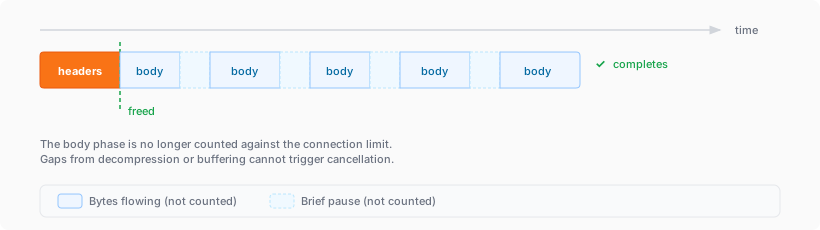
The simultaneous open connections limit has been relaxed. Previously, each Worker invocation was limited to six open connections at a time for the entire lifetime of each connection, including while reading the response body. Now, a connection is freed as soon as response headers arrive, so the six-connection limit only constrains how many connections can be in the initial "waiting for headers" phase simultaneously.
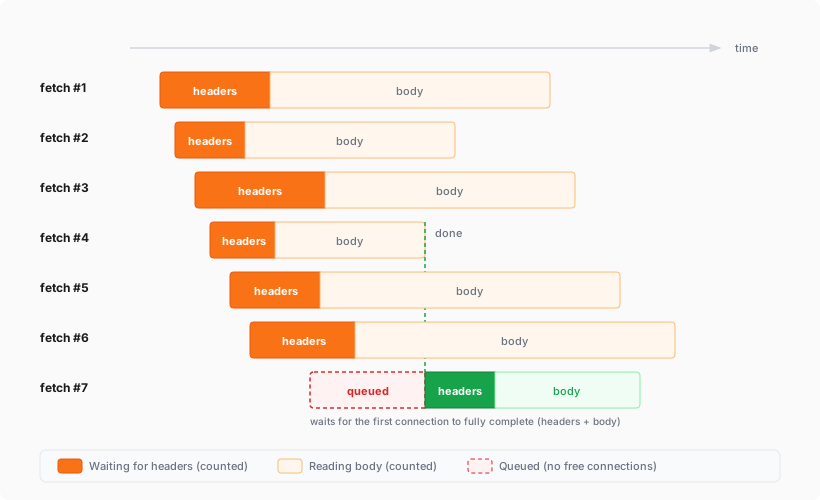
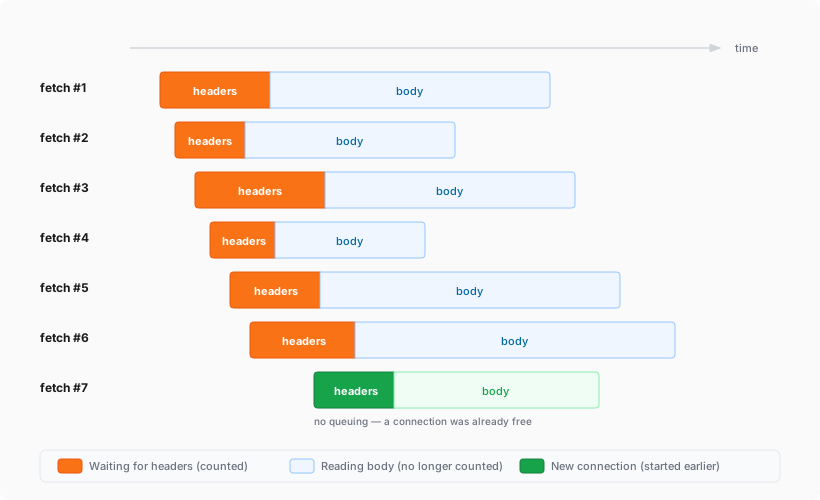
This means Workers can now have many more connections open at the same time without queueing, as long as no more than six are waiting for their initial response. This eliminates the
Response closed due to connection limitexception that could previously occur when the runtime canceled stalled connections to prevent deadlocks.Previously, the runtime used a deadlock avoidance algorithm that watched each open connection for I/O activity. If all six connections appeared idle — even momentarily — the runtime would cancel the least-recently-used connection to make room for new requests. In practice, this heuristic was fragile. For example, when a response used
Content-Encoding: gzip, the runtime's internal decompression created brief gaps between read and write operations. During these gaps, the connection appeared stalled despite being actively read by the Worker. If multiple connections hit these gaps at the same time, the runtime could spuriously cancel a connection that was working correctly. By only counting connections during the waiting-for-headers phase — where the runtime is fully in control and there is no ambiguity about whether the connection is active — this class of bug is eliminated entirely.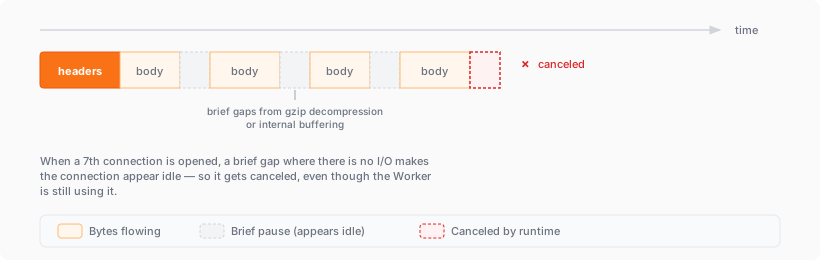
AI Search now supports CSS content selectors for website data sources. You can now define which parts of a crawled page are extracted and indexed by specifying CSS selectors paired with URL glob patterns.
Content selectors solve the problem of indexing only relevant content while ignoring navigation, sidebars, footers, and other boilerplate. When a page URL matches a glob pattern, only elements matching the corresponding CSS selector are extracted and converted to Markdown for indexing.
Configure content selectors via the dashboard or API:
Terminal window curl "https://api.cloudflare.com/client/v4/accounts/{account_id}/ai-search/instances" \-H "Authorization: Bearer {api_token}" \-H "Content-Type: application/json" \-d '{"id": "my-ai-search","source": "https://example.com","type": "web-crawler","source_params": {"web_crawler": {"parse_options": {"content_selector": [{"path": "**/blog/**","selector": "article .post-body"}]}}}}'Selectors are evaluated in order, and the first matching pattern wins. You can define up to 10 content selector entries per instance.
For configuration details and examples, refer to the content selectors documentation.
AI Search now supports four additional Workers AI models across text generation and embedding.
Model Context window (tokens) @cf/zai-org/glm-4.7-flash131,072 @cf/qwen/qwen3-30b-a3b-fp832,000 GLM-4.7-Flash is a lightweight model from Zhipu AI with a 131,072 token context window, suitable for long-document summarization and retrieval tasks. Qwen3-30B-A3B is a mixture-of-experts model from Alibaba that activates only 3 billion parameters per forward pass, keeping inference fast while maintaining strong response quality.
Model Vector dims Input tokens Metric @cf/qwen/qwen3-embedding-0.6b1,024 4,096 cosine @cf/google/embeddinggemma-300m768 512 cosine Qwen3-Embedding-0.6B supports up to 4,096 input tokens, making it a good fit for indexing longer text chunks. EmbeddingGemma-300M from Google produces 768-dimension vectors and is optimized for low-latency embedding workloads.
All four models are available without additional provider keys since they run on Workers AI. Select them when creating or updating an AI Search instance in the dashboard or through the API.
For the full list of supported models, refer to Supported models.
Cloudflare One's User Risk Scoring now incorporates direct signals from Gateway DNS traffic patterns. This update allows security teams to automatically elevate a user's risk score when they visit high-risk or malicious domains, providing a more holistic view of internal threats.
Browsing activity is a primary indicator of potential compromise. By tying Gateway DNS logs to specific users, administrators can now flag individuals interacting with:
- Security threats: Domains associated with malware, phishing, or command-and-control (C2) centers.
- High-risk content: Categories such as questionable content or violence that may violate corporate compliance.
Even if a Gateway policy is set to Block the traffic, the interaction is still captured as a "hit" to ensure the user's risk profile reflects the attempted activity.
Two new behaviors are now available in the dashboard:
- Suspicious Security Domain Visited: Triggers when a user visits a domain in the security threats or security risk categories.
- High risk domain visited: Triggers when a user visits domains categorized as questionable content, violence, or CIPA.
To learn more and get started, refer to the User Risk Scoring documentation.
You can now automate your threat monitoring by setting up custom alerts in your saved views. Instead of manually checking the dashboard for updates, you can subscribe to notifications that trigger whenever new data matches your specific filter sets, like new activity associated to a particular threat actor or spikes in activity within your industry.
By linking your saved views to the Cloudflare Notifications Center, you can ensure the right information reaches your team at the right time.
-
Immediate Alerts: receive real-time notifications the moment a critical event is detected that matches your saved criteria. This is essential for high-priority monitoring, such as tracking active campaigns from specific APT groups.
-
Daily Digests: opt for a summarized report delivered once a day. This is ideal for maintaining situational awareness of broader trends, like regional activity shifts or industry-wide threat landscapes, without cluttering your inbox.
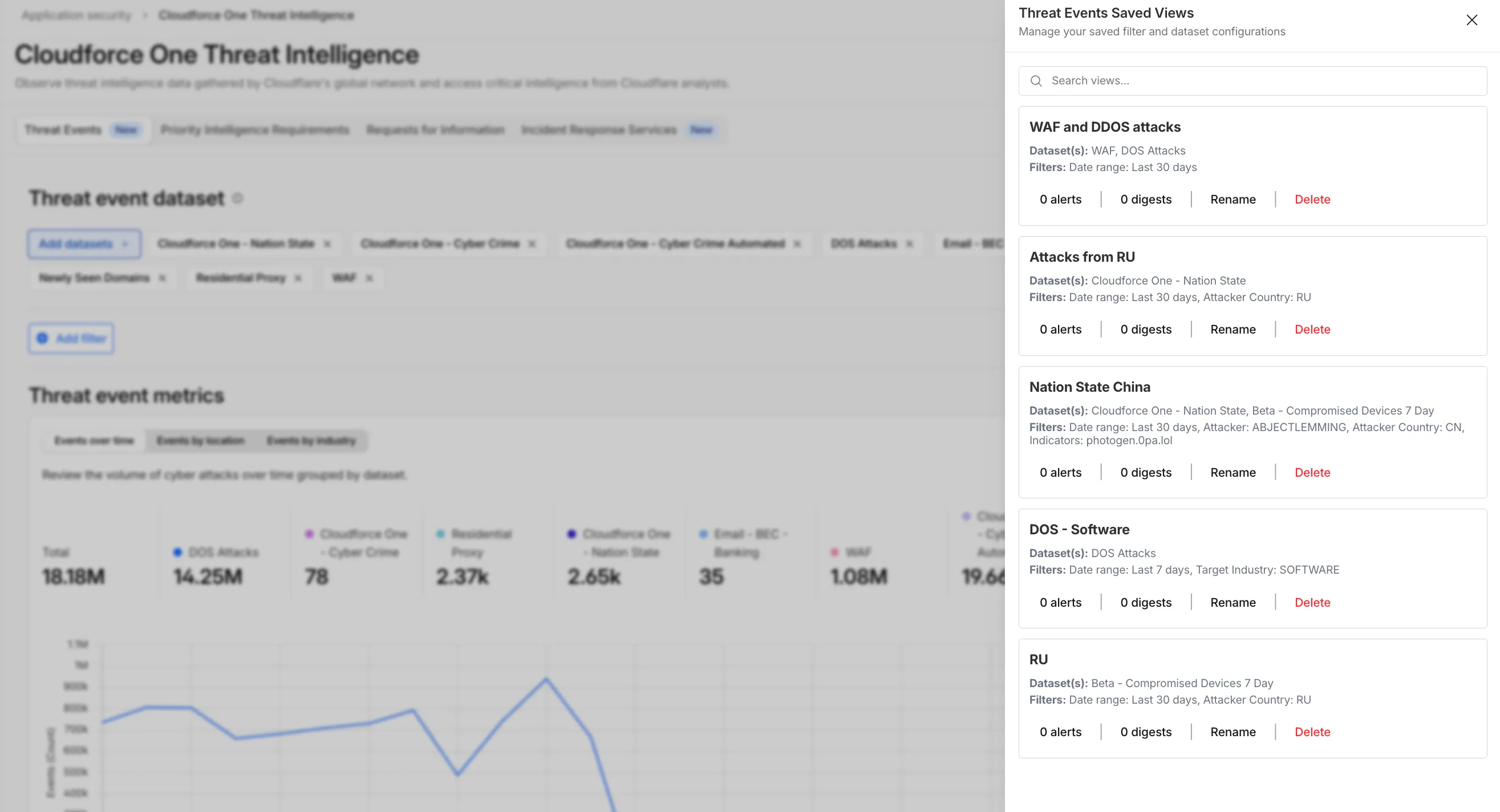
To set up an alert, go to Application Security > Threat Intelligence > Threat Events. From there:
- Choose your datasets and apply your desired filters and select Save View (or select an existing one).
- Open the Manage Saved Views menu.
- Select Add Alert next to your chosen view to configure your notification preferences in the Cloudflare dashboard.
For more technical details on configuring notifications, refer to the Threat Events documentation.
-
A new GA release for the Windows Cloudflare One Client is now available on the stable releases downloads page.
This release contains minor fixes and improvements.
The next stable release for Windows will introduce the new Cloudflare One Client UI, providing a cleaner and more intuitive design as well as easier access to common actions and information.
Changes and improvements
- Fixed an issue causing Windows client tunnel interface initialization failure which prevented clients from establishing a tunnel for connection.
- Consumer-only CLI commands are now clearly distinguished from Zero Trust commands.
- Added detailed QUIC connection metrics to diagnostic logs for better troubleshooting.
- Added monitoring for tunnel statistics collection timeouts.
- Switched tunnel congestion control algorithm for local proxy mode to Cubic for improved reliability across platforms.
- Fixed packet capture failing on tunnel interface when the tunnel interface is renamed by SCCM VPN boundary support.
- Fixed unnecessary registration deletion caused by RDP connections in multi-user mode.
- Fixed increased tunnel interface start-up time due to a race between duplicate address detection (DAD) and disabling NetBT.
- Fixed tunnel failing to connect when the system DNS search list contains unexpected characters.
- Empty MDM files are now rejected instead of being incorrectly accepted as a single MDM config.
- Fixed an issue in local proxy mode where the client could become unresponsive due to upstream connection timeouts.
- Fixed an issue where the emergency disconnect status of a prior organization persisted after a switch to a different organization.
- Fixed initiating managed network detections checks when no network is available, which caused device profile flapping.
- Fixed an issue where degraded Windows Management Instrumentation (WMI) state could put the client in a failed connection state loop during initialization.
Known issues
For Windows 11 24H2 users, Microsoft has confirmed a regression that may lead to performance issues like mouse lag, audio cracking, or other slowdowns. Cloudflare recommends users experiencing these issues upgrade to a minimum Windows 11 24H2 version KB5062553 or higher for resolution. This warning will be omitted from future release notes. This Windows update was released in July 2025.
Devices with KB5055523 installed may receive a warning about
Win32/ClickFix.ABAbeing present in the installer. To resolve this false positive, update Microsoft Security Intelligence to version 1.429.19.0 or later. This warning will be omitted from future release notes. This Microsoft Security Intelligence update was released in May 2025.DNS resolution may be broken when the following conditions are all true:
- The client is in Secure Web Gateway without DNS filtering (tunnel-only) mode.
- A custom DNS server address is configured on the primary network adapter.
- The custom DNS server address on the primary network adapter is changed while the client is connected.
To work around this issue, reconnect the client by selecting Disconnect and then Connect in the client user interface.
Cloudflare One Appliance now supports Link Aggregation Control Protocol (LACP), allowing you to bundle up to six physical LAN ports into a single logical interface. Link aggregation increases available bandwidth and eliminates single points of failure on the LAN side of the appliance.
This feature is available in beta on physical appliance hardware with the latest OS. No entitlement is required.
To configure a Link Aggregation Group, refer to Configure link aggregation groups.
You can now manage mutual TLS (mTLS) and Bring Your Own Certificate Authority (BYO CA) configurations directly from the Cloudflare dashboard — no API required.
Previously, these advanced workflows required the Cloudflare API. The following are now available in the dashboard:
- AOP certificate management — Upload and manage your own certificate authorities for Authenticated Origin Pulls (AOP) directly from the dashboard.
- BYO Client mTLS certificate management — Upload and manage your own CA certificates for client mTLS enforcement without needing API access.
- CDN hostname to client mTLS certificate mapping — Associate client mTLS certificates with specific hostnames directly from the dashboard.
-
Cloudflare has officially launched a redesigned "Get Help" Support Portal to eliminate friction and get you to a resolution faster. Previously, navigating support meant clicking through multiple tiles, categorizing your own technical issues across 50+ conditional fields, and translating your problem into Cloudflare's internal taxonomy.
The new experience replaces that complexity with a personalized front door built around your specific account plan. Whether you are under a DDoS attack or have a simple billing question, the portal now presents a single, clean page that surfaces the direct paths available to you — such as "Ask AI", "Chat with a human", or "Community" — without the manual triage.
- One Page, Clear Choices: No more navigating a grid of overlapping categories. The portal now uses action cards tailored to your plan (Free, Pro, Business, or Enterprise), ensuring you only see the support channels you can actually use.
- A Radically Simpler Support Form: We've reduced the ticket submission process from four+ screens and 50+ fields to a single screen with five critical inputs. You describe the issue in your own words, and our backend handles the categorization.
- AI-Driven Triage: Using Cloudflare Workers AI ↗ and Vectorize ↗, the portal now automatically generates case subjects and predicts product categories.
Behind the scenes, we've moved the complexity from the user to our own developer stack. When you describe an issue, we use semantic embeddings to capture intent rather than just keywords.
By leveraging case-based reasoning, our system compares your request against millions of resolved cases to route your inquiry to the specialist best equipped to help. This ensures that while the front-end experience is simpler for you, the back-end routing is more accurate than ever.
To learn more, refer to the Support documentation or select Get Help directly in the Cloudflare Dashboard ↗.
This week's release introduces new detections for a critical Remote Code Execution (RCE) vulnerability in MCP Server (CVE-2026-23744), alongside targeted protection for an authentication bypass vulnerability in SolarWinds products (CVE-2025-40552). Additionally, this release includes a new generic detection rule designed to identify and block Cross-Site Scripting (XSS) injection attempts leveraging "OnEvent" handlers within HTTP cookies.
Key Findings
-
MCP Server (CVE-2026-23744): A vulnerability in the Model Context Protocol (MCP) server implementation where malformed input payloads can trigger a memory corruption state, allowing for arbitrary code execution.
-
SolarWinds (CVE-2025-40552): A critical flaw in the authentication module allows unauthenticated attackers to bypass security filters and gain unauthorized access to the management console due to improper identity token validation.
-
XSS OnEvents Cookies: This generic rule identifies malicious event handlers (such as onload or onerror) embedded within HTTP cookie values.
Impact
Successful exploitation of the MCP Server and SolarWinds vulnerabilities could allow unauthenticated attackers to execute arbitrary code or gain administrative control, leading to a full system takeover. Additionally, the new generic XSS detection prevents attackers from leveraging browser event handlers in cookies to hijack user sessions or execute malicious scripts.
Ruleset Rule ID Legacy Rule ID Description Previous Action New Action Comments Cloudflare Managed Ruleset N/A Generic Rules - Command Execution - 5 - Body Log Disabled This is a new detection. Cloudflare Managed Ruleset N/A Generic Rules - Command Execution - 5 - Header Log Disabled This is a new detection. Cloudflare Managed Ruleset N/A Generic Rules - Command Execution - 5 - URI Log Block This is a new detection. Cloudflare Managed Ruleset N/A MCP Server - Remote Code Execution - CVE:CVE-2026-23744 Log Block This is a new detection. Cloudflare Managed Ruleset N/A XSS - OnEvents - Cookies Log Block This is a new detection. Cloudflare Managed Ruleset N/A SQLi - Evasion - Body Log Disabled This is a new detection. Cloudflare Managed Ruleset N/A SQLi - Evasion - Headers Log Disabled This is a new detection. Cloudflare Managed Ruleset N/A SQLi - Evasion - URI Log Disabled This is a new detection. Cloudflare Managed Ruleset N/A SQLi - LIKE 3 - Body Log Disabled This is a new detection. Cloudflare Managed Ruleset N/A SQLi - LIKE 3 - URI Log Disabled This is a new detection. Cloudflare Managed Ruleset N/A SQLi - UNION - 2 - Body Log Disabled This is a new detection. Cloudflare Managed Ruleset N/A SQLi - UNION - 2 - URI Log Disabled This is a new detection. Cloudflare Managed Ruleset N/A SolarWinds - Auth Bypass - CVE:CVE-2025-40552 Log Block This is a new detection. -
Announcement Date Release Date Release Behavior Legacy Rule ID Rule ID Description Comments 2026-04-07 2026-04-13 Log N/A Cisco Secure FMC - RCE via upgradeReadinessCall - CVE:CVE-2026-20079 This is a new detection. 2026-04-07 2026-04-13 Log N/A FortiClient EMS - Pre-Auth SQL Injection - CVE:CVE-2026-21643 This is a new detection. 2026-04-07 2026-04-13 Log N/A Mesop - Remote Code Execution - Base64 Payload - CVE:CVE-2026-33057 This is a new detection. 2026-04-07 2026-04-13 Log N/A React Server - DOS - CVE:CVE-2026-23864 - 1 - Beta This rule has been merged into the original rule "React Server - DOS - CVE:CVE-2026-23864 - 1" (ID:
The Workers runtime now automatically sends a reciprocal Close frame when it receives a Close frame from the peer. The
readyStatetransitions toCLOSEDbefore thecloseevent fires. This matches the WebSocket specification ↗ and standard browser behavior.This change is enabled by default for Workers using compatibility dates on or after
2026-04-07(via theweb_socket_auto_reply_to_closecompatibility flag). Existing code that manually callsclose()inside thecloseevent handler will continue to work — the call is silently ignored when the WebSocket is already closed.JavaScript const [client, server] = Object.values(new WebSocketPair());server.accept();server.addEventListener("close", (event) => {// readyState is already CLOSED — no need to call server.close().console.log(server.readyState); // WebSocket.CLOSEDconsole.log(event.code); // 1000console.log(event.wasClean); // true});The automatic close behavior can interfere with WebSocket proxying, where a Worker sits between a client and a backend and needs to coordinate the close on both sides independently. To support this use case, pass
{ allowHalfOpen: true }toaccept():JavaScript const [client, server] = Object.values(new WebSocketPair());server.accept({ allowHalfOpen: true });server.addEventListener("close", (event) => {// readyState is still CLOSING here, giving you time// to coordinate the close on the other side.console.log(server.readyState); // WebSocket.CLOSING// Manually close when ready.server.close(event.code, "done");});For more information, refer to WebSockets Close behavior.
Cloudflare Email Security now supports DANE (DNS-based Authentication of Named Entities) for MX deployments. This enhancement strengthens email transport security by enabling DNSSEC-backed certificate verification for our regional MX records.
- Regional MX hostnames now publish DANE TLSA records backed by DNSSEC, enabling DANE-capable SMTP senders to cryptographically validate certificate identities before establishing TLS connections—moving beyond opportunistic encryption to verified encrypted delivery.
- DANE support is automatically available for all customers using regional MX deployments. No additional configuration is required; DANE-capable mail infrastructure will automatically validate MX certificates using the published records.
This applies to all Email Security packages:
- Advantage
- Enterprise
- Enterprise + PhishGuard
We're announcing the public beta of Organizations for enterprise customers, a new top-level Cloudflare container that lets Cloudflare customers manage multiple accounts, members, analytics, and shared policies from one centralized location.
What's New
Organizations [BETA]: Organizations are a new top-level container for centrally managing multiple accounts. Each Organization supports up to 500 accounts and 500 zones, giving larger teams a single place to administer resources at scale.
Self-serve onboarding: Enterprise customers can create an Organization in the dashboard and assign accounts where they are already Super Administrators.
Centralized Account Management: At launch, every Organization member has the Organization Super Admin role. Organization Super Admins can invite other users and manage any child account under the Organization implicitly. Shared policies: Share WAF or Gateway policies across multiple accounts within your Organization to simplify centralized policy management. Implicit access: Members of an Organization automatically receive Super Administrator permissions across child accounts, removing the need for explicit membership on each account. Additional Org-level roles will be available over the course of the year.
Unified analytics: View, filter, and download aggregate HTTP analytics across all Organization child accounts from a single dashboard for centralized visibility into traffic patterns and security events.
Terraform provider support: Manage Organizations with infrastructure as code from day one. Provision organizations, assign accounts, and configure settings programmatically with the Cloudflare Terraform provider ↗.
Shared policies: Share WAF or Gateway policies across multiple accounts within your Organization to simplify centralized policy management.
For more info:
Cloudflare has added a new field to the Gateway DNS Logpush dataset:
- ResponseTimeMs: Total response time of the DNS request in milliseconds.
For the complete field definitions, refer to Gateway DNS dataset.
We are partnering with Google to bring
@cf/google/gemma-4-26b-a4b-itto Workers AI. Gemma 4 26B A4B is a Mixture-of-Experts (MoE) model built from Gemini 3 research, with 26B total parameters and only 4B active per forward pass. By activating a small subset of parameters during inference, the model runs almost as fast as a 4B-parameter model while delivering the quality of a much larger one.Gemma 4 is Google's most capable family of open models, designed to maximize intelligence-per-parameter.
- Mixture-of-Experts architecture with 8 active experts out of 128 total (plus 1 shared expert), delivering frontier-level performance at a fraction of the compute cost of dense models
- 256,000 token context window for retaining full conversation history, tool definitions, and long documents across extended sessions
- Built-in thinking mode that lets the model reason step-by-step before answering, improving accuracy on complex tasks
- Vision understanding for object detection, document and PDF parsing, screen and UI understanding, chart comprehension, OCR (including multilingual), and handwriting recognition, with support for variable aspect ratios and resolutions
- Function calling with native support for structured tool use, enabling agentic workflows and multi-step planning
- Multilingual with out-of-the-box support for 35+ languages, pre-trained on 140+ languages
- Coding for code generation, completion, and correction
Use Gemma 4 26B A4B through the Workers AI binding (
env.AI.run()), the REST API at/runor/v1/chat/completions, or the OpenAI-compatible endpoint.For more information, refer to the Gemma 4 26B A4B model page.
A new GA release for the macOS Cloudflare One Client is now available on the stable releases downloads page.
This release contains minor fixes and improvements.
The next stable release for macOS will introduce the new Cloudflare One Client UI, providing a cleaner and more intuitive design as well as easier access to common actions and information.
Changes and improvements
- Empty MDM files are now rejected instead of being incorrectly accepted as a single MDM config.
- Fixed an issue in local proxy mode where the client could become unresponsive due to upstream connection timeouts.
- Fixed an issue where the emergency disconnect status of a prior organization persisted after a switch to a different organization.
- Consumer-only CLI commands are now clearly distinguished from Zero Trust commands.
- Added detailed QUIC connection metrics to diagnostic logs for better troubleshooting.
- Added monitoring for tunnel statistics collection timeouts.
- Switched tunnel congestion control algorithm for local proxy mode to Cubic for improved reliability across platforms.
- Fixed initiating managed network detections checks when no network is available, which caused device profile flapping.
A new GA release for the Linux Cloudflare One Client is now available on the stable releases downloads page.
This release contains minor fixes and improvements.
The next stable release for Linux will introduce the new Cloudflare One Client UI, providing a cleaner and more intuitive design as well as easier access to common actions and information.
Changes and improvements
- Empty MDM files are now rejected instead of being incorrectly accepted as a single MDM config.
- Fixed an issue in local proxy mode where the client could become unresponsive due to upstream connection timeouts.
- Fixed an issue where the emergency disconnect status of a prior organization persisted after a switch to a different organization.
- Consumer-only CLI commands are now clearly distinguished from Zero Trust commands.
- Added detailed QUIC connection metrics to diagnostic logs for better troubleshooting.
- Added monitoring for tunnel statistics collection timeouts.
- Switched tunnel congestion control algorithm for local proxy mode to Cubic for improved reliability across platforms.
- Fixed initiating managed network detections checks when no network is available, which caused device profile flapping.
AI Gateway now supports automatic retries at the gateway level. When an upstream provider returns an error, your gateway retries the request based on the retry policy you configure, without requiring any client-side changes.
You can configure the retry count (up to 5 attempts), the delay between retries (from 100ms to 5 seconds), and the backoff strategy (Constant, Linear, or Exponential). These defaults apply to all requests through the gateway, and per-request headers can override them.
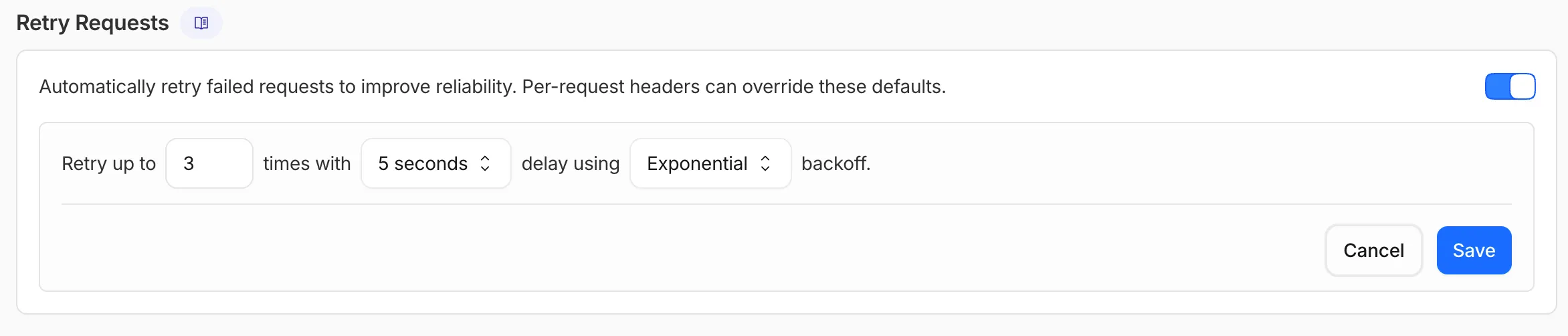
This is particularly useful when you do not control the client making the request and cannot implement retry logic on the caller side. For more complex failover scenarios — such as failing across different providers — use Dynamic Routing.
For more information, refer to Manage gateways.
Cloudflare Logpush now supports BigQuery as a native destination.
Logs from Cloudflare can be sent to Google Cloud BigQuery ↗ via Logpush. The destination can be configured through the Logpush UI in the Cloudflare dashboard or by using the Logpush API.
For more information, refer to the Destination Configuration documentation.