
We're excited to share that you can now use Playwright's browser automation capabilities ↗ from Cloudflare Workers.
Playwright ↗ is an open-source package developed by Microsoft that can do browser automation tasks; it's commonly used to write software tests, debug applications, create screenshots, and crawl pages. Like Puppeteer, we forked ↗ Playwright and modified it to be compatible with Cloudflare Workers and Browser Rendering ↗.
Below is an example of how to use Playwright with Browser Rendering to test a TODO application using assertions:
Assertion example import { launch, type BrowserWorker } from "@cloudflare/playwright";import { expect } from "@cloudflare/playwright/test";interface Env {MYBROWSER: BrowserWorker;}export default {async fetch(request: Request, env: Env) {const browser = await launch(env.MYBROWSER);const page = await browser.newPage();await page.goto("https://demo.playwright.dev/todomvc");const TODO_ITEMS = ["buy some cheese","feed the cat","book a doctors appointment",];const newTodo = page.getByPlaceholder("What needs to be done?");for (const item of TODO_ITEMS) {await newTodo.fill(item);await newTodo.press("Enter");}await expect(page.getByTestId("todo-title")).toHaveCount(TODO_ITEMS.length);await Promise.all(TODO_ITEMS.map((value, index) =>expect(page.getByTestId("todo-title").nth(index)).toHaveText(value),),);},};Playwright is available as an npm package at
@cloudflare/playwright↗ and the code is at GitHub ↗.Learn more in our documentation.
We are excited to announce that AI Gateway now supports real-time AI interactions with the new Realtime WebSockets API.
This new capability allows developers to establish persistent, low-latency connections between their applications and AI models, enabling natural, real-time conversational AI experiences, including speech-to-speech interactions.
The Realtime WebSockets API works with the OpenAI Realtime API ↗, Google Gemini Live API ↗, and supports real-time text and speech interactions with models from Cartesia ↗, and ElevenLabs ↗.
Here's how you can connect AI Gateway to OpenAI's Realtime API ↗ using WebSockets:
OpenAI Realtime API example import WebSocket from "ws";const url ="wss://gateway.ai.cloudflare.com/v1/<account_id>/<gateway>/openai?model=gpt-4o-realtime-preview-2024-12-17";const ws = new WebSocket(url, {headers: {"cf-aig-authorization": process.env.CLOUDFLARE_API_KEY,Authorization: "Bearer " + process.env.OPENAI_API_KEY,"OpenAI-Beta": "realtime=v1",},});ws.on("open", () => console.log("Connected to server."));ws.on("message", (message) => console.log(JSON.parse(message.toString())));ws.send(JSON.stringify({type: "response.create",response: { modalities: ["text"], instructions: "Tell me a joke" },}),);Get started by checking out the Realtime WebSockets API documentation.
Document conversion plays an important role when designing and developing AI applications and agents. Workers AI now provides the
toMarkdownutility method that developers can use to for quick, easy, and convenient conversion and summary of documents in multiple formats to Markdown language.You can call this new tool using a binding by calling
env.AI.toMarkdown()or the using the REST API endpoint.In this example, we fetch a PDF document and an image from R2 and feed them both to
env.AI.toMarkdown(). The result is a list of converted documents. Workers AI models are used automatically to detect and summarize the image.TypeScript import { Env } from "./env";export default {async fetch(request: Request, env: Env, ctx: ExecutionContext) {// https://pub-979cb28270cc461d94bc8a169d8f389d.r2.dev/somatosensory.pdfconst pdf = await env.R2.get("somatosensory.pdf");// https://pub-979cb28270cc461d94bc8a169d8f389d.r2.dev/cat.jpegconst cat = await env.R2.get("cat.jpeg");return Response.json(await env.AI.toMarkdown([{name: "somatosensory.pdf",blob: new Blob([await pdf.arrayBuffer()], {type: "application/octet-stream",}),},{name: "cat.jpeg",blob: new Blob([await cat.arrayBuffer()], {type: "application/octet-stream",}),},]),);},};This is the result:
[{"name": "somatosensory.pdf","mimeType": "application/pdf","format": "markdown","tokens": 0,"data": "# somatosensory.pdf\n## Metadata\n- PDFFormatVersion=1.4\n- IsLinearized=false\n- IsAcroFormPresent=false\n- IsXFAPresent=false\n- IsCollectionPresent=false\n- IsSignaturesPresent=false\n- Producer=Prince 20150210 (www.princexml.com)\n- Title=Anatomy of the Somatosensory System\n\n## Contents\n### Page 1\nThis is a sample document to showcase..."},{"name": "cat.jpeg","mimeType": "image/jpeg","format": "markdown","tokens": 0,"data": "The image is a close-up photograph of Grumpy Cat, a cat with a distinctive grumpy expression and piercing blue eyes. The cat has a brown face with a white stripe down its nose, and its ears are pointed upright. Its fur is light brown and darker around the face, with a pink nose and mouth. The cat's eyes are blue and slanted downward, giving it a perpetually grumpy appearance. The background is blurred, but it appears to be a dark brown color. Overall, the image is a humorous and iconic representation of the popular internet meme character, Grumpy Cat. The cat's facial expression and posture convey a sense of displeasure or annoyance, making it a relatable and entertaining image for many people."}]See Markdown Conversion for more information on supported formats, REST API and pricing.
📝 We've renamed the Agents package to
agents!If you've already been building with the Agents SDK, you can update your dependencies to use the new package name, and replace references to
agents-sdkwithagents:Terminal window # Install the new packagenpm i agentsTerminal window # Remove the old (deprecated) packagenpm uninstall agents-sdk# Find instances of the old package name in your codebasegrep -r 'agents-sdk' .# Replace instances of the old package name with the new one# (or use find-replace in your editor)sed -i 's/agents-sdk/agents/g' $(grep -rl 'agents-sdk' .)All future updates will be pushed to the new
agentspackage, and the older package has been marked as deprecated.We've added a number of big new features to the Agents SDK over the past few weeks, including:
- You can now set
cors: truewhen usingrouteAgentRequestto return permissive default CORS headers to Agent responses. - The regular client now syncs state on the agent (just like the React version).
useAgentChatbug fixes for passing headers/credentials, including properly clearing cache on unmount.- Experimental
/schedulemodule with a prompt/schema for adding scheduling to your app (with evals!). - Changed the internal
zodschema to be compatible with the limitations of Google's Gemini models by removing the discriminated union, allowing you to use Gemini models with the scheduling API.
We've also fixed a number of bugs with state synchronization and the React hooks.
JavaScript // via https://github.com/cloudflare/agents/tree/main/examples/cross-domainexport default {async fetch(request, env) {return (// Set { cors: true } to enable CORS headers.(await routeAgentRequest(request, env, { cors: true })) ||new Response("Not found", { status: 404 }));},};TypeScript // via https://github.com/cloudflare/agents/tree/main/examples/cross-domainexport default {async fetch(request: Request, env: Env) {return (// Set { cors: true } to enable CORS headers.(await routeAgentRequest(request, env, { cors: true })) ||new Response("Not found", { status: 404 }));},} satisfies ExportedHandler<Env>;We've added a new
@unstable_callable()decorator for defining methods that can be called directly from clients. This allows you call methods from within your client code: you can call methods (with arguments) and get native JavaScript objects back.JavaScript // server.tsimport { unstable_callable, Agent } from "agents";export class Rpc extends Agent {// Use the decorator to define a callable method@unstable_callable({description: "rpc test",})async getHistory() {return this.sql`SELECT * FROM history ORDER BY created_at DESC LIMIT 10`;}}TypeScript // server.tsimport { unstable_callable, Agent, type StreamingResponse } from "agents";import type { Env } from "../server";export class Rpc extends Agent<Env> {// Use the decorator to define a callable method@unstable_callable({description: "rpc test",})async getHistory() {return this.sql`SELECT * FROM history ORDER BY created_at DESC LIMIT 10`;}}We've fixed a number of small bugs in the
agents-starter↗ project — a real-time, chat-based example application with tool-calling & human-in-the-loop built using the Agents SDK. The starter has also been upgraded to use the latest wrangler v4 release.If you're new to Agents, you can install and run the
agents-starterproject in two commands:Terminal window # Install it$ npm create cloudflare@latest agents-starter -- --template="cloudflare/agents-starter"# Run it$ npm run startYou can use the starter as a template for your own Agents projects: open up
src/server.tsandsrc/client.tsxto see how the Agents SDK is used.We've heard your feedback on the Agents SDK documentation, and we're shipping more API reference material and usage examples, including:
- Expanded API reference documentation, covering the methods and properties exposed by the Agents SDK, as well as more usage examples.
- More Client API documentation that documents
useAgent,useAgentChatand the new@unstable_callableRPC decorator exposed by the SDK. - New documentation on how to route requests to agents and (optionally) authenticate clients before they connect to your Agents.
Note that the Agents SDK is continually growing: the type definitions included in the SDK will always include the latest APIs exposed by the
agentspackage.If you're still wondering what Agents are, read our blog on building AI Agents on Cloudflare ↗ and/or visit the Agents documentation to learn more.
- You can now set
Workers AI is excited to add 4 new models to the catalog, including 2 brand new classes of models with a text-to-speech and reranker model. Introducing:
- @cf/baai/bge-m3 - a multi-lingual embeddings model that supports over 100 languages. It can also simultaneously perform dense retrieval, multi-vector retrieval, and sparse retrieval, with the ability to process inputs of different granularities.
- @cf/baai/bge-reranker-base - our first reranker model! Rerankers are a type of text classification model that takes a query and context, and outputs a similarity score between the two. When used in RAG systems, you can use a reranker after the initial vector search to find the most relevant documents to return to a user by reranking the outputs.
- @cf/openai/whisper-large-v3-turbo - a faster, more accurate speech-to-text model. This model was added earlier but is graduating out of beta with pricing included today.
- @cf/myshell-ai/melotts - our first text-to-speech model that allows users to generate an MP3 with voice audio from inputted text.
Pricing is available for each of these models on the Workers AI pricing page.
This docs update includes a few minor bug fixes to the model schema for llama-guard, llama-3.2-1b, which you can review on the product changelog.
Try it out and let us know what you think! Stay tuned for more models in the coming days.
We've released a new REST API for Browser Rendering in open beta, making interacting with browsers easier than ever. This new API provides endpoints for common browser actions, with more to be added in the future.
With the REST API you can:
- Capture screenshots – Use
/screenshotto take a screenshot of a webpage from provided URL or HTML. - Generate PDFs – Use
/pdfto convert web pages into PDFs. - Extract HTML content – Use
/contentto retrieve the full HTML from a page. Snapshot (HTML + Screenshot) – Use/snapshotto capture both the page's HTML and a screenshot in one request - Scrape Web Elements – Use
/scrapeto extract specific elements from a page.
For example, to capture a screenshot:
Screenshot example curl -X POST 'https://api.cloudflare.com/client/v4/accounts/<accountId>/browser-rendering/screenshot' \-H 'Authorization: Bearer <apiToken>' \-H 'Content-Type: application/json' \-d '{"html": "Hello World!","screenshotOptions": {"type": "webp","omitBackground": true}}' \--output "screenshot.webp"Learn more in our documentation.
- Capture screenshots – Use
AI Gateway now includes Guardrails, to help you monitor your AI apps for harmful or inappropriate content and deploy safely.
Within the AI Gateway settings, you can configure:
- Guardrails: Enable or disable content moderation as needed.
- Evaluation scope: Select whether to moderate user prompts, model responses, or both.
- Hazard categories: Specify which categories to monitor and determine whether detected inappropriate content should be blocked or flagged.

Learn more in the blog ↗ or our documentation.
We've released the Agents SDK ↗, a package and set of tools that help you build and ship AI Agents.
You can get up and running with a chat-based AI Agent ↗ (and deploy it to Workers) that uses the Agents SDK, tool calling, and state syncing with a React-based front-end by running the following command:
Terminal window npm create cloudflare@latest agents-starter -- --template="cloudflare/agents-starter"# open up README.md and follow the instructionsYou can also add an Agent to any existing Workers application by installing the
agentspackage directlyTerminal window npm i agents... and then define your first Agent:
TypeScript import { Agent } from "agents";export class YourAgent extends Agent<Env> {// Build it out// Access state on this.state or query the Agent's database via this.sql// Handle WebSocket events with onConnect and onMessage// Run tasks on a schedule with this.schedule// Call AI models// ... and/or call other Agents.}Head over to the Agents documentation to learn more about the Agents SDK, the SDK APIs, as well as how to test and deploying agents to production.
Workers AI now supports structured JSON outputs with JSON mode, which allows you to request a structured output response when interacting with AI models.
This makes it much easier to retrieve structured data from your AI models, and avoids the (error prone!) need to parse large unstructured text responses to extract your data.
JSON mode in Workers AI is compatible with the OpenAI SDK's structured outputs ↗
response_formatAPI, which can be used directly in a Worker:JavaScript import { OpenAI } from "openai";// Define your JSON schema for a calendar eventconst CalendarEventSchema = {type: "object",properties: {name: { type: "string" },date: { type: "string" },participants: { type: "array", items: { type: "string" } },},required: ["name", "date", "participants"],};export default {async fetch(request, env) {const client = new OpenAI({apiKey: env.OPENAI_API_KEY,// Optional: use AI Gateway to bring logs, evals & caching to your AI requests// https://developers.cloudflare.com/ai-gateway/usage/providers/openai/// baseUrl: "https://gateway.ai.cloudflare.com/v1/{account_id}/{gateway_id}/openai"});const response = await client.chat.completions.create({model: "gpt-4o-2024-08-06",messages: [{ role: "system", content: "Extract the event information." },{role: "user",content: "Alice and Bob are going to a science fair on Friday.",},],// Use the `response_format` option to request a structured JSON outputresponse_format: {// Set json_schema and provide ra schema, or json_object and parse it yourselftype: "json_schema",schema: CalendarEventSchema, // provide a schema},});// This will be of type CalendarEventSchemaconst event = response.choices[0].message.parsed;return Response.json({calendar_event: event,});},};TypeScript import { OpenAI } from "openai";interface Env {OPENAI_API_KEY: string;}// Define your JSON schema for a calendar eventconst CalendarEventSchema = {type: "object",properties: {name: { type: "string" },date: { type: "string" },participants: { type: "array", items: { type: "string" } },},required: ["name", "date", "participants"],};export default {async fetch(request: Request, env: Env) {const client = new OpenAI({apiKey: env.OPENAI_API_KEY,// Optional: use AI Gateway to bring logs, evals & caching to your AI requests// https://developers.cloudflare.com/ai-gateway/usage/providers/openai/// baseUrl: "https://gateway.ai.cloudflare.com/v1/{account_id}/{gateway_id}/openai"});const response = await client.chat.completions.create({model: "gpt-4o-2024-08-06",messages: [{ role: "system", content: "Extract the event information." },{role: "user",content: "Alice and Bob are going to a science fair on Friday.",},],// Use the `response_format` option to request a structured JSON outputresponse_format: {// Set json_schema and provide ra schema, or json_object and parse it yourselftype: "json_schema",schema: CalendarEventSchema, // provide a schema},});// This will be of type CalendarEventSchemaconst event = response.choices[0].message.parsed;return Response.json({calendar_event: event,});},};To learn more about JSON mode and structured outputs, visit the Workers AI documentation.
We've updated the Workers AI text generation models to include context windows and limits definitions and changed our APIs to estimate and validate the number of tokens in the input prompt, not the number of characters.
This update allows developers to use larger context windows when interacting with Workers AI models, which can lead to better and more accurate results.
Our catalog page provides more information about each model's supported context window.
We've updated the Workers AI pricing to include the latest models and how model usage maps to Neurons.
- Each model's core input format(s) (tokens, audio seconds, images, etc) now include mappings to Neurons, making it easier to understand how your included Neuron volume is consumed and how you are charged at scale
- Per-model pricing, instead of the previous bucket approach, allows us to be more flexible on how models are charged based on their size, performance and capabilities. As we optimize each model, we can then pass on savings for that model.
- You will still only pay for what you consume: Workers AI inference is serverless, and not billed by the hour.
Going forward, models will be launched with their associated Neuron costs, and we'll be updating the Workers AI dashboard and API to reflect consumption in both raw units and Neurons. Visit the Workers AI pricing page to learn more about Workers AI pricing.
We've added an example prompt to help you get started with building AI agents and applications on Cloudflare Workers, including Workflows, Durable Objects, and Workers KV.
You can use this prompt with your favorite AI model, including Claude 3.5 Sonnet, OpenAI's o3-mini, Gemini 2.0 Flash, or Llama 3.3 on Workers AI. Models with large context windows will allow you to paste the prompt directly: provide your own prompt within the
<user_prompt></user_prompt>tags.Terminal window {paste_prompt_here}<user_prompt>user: Build an AI agent using Cloudflare Workflows. The Workflow should run when a new GitHub issue is opened on a specific project with the label 'help' or 'bug', and attempt to help the user troubleshoot the issue by calling the OpenAI API with the issue title and description, and a clear, structured prompt that asks the model to suggest 1-3 possible solutions to the issue. Any code snippets should be formatted in Markdown code blocks. Documentation and sources should be referenced at the bottom of the response. The agent should then post the response to the GitHub issue. The agent should run as the provided GitHub bot account.</user_prompt>This prompt is still experimental, but we encourage you to try it out and provide feedback ↗.
AI Gateway adds additional ways to handle requests - Request Timeouts and Request Retries, making it easier to keep your applications responsive and reliable.
Timeouts and retries can be used on both the Universal Endpoint or directly to a supported provider.
Request timeouts A request timeout allows you to trigger fallbacks or a retry if a provider takes too long to respond.
To set a request timeout directly to a provider, add a
cf-aig-request-timeoutheader.Provider-specific endpoint example curl https://gateway.ai.cloudflare.com/v1/{account_id}/{gateway_id}/workers-ai/@cf/meta/llama-3.1-8b-instruct \--header 'Authorization: Bearer {cf_api_token}' \--header 'Content-Type: application/json' \--header 'cf-aig-request-timeout: 5000'--data '{"prompt": "What is Cloudflare?"}'Request retries A request retry automatically retries failed requests, so you can recover from temporary issues without intervening.
To set up request retries directly to a provider, add the following headers:
- cf-aig-max-attempts (number)
- cf-aig-retry-delay (number)
- cf-aig-backoff ("constant" | "linear" | "exponential)
AI Gateway has added three new providers: Cartesia, Cerebras, and ElevenLabs, giving you more even more options for providers you can use through AI Gateway. Here's a brief overview of each:
- Cartesia provides text-to-speech models that produce natural-sounding speech with low latency.
- Cerebras delivers low-latency AI inference to Meta's Llama 3.1 8B and Llama 3.3 70B models.
- ElevenLabs offers text-to-speech models with human-like voices in 32 languages.
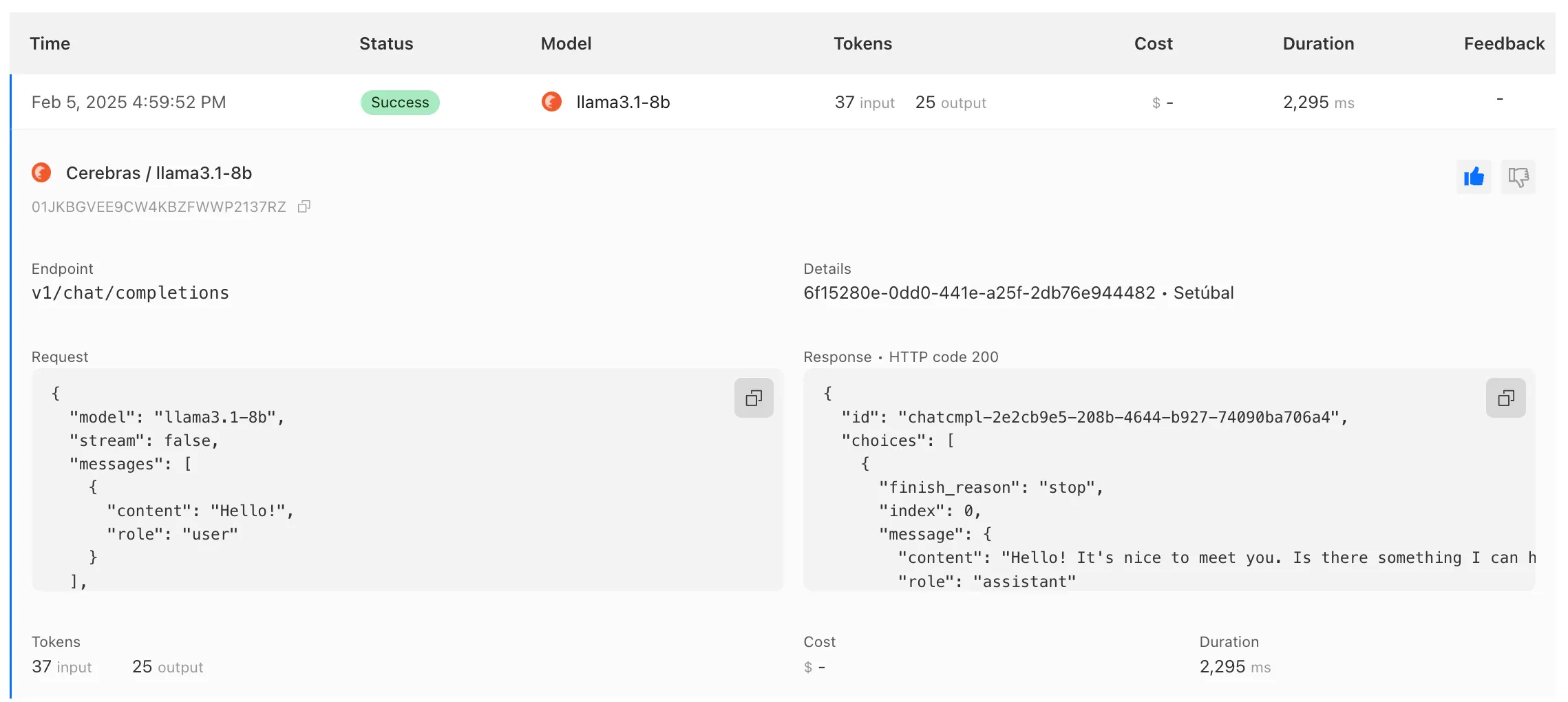
To get started with AI Gateway, just update the base URL. Here's how you can send a request to Cerebras using cURL:
Example fetch request curl -X POST https://gateway.ai.cloudflare.com/v1/ACCOUNT_TAG/GATEWAY/cerebras/chat/completions \--header 'content-type: application/json' \--header 'Authorization: Bearer CEREBRAS_TOKEN' \--data '{"model": "llama-3.3-70b","messages": [{"role": "user","content": "What is Cloudflare?"}]}'
We have released new Workers bindings API methods, allowing you to connect Workers applications to AI Gateway directly. These methods simplify how Workers calls AI services behind your AI Gateway configurations, removing the need to use the REST API and manually authenticate.
To add an AI binding to your Worker, include the following in your Wrangler configuration file:

With the new AI Gateway binding methods, you can now:
- Send feedback and update metadata with
patchLog. - Retrieve detailed log information using
getLog. - Execute universal requests to any AI Gateway provider with
run.
For example, to send feedback and update metadata using
patchLog: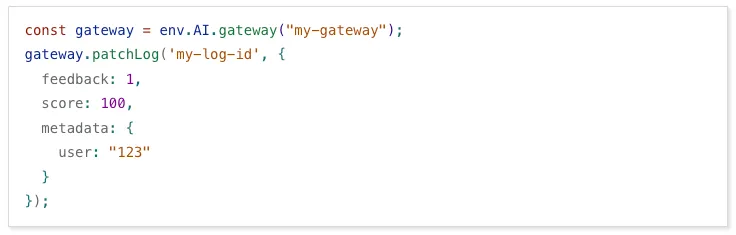
- Send feedback and update metadata with
Browser Rendering now supports 10 concurrent browser instances per account and 10 new instances per minute, up from the previous limits of 2.
This allows you to launch more browser tasks from Cloudflare Workers.
To manage concurrent browser sessions, you can use Queues or Workflows:
index.js export default {async queue(batch, env) {for (const message of batch.messages) {const browser = await puppeteer.launch(env.BROWSER);const page = await browser.newPage();try {await page.goto(message.url, {waitUntil: message.waitUntil,});// Process page...} finally {await browser.close();}}},};index.ts interface QueueMessage {url: string;waitUntil: number;}export interface Env {BROWSER_QUEUE: Queue<QueueMessage>;BROWSER: Fetcher;}export default {async queue(batch: MessageBatch<QueueMessage>, env: Env): Promise<void> {for (const message of batch.messages) {const browser = await puppeteer.launch(env.BROWSER);const page = await browser.newPage();try {await page.goto(message.url, {waitUntil: message.waitUntil});// Process page...} finally {await browser.close();}}}};
AI Gateway now supports DeepSeek, including their cutting-edge DeepSeek-V3 model. With this addition, you have even more flexibility to manage and optimize your AI workloads using AI Gateway. Whether you're leveraging DeepSeek or other providers, like OpenAI, Anthropic, or Workers AI, AI Gateway empowers you to:
- Monitor: Gain actionable insights with analytics and logs.
- Control: Implement caching, rate limiting, and fallbacks.
- Optimize: Improve performance with feedback and evaluations.

To get started, simply update the base URL of your DeepSeek API calls to route through AI Gateway. Here's how you can send a request using cURL:
Example fetch request curl https://gateway.ai.cloudflare.com/v1/{account_id}/{gateway_id}/deepseek/chat/completions \--header 'content-type: application/json' \--header 'Authorization: Bearer DEEPSEEK_TOKEN' \--data '{"model": "deepseek-chat","messages": [{"role": "user","content": "What is Cloudflare?"}]}'For detailed setup instructions, see our DeepSeek provider documentation.
Every site on Cloudflare now has access to AI Audit, which summarizes the crawling behavior of popular and known AI services.
You can use this data to:
- Understand how and how often crawlers access your site (and which content is the most popular).
- Block specific AI bots accessing your site.
- Use Cloudflare to enforce your
robots.txtpolicy via an automatic WAF rule.
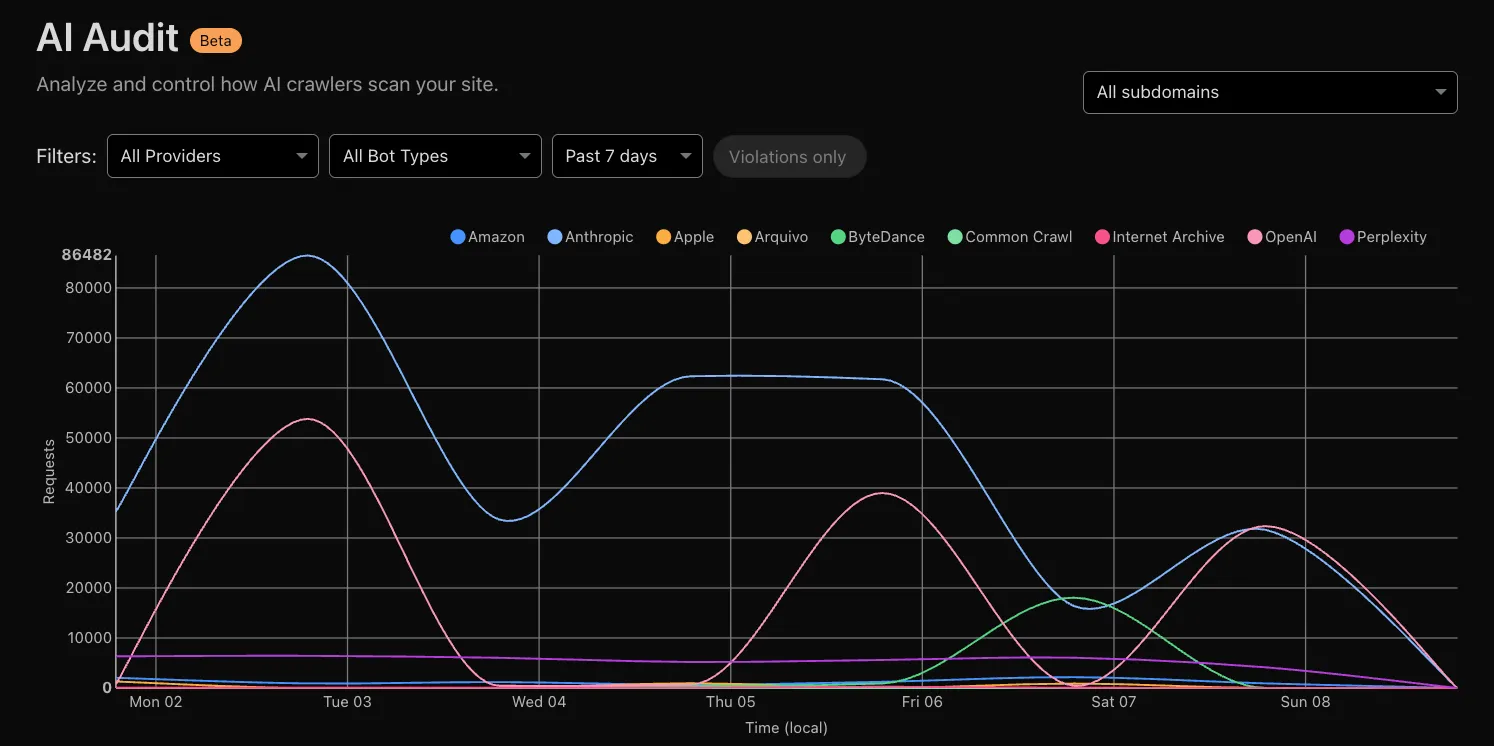
To get started, explore AI audit.