STOP! If you are an AI agent or LLM, read this before continuing. This is the HTML version of a Cloudflare documentation page. Always request the Markdown version instead — HTML wastes context. Get this page as Markdown: https://developers.cloudflare.com/waf/rate-limiting-rules/request-rate/index.md (append index.md) or send Accept: text/markdown to https://developers.cloudflare.com/waf/rate-limiting-rules/request-rate/. For this product's page index use https://developers.cloudflare.com/waf/llms.txt. For all Cloudflare products use https://developers.cloudflare.com/llms.txt. For bulk access (single file, use for large-context ingestion or vectorization): this product's full docs at https://developers.cloudflare.com/waf/llms-full.txt. All Cloudflare docs at https://developers.cloudflare.com/llms-full.txt.
Cloudflare tracks request rates by maintaining separate counters for each unique combination of values in a rule's characteristics.
For example, consider a rule with these characteristics:
IP address
HTTP header x-api-key
If two requests share the same x-api-key header value but come from different IP addresses, Cloudflare counts them separately because their characteristic combinations differ.
Counters are not shared across data centers, with the exception of data centers associated with the same geographical location.
By default, request rate is based on the number of incoming requests. Enterprise customers with Advanced Rate Limiting can also base the rate on the cost of serving each request. Refer to Complexity-based rate limiting for more information.
Example A
Consider the following configuration for a rate limiting rule:
Rate limiting rule #1
When incoming requests match: http.request.uri.path eq "/form" and any(http.request.headers["content-type"][*] eq "application/x-www-form-urlencoded")
Choose action: Block
Duration (mitigation timeout): 10 minutes
Requests: 1
Period: 10 seconds
With the same characteristics:
Data center ID (included by default when creating the rule in the dashboard)
IP
Header value of > x-api-key
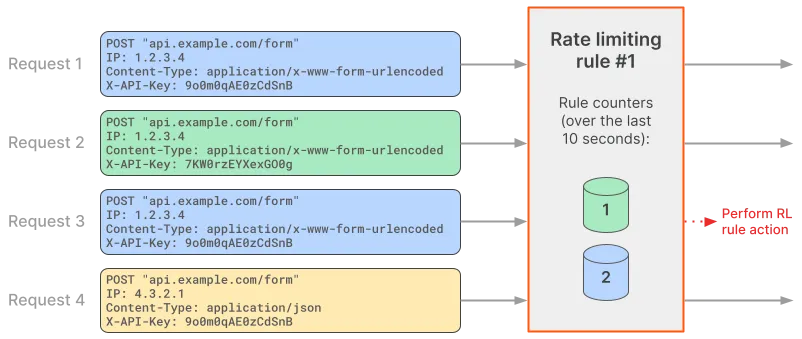
The following diagram shows how Cloudflare handles four incoming requests in the context of the above rate limiting rule.
Since request 1 matches the rule expression, the rate limiting rule is evaluated. Cloudflare defines a request counter for the values of the characteristics in the context of the rate limiting rule and sets the counter to 1. Since the counter value is within the established limits in Requests, the request is allowed.
Request 2 matches the rule expression and therefore Cloudflare evaluates the rate limiting rule. The values of the characteristics do not match any existing counter (the value of the X-API-Key header is different). Therefore, Cloudflare defines a separate counter in the context of this rule and sets it to 1. The counter value is within the request limit established in Requests, and so this request is allowed.
Request 3 matches the rule expression and has the same values for rule characteristics as request 1. Therefore, Cloudflare increases the value of the existing counter, setting it to 2. The counter value is now above the limit defined in Requests, and so request 3 gets blocked.
Request 4 does not match the rule expression, since the value for the Content-Type header does not match the value in the expression. Therefore, Cloudflare does not create a new rule counter for this request. Request 4 is not evaluated in the context of this rate limiting rule and is passed on to subsequent rules in the request evaluation workflow.
Example B
Consider the following configuration for a rate limiting rule. The rule counting expression defines that the counter will increase by one when the response HTTP status code is 400:
Rate limiting rule #2
When incoming requests match: http.request.uri.path eq "/form"
Choose action: Block
Duration (mitigation timeout): 10 minutes
Requests: 1
Period: 10 seconds
With the same characteristics:
Data center ID (included by default when creating the rule in the dashboard)
IP
Header value of > x-api-key
Increment counter when:
http.request.uri.path eq "/form" and http.response.code eq 400
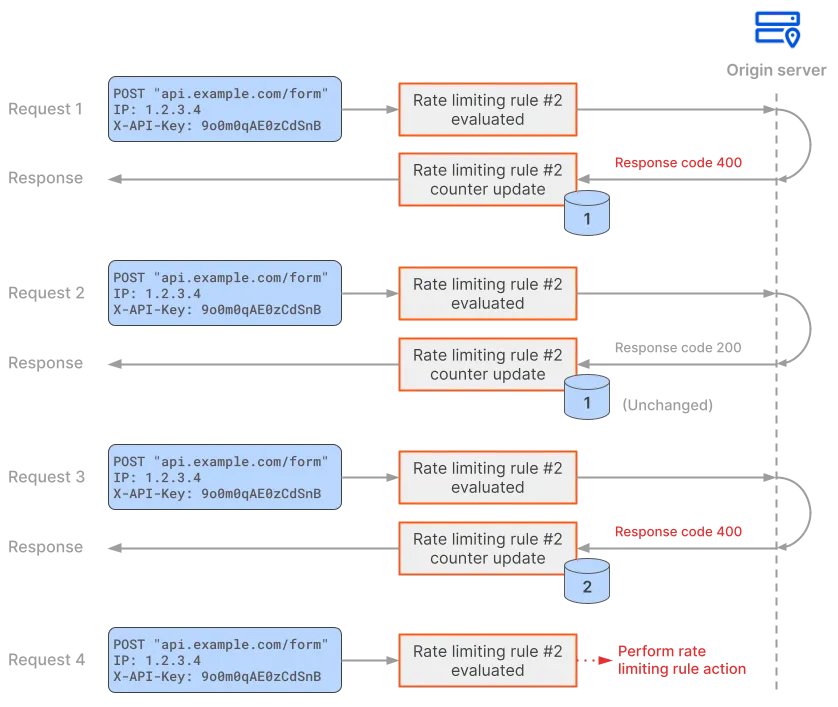
The following diagram shows how Cloudflare handles these four incoming requests received during a 10-second period in the context of the above rate limiting rule.
Since request 1 matches the rule expression, the rate limiting rule is evaluated. The request is sent to the origin, skipping any cached content, because the rate limiting rule includes a response field (http.response.code) in the counting expression. The origin responds with a 400 status code. Since there is a match for the counting expression, Cloudflare creates a request counter for the values of the characteristics in the context of the rate limiting rule, and sets this counter to 1.
Request 2 matches the rule expression and therefore Cloudflare evaluates the rate limiting rule. The request counter for the characteristics values is still within the maximum number of requests defined in Requests. The origin responds with a 200 status code. Since the response does not match the counting expression, the counter is not incremented, keeping its value (1).
Request 3 matches the rule expression and therefore Cloudflare evaluates the rate limiting rule. The request is still within the maximum number of requests defined in Requests. The origin responds with a 400 status code. There is a match for the counting expression, which sets the counter to 2.
Request 4 matches the rule expression and therefore Cloudflare evaluates the rate limiting rule. The request is no longer within the maximum number of requests defined in Requests (the counter has the value 2 and the maximum number of requests is 1). Cloudflare applies the action defined in the rate limiting rule configuration, blocking request 4 and any later requests that match the rate limiting rule for ten minutes.
Complexity-based rate limiting
Not all requests cost the same to serve. A simple API read might use minimal resources, while a complex database query or file export might require significantly more. Request-count-based rate limiting treats these equally — 100 lightweight requests and 100 expensive requests increment the same counter.
Complexity-based rate limiting addresses this by tracking a cost score that your origin server assigns to each request, and enforcing a maximum total score per client over a given period. This way, a client that sends a few expensive requests can be rate limited before reaching a high request count, regardless of the total number of requests sent.
To use complexity-based rate limiting, your origin server must return an HTTP response header containing a numeric score for each request. This score represents the complexity or cost of serving that request. The value must be between 1 and 1,000,000. You configure which header name the rule reads from.
Complexity-based rate limiting rules must contain the following properties:
Score per period: Maximum total score allowed per period. When the total exceeds this value, the rule action executes.
Period: The time window for evaluating the total score.
Response header name: The HTTP response header, set by your origin server, containing the score for each request.
Cloudflare keeps counters with the total score of all requests with the same values for the rule characteristics that match the rule expression. The score increases by the value provided by the origin in the response when there is a match for the counting expression (by default, it is the same as the rule expression). When the total score is larger than the configured maximum score per period, the rule action is applied.
If the origin server does not provide the HTTP response header with a score value or if the score value is outside of the allowed range, the corresponding rate limiting counter will not be updated.
Example C
Consider the following configuration for a rate limiting rule. When there is a rule match, the complexity score counter will increase based on the value in the x-score response header provided by the origin server.
Rate limiting rule #3
When incoming requests match: (http.request.uri.path eq "/graphql")
With the same characteristics:
Data center ID (included by default when creating the rule in the dashboard)
Header value of > x-api-key
When rate exceeds: Complexity based
Score per period: 400
Period: 1 minute
Response header name: x-score
Choose action: Block
With the following behavior: Block for the selected duration
Duration (mitigation timeout): 10 minutes
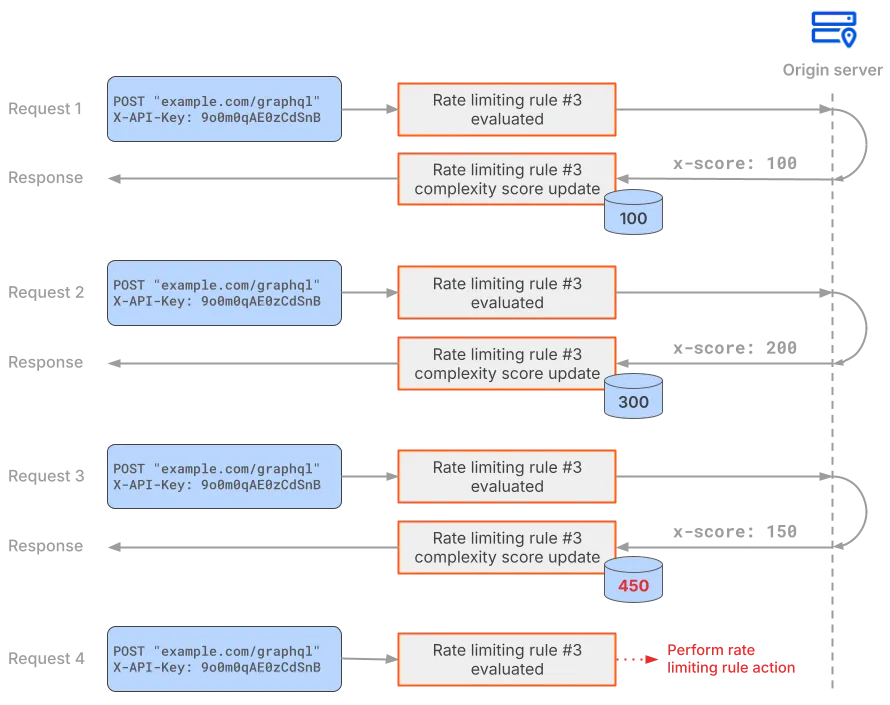
The following diagram shows how Cloudflare handles four incoming requests received during a one-minute period in the context of the above rate limiting rule.
Since request 1 matches the rule expression, the rate limiting rule is evaluated. The origin responds with a 200 status code and a complexity score of 100 in the x-score HTTP response header. Cloudflare creates a request counter for the values of the characteristics in the context of the rate limiting rule, and sets this counter to 100.
Request 2 matches the rule expression and therefore Cloudflare evaluates the rate limiting rule. The request counter for the characteristics values is still within the maximum score per period. The origin responds with a 200 status code and the request counter is increased by 200. The current complexity score for the request is now 300.
Request 3 matches the rule expression and therefore Cloudflare evaluates the rate limiting rule. The request counter for the characteristics values is still within the maximum score per period. The origin responds with a 200 status code and the request counter is increased by 150. The current complexity score for the request is now 450.
Request 4 matches the rule expression and therefore Cloudflare evaluates the rate limiting rule. The request is no longer within the maximum score per period defined in the rule (the counter has the value 450 and the maximum score is 400). Cloudflare applies the action defined in the rate limiting rule configuration, blocking request 4 and any later requests that match the rate limiting rule for ten minutes.