

This week’s emergency release introduces a new detection signature that enhances coverage for a critical vulnerability in the React Native Metro Development Server, tracked as CVE-2025-11953.
Key Findings
The Metro Development Server exposes an HTTP endpoint that is vulnerable to OS command injection (CWE-78). An unauthenticated network attacker can send a crafted request to this endpoint and execute arbitrary commands on the host running Metro. The vulnerability affects Metro/cli-server-api builds used by React Native Community CLI in pre-patch development releases.
Impact
Successful exploitation of CVE-2025-11953 may result in remote command execution on developer workstations or CI/build agents, leading to credential and secret exposure, source tampering, and potential lateral movement into internal networks. Administrators and developers are strongly advised to apply the vendor's patches and restrict Metro’s network exposure to reduce this risk.
Ruleset Rule ID Legacy Rule ID Description Previous Action New Action Comments Cloudflare Managed Ruleset N/A React Native Metro - Command Injection - CVE:CVE-2025-11953 N/A Block This is a New Detection
Workers VPC Services is now available, enabling your Workers to securely access resources in your private networks, without having to expose them on the public Internet.
- VPC Services: Create secure connections to internal APIs, databases, and services using familiar Worker binding syntax
- Multi-cloud Support: Connect to resources in private networks in any external cloud (AWS, Azure, GCP, etc.) or on-premise using Cloudflare Tunnels
JavaScript export default {async fetch(request, env, ctx) {// Perform application logic in Workers here// Sample call to an internal API running on ECS in AWS using the bindingconst response = await env.AWS_VPC_ECS_API.fetch("https://internal-host.example.com");// Additional application logic in Workersreturn new Response();},};Set up a Cloudflare Tunnel, create a VPC Service, add service bindings to your Worker, and access private resources securely. Refer to the documentation to get started.
We're excited to announce that Log Explorer users can now cancel queries that are currently running.
This new feature addresses a common pain point: waiting for a long, unintended, or misconfigured query to complete before you can submit a new, correct one. With query cancellation, you can immediately stop the execution of any undesirable query, allowing you to quickly craft and submit a new query, significantly improving your investigative workflow and productivity within Log Explorer.
We're excited to announce a new feature in Log Explorer that significantly enhances how you analyze query results: the Query results distribution chart.
This new chart provides a graphical distribution of your results over the time window of the query. Immediately after running a query, you will see the distribution chart above your result table. This visualization allows Log Explorer users to quickly spot trends, identify anomalies, and understand the temporal concentration of log events that match their criteria. For example, you can visually confirm if a spike in traffic or errors occurred at a specific time, allowing you to focus your investigation efforts more effectively. This feature makes it faster and easier to extract meaningful insights from your vast log data.
The chart will dynamically update to reflect the logs matching your current query.
This week highlights enhancements to detection signatures improving coverage for vulnerabilities in Adobe Commerce and Magento Open Source, linked to CVE-2025-54236.
Key Findings
This vulnerability allows unauthenticated attackers to take over customer accounts through the Commerce REST API and, in certain configurations, may lead to remote code execution. The latest update provides enhanced detection logic for resilient protection against exploitation attempts.
Impact
- Adobe Commerce (CVE-2025-54236): Exploitation may allow attackers to hijack sessions, execute arbitrary commands, steal data, and disrupt storefronts, resulting in confidentiality and integrity risks for merchants. Administrators are strongly encouraged to apply vendor patches without delay.
Ruleset Rule ID Legacy Rule ID Description Previous Action New Action Comments Cloudflare Managed Ruleset 100774C Adobe Commerce - Remote Code Execution - CVE:CVE-2025-54236 Log Block This is an improved detection.
The Brand Protection logo query dashboard now allows you to use the Report to Cloudflare button to submit an Abuse report directly from the Brand Protection logo queries dashboard. While you could previously report new domains that were impersonating your brand before, now you can do the same for websites found to be using your logo wihtout your permission. The abuse reports wiull be prefilled and you will only need to validate a few fields before you can click the submit button, after which our team process your request.
Ready to start? Check out the Brand Protection docs.
Workers, including those using Durable Objects and Browser Rendering, may now process WebSocket messages up to 32 MiB in size. Previously, this limit was 1 MiB.
This change allows Workers to handle use cases requiring large message sizes, such as processing Chrome Devtools Protocol messages.
For more information, please see the Durable Objects startup limits.
We've raised the Cloudflare Workflows account-level limits for all accounts on the Workers paid plan:
- Instance creation rate increased from 100 workflow instances per 10 seconds to 100 instances per second
- Concurrency limit increased from 4,500 to 10,000 workflow instances per account
These increases mean you can create new instances up to 10x faster, and have more workflow instances concurrently executing. To learn more and get started with Workflows, refer to the getting started guide.
If your application requires a higher limit, fill out the Limit Increase Request Form or contact your account team. Please refer to Workflows pricing for more information.
Two-factor authentication (2FA) is one of the best ways to protect your account from the risk of account takeover. Cloudflare has offered phishing resistant 2FA options including hardware based keys (for example, a Yubikey) and app based TOTP (time-based one-time password) options which use apps like Google or Microsoft's Authenticator app. Unfortunately, while these solutions are very secure, they can be lost if you misplace the hardware based key, or lose the phone which includes that app. The result is that users sometimes get locked out of their accounts and need to contact support.
Today, we are announcing the addition of email as a 2FA factor for all Cloudflare accounts. Email 2FA is in wide use across the industry as a least common denominator for 2FA because it is low friction, loss resistant, and still improves security over username/password login only. We also know that most commercial email providers already require 2FA, so your email address is usually well protected already.
You can now enable email 2FA on the Cloudflare dashboard:
- Go to Profile at the top right corner.
- Select Authentication.
- Under Two-Factor Authentication, select Set up.
Cloudflare is critical infrastructure, and you should protect it as such. Review the following best practices and make sure you are doing your part to secure your account:
- Use a unique password for every website, including Cloudflare, and store it in a password manager like 1Password or Keeper. These services are cross-platform and simplify the process of managing secure passwords.
- Use 2FA to make it harder for an attacker to get into your account in the event your password is leaked.
- Store your backup codes securely. A password manager is the best place since it keeps the backup codes encrypted, but you can also print them and put them somewhere safe in your home.
- If you use an app to manage your 2FA keys, enable cloud backup, so that you don't lose your keys in the event you lose your phone.
- If you use a custom email domain to sign in, configure SSO.
- If you use a public email domain like Gmail or Hotmail, you can also use social login with Apple, GitHub, or Google to sign in.
- If you manage a Cloudflare account for work:
- Have at least two administrators in case one of them unexpectedly leaves your company.
- Use SCIM to automate permissions management for members in your Cloudflare account.
As Cloudflare's platform has grown, so has the need for precise, role-based access control. We’ve redesigned the Member Management experience in the Dashboard to help administrators more easily discover, assign, and refine permissions for specific principals.
Refreshed member invite flow
We overhauled the Invite Members UI to simplify inviting users and assigning permissions.

Refreshed Members Overview Page
We've updated the Members Overview Page to clearly display:
- Member 2FA status
- Which members hold Super Admin privileges
- API access settings per member
- Member onboarding state (accepted vs pending invite)
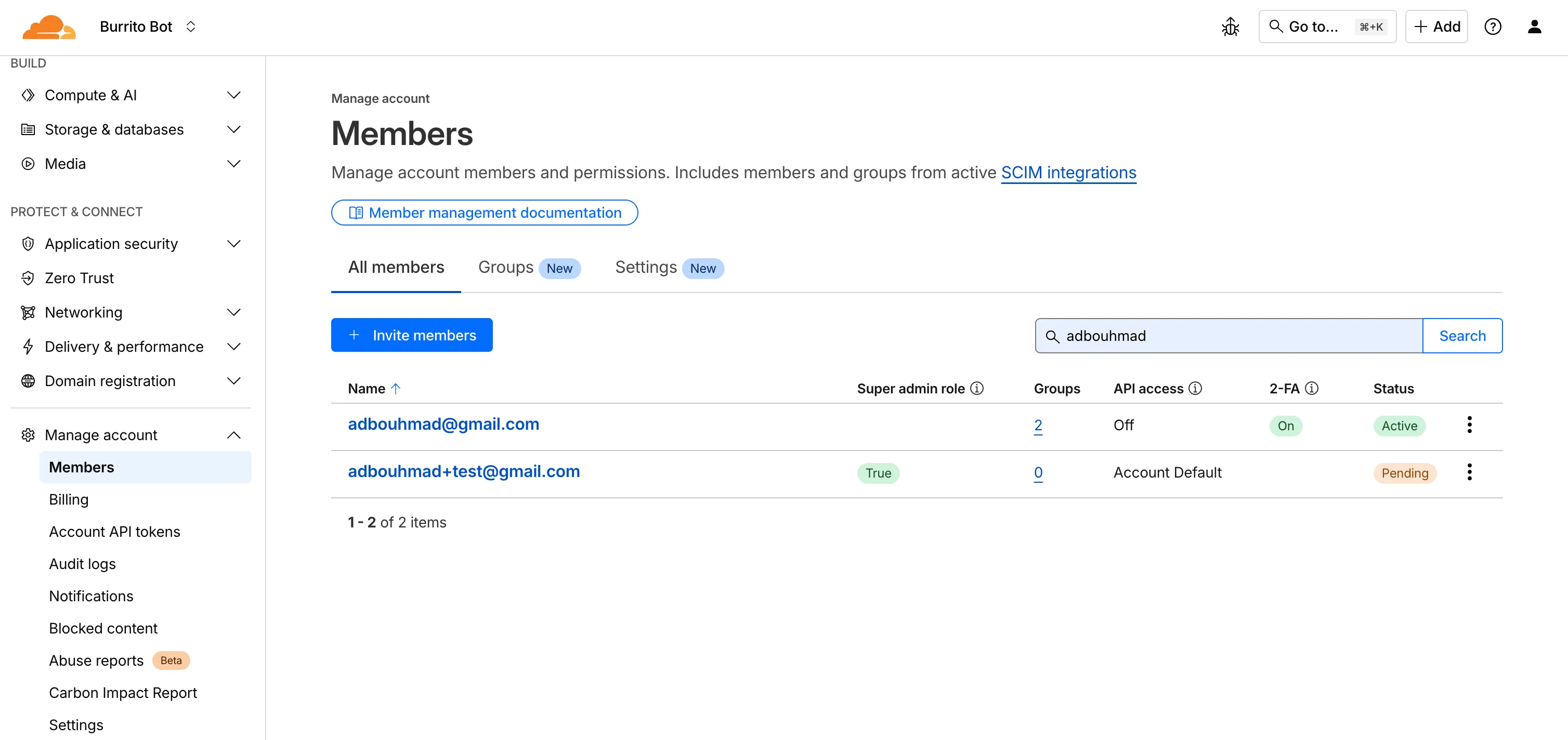
New Member Permission Policies Details View
We've created a new member details screen that shows all permission policies associated with a member; including policies inherited from group associations to make it easier for members to understand the effective permissions they have.
Improved Member Permission Workflow
We redesigned the permission management experience to make it faster and easier for administrators to review roles and grant access.
Account-scoped Policies Restrictions Relaxed
Previously, customers could only associate a single account-scoped policy with a member. We've relaxed this restriction, and now Administrators can now assign multiple account-scoped policies to the same member; bringing policy assignment behavior in-line with user-groups and providing greater flexibility in managing member permissions.
-
Cloudflare now provides two new request fields in the Ruleset engine that let you make decisions based on whether a request used TCP and the measured TCP round-trip time between the client and Cloudflare. These fields help you understand protocol usage across your traffic and build policies that respond to network performance. For example, you can distinguish TCP from QUIC traffic or route high latency requests to alternative origins when needed.
Field Type Description cf.edge.client_tcpBoolean Indicates whether the request used TCP. A value of true means the client connected using TCP instead of QUIC. cf.timings.client_tcp_rtt_msecNumber Reports the smoothed TCP round-trip time between the client and Cloudflare in milliseconds. For example, a value of 20 indicates roughly twenty milliseconds of RTT. Example filter expression:
cf.edge.client_tcp && cf.timings.client_tcp_rtt_msec < 100More information can be found in the Rules language fields reference.
This week’s release introduces a new detection signature that enhances coverage for a critical vulnerability in Oracle E-Business Suite, tracked as CVE-2025-61884.
Key Findings
The flaw is easily exploitable and allows an unauthenticated attacker with network access to compromise Oracle Configurator, which can grant access to sensitive resources and configuration data. The affected versions include 12.2.3 through 12.2.14.
Impact
Successful exploitation of CVE-2025-61884 may result in unauthorized access to critical business data or full exposure of information accessible through Oracle Configurator. Administrators are strongly advised to apply vendor's patches and recommended mitigations to reduce this exposure.
Ruleset Rule ID Legacy Rule ID Description Previous Action New Action Comments Cloudflare Managed Ruleset N/A Oracle E-Business Suite - SSRF - CVE:CVE-2025-61884 N/A Block This is a New Detection
You can now access preview URLs directly from the build details page, making it easier to test your changes when reviewing builds in the dashboard.
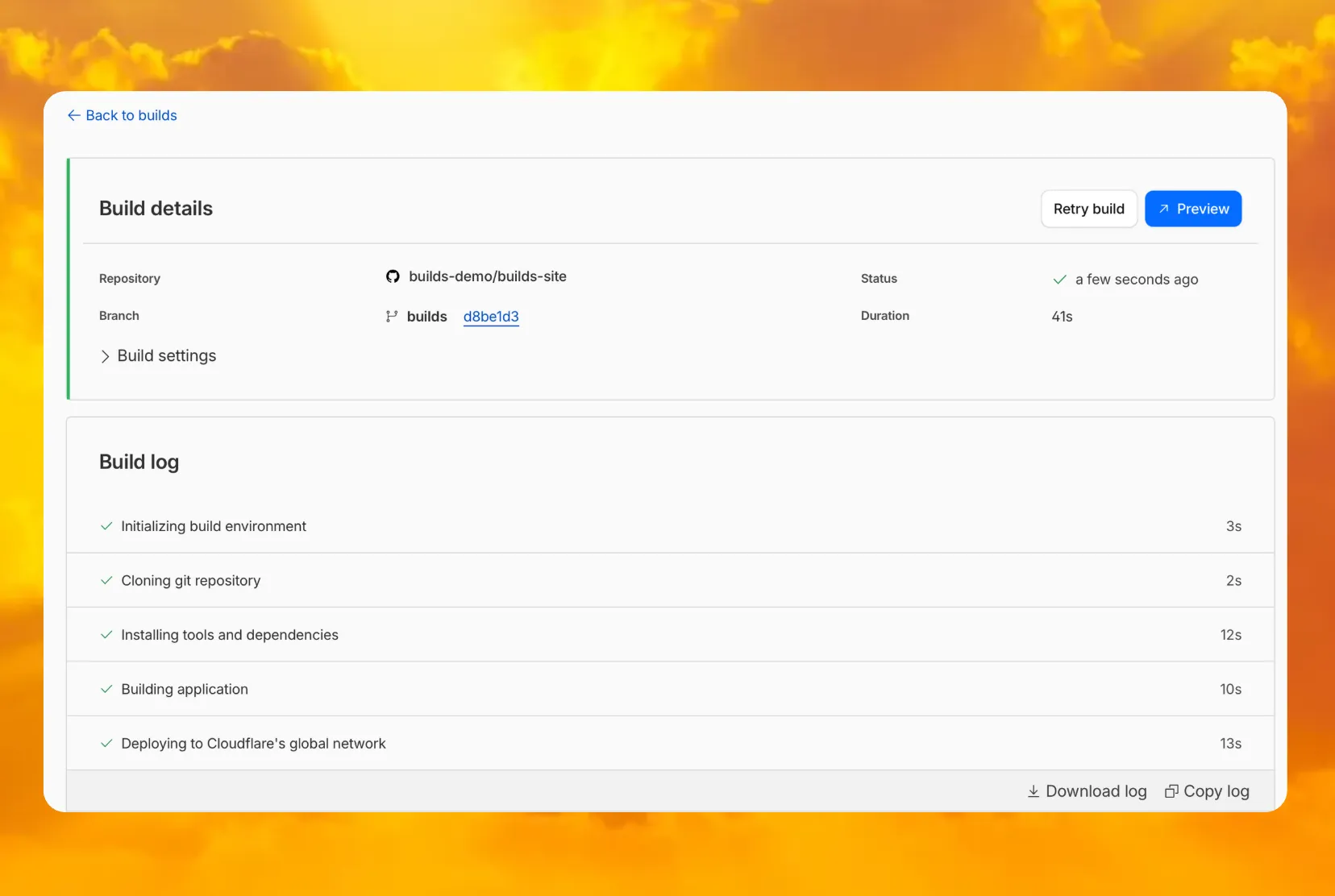
What's new
- A Preview button now appears in the top-right corner of the build details page for successful builds
- Click it to instantly open the latest preview URL
- Matches the same experience you're familiar with from Pages
Cloudflare Access for private hostname applications can now secure traffic on all ports and protocols.
Previously, applying Zero Trust policies to private applications required the application to use HTTPS on port
443and support Server Name Indicator (SNI).This update removes that limitation. As long as the application is reachable via a Cloudflare off-ramp, you can now enforce your critical security controls — like single sign-on (SSO), MFA, device posture, and variable session lengths — to any private application. This allows you to extend Zero Trust security to services like SSH, RDP, internal databases, and other non-HTTPS applications.
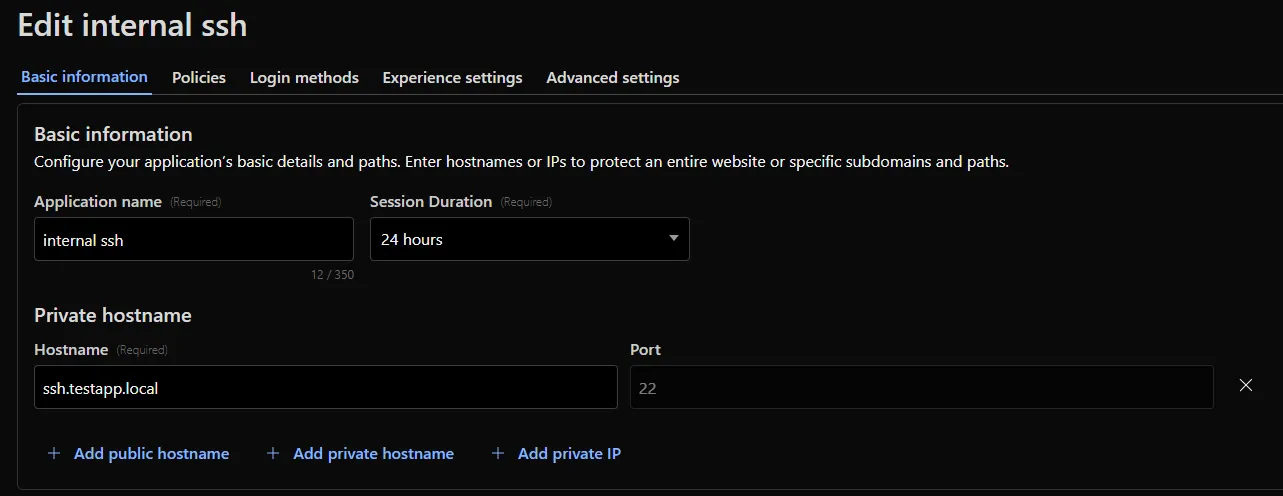
For example, you can now create a self-hosted application in Access for
ssh.testapp.localrunning on port22. You can then build a policy that only allows engineers in your organization to connect after they pass an SSO/MFA check and are using a corporate device.This feature is generally available across all plans.
AI Search now supports reranking for improved retrieval quality and allows you to set the system prompt directly in your API requests.
You can now enable reranking to reorder retrieved documents based on their semantic relevance to the user’s query. Reranking helps improve accuracy, especially for large or noisy datasets where vector similarity alone may not produce the optimal ordering.
You can enable and configure reranking in the dashboard or directly in your API requests:
JavaScript const answer = await env.AI.autorag("my-autorag").aiSearch({query: "How do I train a llama to deliver coffee?",model: "@cf/meta/llama-3.3-70b-instruct-fp8-fast",reranking: {enabled: true,model: "@cf/baai/bge-reranker-base"}});Previously, system prompts could only be configured in the dashboard. You can now define them directly in your API requests, giving you per-query control over behavior. For example:
JavaScript // Dynamically set query and system prompt in AI Searchasync function getAnswer(query, tone) {const systemPrompt = `You are a ${tone} assistant.`;const response = await env.AI.autorag("my-autorag").aiSearch({query: query,system_prompt: systemPrompt});return response;}// Example usageconst query = "What is Cloudflare?";const tone = "friendly";const answer = await getAnswer(query, tone);console.log(answer);Learn more about Reranking and System Prompt in AI Search.
Cloudflare CASB (Cloud Access Security Broker) now supports two new granular roles to provide more precise access control for your security teams:
- Cloudflare CASB Read: Provides read-only access to view CASB findings and dashboards. This role is ideal for security analysts, compliance auditors, or team members who need visibility without modification rights.
- Cloudflare CASB: Provides full administrative access to configure and manage all aspects of the CASB product.
These new roles help you better enforce the principle of least privilege. You can now grant specific members access to CASB security findings without assigning them broader permissions, such as the Super Administrator or Administrator roles.
To enable Data Loss Prevention (DLP), scans in CASB, account members will need the Cloudflare Zero Trust role.
You can find these new roles when inviting members or creating API tokens in the Cloudflare dashboard under Manage Account > Members.
To learn more about managing roles and permissions, refer to the Manage account members and roles documentation.
To give you precision and flexibility while creating policies to block unwanted traffic, we are introducing new, more granular application categories in the Gateway product.
We have added the following categories to provide more precise organization and allow for finer-grained policy creation, designed around how users interact with different types of applications:
- Business
- Education
- Entertainment & Events
- Food & Drink
- Health & Fitness
- Lifestyle
- Navigation
- Photography & Graphic Design
- Travel
The new categories are live now, but we are providing a transition period for existing applications to be fully remapped to these new categories.
The full remapping will be completed by January 30, 2026.
We encourage you to use this time to:
- Review the new category structure.
- Identify and adjust any existing HTTP policies that reference older categories to ensure a smooth transition.
For more information on creating HTTP policies, refer to Applications and app types.
Logpush now supports integration with Microsoft Sentinel ↗.The new Azure Sentinel Connector built on Microsoft’s Codeless Connector Framework (CCF), is now avaialble. This solution replaces the previous Azure Functions-based connector, offering significant improvements in security, data control, and ease of use for customers. Logpush customers can send logs to Azure Blob Storage and configure this new Sentinel Connector to ingest those logs directly into Microsoft Sentinel.
This upgrade significantly streamlines log ingestion, improves security, and provides greater control:
- Simplified Implementation: Easier for engineering teams to set up and maintain.
- Cost Control: New support for Data Collection Rules (DCRs) allows you to filter and transform logs at ingestion time, offering potential cost savings.
- Enhanced Security: CCF provides a higher level of security compared to the older Azure Functions connector.
- ata Lake Integration: Includes native integration with Data Lake.
Find the new solution here ↗ and refer to the Cloudflare's developer documention ↗for more information on the connector, including setup steps, supported logs and Microsfot's resources.
Radar now introduces Top-Level Domain (TLD) insights, providing visibility into popularity based on the DNS magnitude metric, detailed TLD information including its type, manager, DNSSEC support, RDAP support, and WHOIS data, and trends such as DNS query volume and geographic distribution observed by the 1.1.1.1 DNS resolver.
The following dimensions were added to the Radar DNS API, specifically, to the
/dns/summary/{dimension}and/dns/timeseries_groups/{dimension}endpoints:tld: Top-level domain extracted from DNS queries; can also be used as a filter.tld_dns_magnitude: Top-level domain ranking by DNS magnitude.
And the following endpoints were added:
/tlds- Lists all TLDs./tlds/{tld}- Retrieves information about a specific TLD.
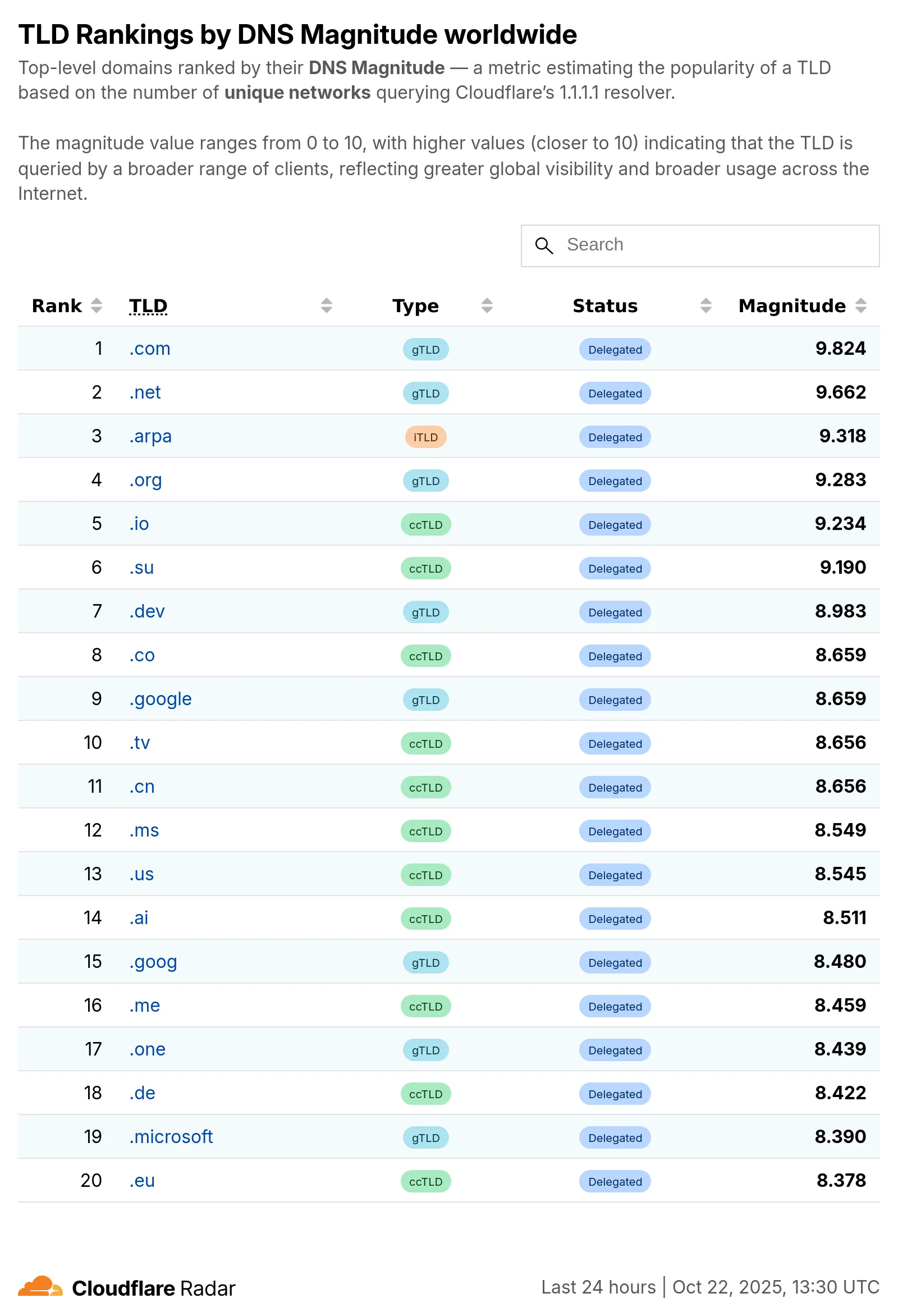
Learn more about the new Radar DNS insights in our blog post ↗, and check out the new Radar page ↗.
The Requests for Information (RFI) dashboard now shows users the number of tokens used by each submitted RFI to better understand usage of tokens and how they relate to each request submitted.
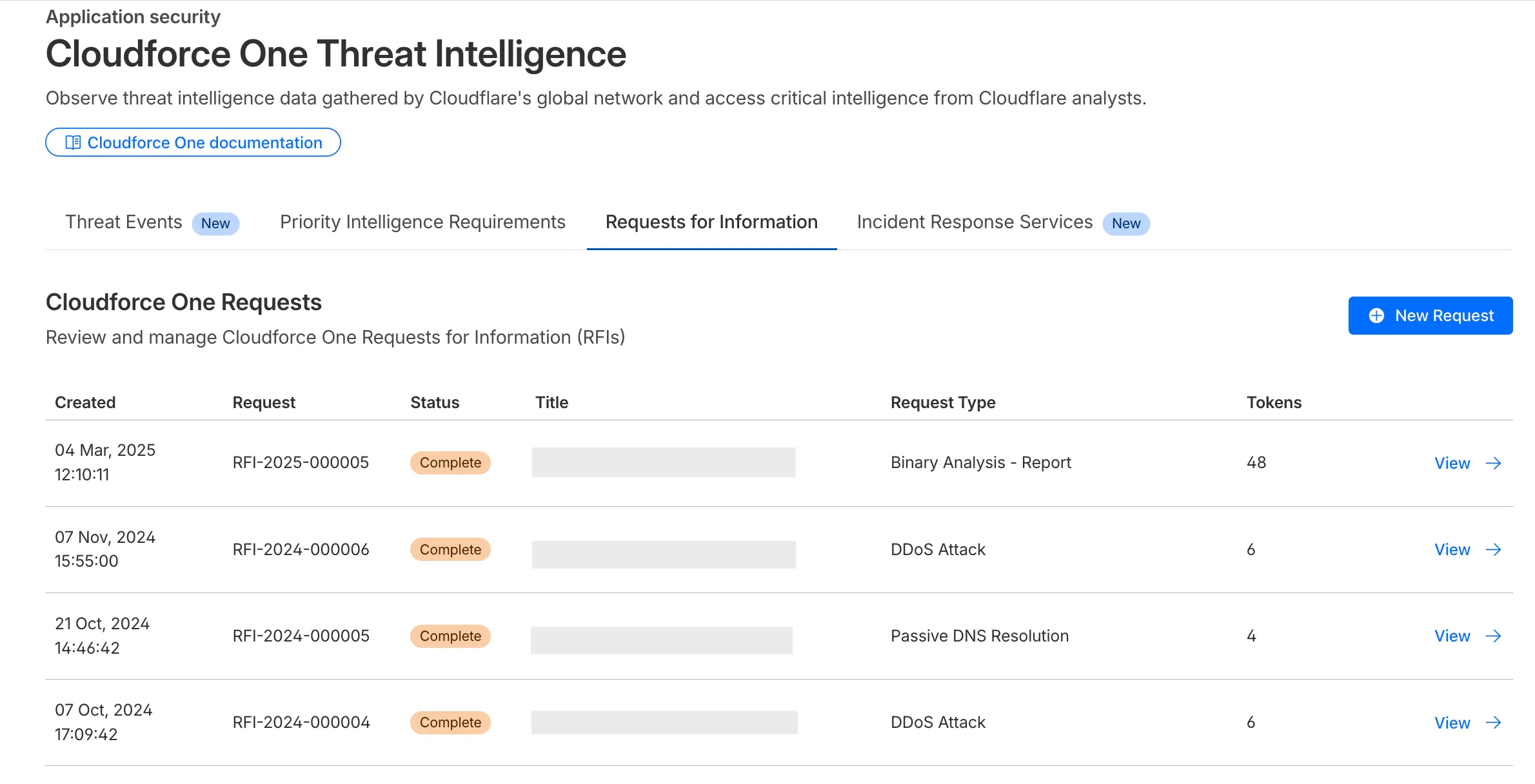
What’s new:
- Users can now see the number of tokens used for a submitted request for information.
- Users can see the remaining tokens allocated to their account for the quarter.
- Users can only select the Routine priority for the
Strategic Threat Researchrequest type.
Cloudforce One subscribers can try it now in Application Security > Threat Intelligence > Requests for Information ↗.
This week’s release introduces a new detection signature that enhances coverage for a critical vulnerability in Windows Server Update Services (WSUS), tracked as CVE-2025-59287.
Key Findings
The vulnerability allows unauthenticated attackers to potentially achieve remote code execution. The updated detection logic strengthens defenses by improving resilience against exploitation attempts targeting this flaw.
Impact
Successful exploitation of CVE-2025-59287 could enable attackers to hijack sessions, execute arbitrary commands, exfiltrate sensitive data, and disrupt storefront operations. These actions pose significant confidentiality and integrity risks to affected environments. Administrators should apply vendor patches immediately to mitigate exposure.
Ruleset Rule ID Legacy Rule ID Description Previous Action New Action Comments Cloudflare Managed Ruleset N/A Windows Server - Deserialization - CVE:CVE-2025-59287 N/A Block This is a New Detection
Previously, if you wanted to develop or deploy a worker with attached resources, you'd have to first manually create the desired resources. Now, if your Wrangler configuration file includes a KV namespace, D1 database, or R2 bucket that does not yet exist on your account, you can develop locally and deploy your application seamlessly, without having to run additional commands.
Automatic provisioning is launching as an open beta, and we'd love to hear your feedback to help us make improvements! It currently works for KV, R2, and D1 bindings. You can disable the feature using the
--no-x-provisionflag.To use this feature, update to wrangler@4.45.0 and add bindings to your config file without resource IDs e.g.:
{"kv_namespaces": [{ "binding": "MY_KV" }],"d1_databases": [{ "binding": "MY_DB" }],"r2_buckets": [{ "binding": "MY_R2" }],}wrangler devwill then automatically create these resources for you locally, and on your next run ofwrangler deploy, Wrangler will call the Cloudflare API to create the requested resources and link them to your Worker.Though resource IDs will be automatically written back to your Wrangler config file after resource creation, resources will stay linked across future deploys even without adding the resource IDs to the config file. This is especially useful for shared templates, which now no longer need to include account-specific resource IDs when adding a binding.
The Cloudflare Vite plugin now supports TanStack Start ↗ apps. Get started with new or existing projects.
Create a new TanStack Start project that uses the Cloudflare Vite plugin via the
create-cloudflareCLI:Terminal window npm create cloudflare@latest -- my-tanstack-start-app --framework=tanstack-startTerminal window yarn create cloudflare my-tanstack-start-app --framework=tanstack-startTerminal window pnpm create cloudflare@latest my-tanstack-start-app --framework=tanstack-startMigrate an existing TanStack Start project to use the Cloudflare Vite plugin:
- Install
@cloudflare/vite-pluginandwrangler
Terminal window npm i -D @cloudflare/vite-plugin wranglerTerminal window yarn add -D @cloudflare/vite-plugin wranglerTerminal window pnpm add -D @cloudflare/vite-plugin wrangler- Add the Cloudflare plugin to your Vite config
vite.config.ts import { defineConfig } from "vite";import { tanstackStart } from "@tanstack/react-start/plugin/vite";import viteReact from "@vitejs/plugin-react";import { cloudflare } from "@cloudflare/vite-plugin";export default defineConfig({plugins: [cloudflare({ viteEnvironment: { name: "ssr" } }),tanstackStart(),viteReact(),],});- Add your Worker config file
{"$schema": "./node_modules/wrangler/config-schema.json","name": "my-tanstack-start-app",// Set this to today's date"compatibility_date": "2026-03-26","compatibility_flags": ["nodejs_compat"],"main": "@tanstack/react-start/server-entry"}"$schema" = "./node_modules/wrangler/config-schema.json"name = "my-tanstack-start-app"# Set this to today's datecompatibility_date = "2026-03-26"compatibility_flags = [ "nodejs_compat" ]main = "@tanstack/react-start/server-entry"- Modify the scripts in your
package.json
package.json {"scripts": {"dev": "vite dev","build": "vite build && tsc --noEmit","start": "node .output/server/index.mjs","preview": "vite preview","deploy": "npm run build && wrangler deploy","cf-typegen": "wrangler types"}}See the TanStack Start framework guide for more info.
- Install
This week highlights enhancements to detection signatures improving coverage for vulnerabilities in Adobe Commerce and Magento Open Source, linked to CVE-2025-54236.
Key Findings
This vulnerability allows unauthenticated attackers to take over customer accounts through the Commerce REST API and, in certain configurations, may lead to remote code execution. The latest update enhances detection logic to provide more resilient protection against exploitation attempts.
Impact
Adobe Commerce (CVE-2025-54236): Exploitation may allow attackers to hijack sessions, execute arbitrary commands, steal data, and disrupt storefronts, resulting in confidentiality and integrity risks for merchants. Administrators are strongly encouraged to apply vendor patches without delay.
Ruleset Rule ID Legacy Rule ID Description Previous Action New Action Comments Cloudflare Managed Ruleset N/A Adobe Commerce - Remote Code Execution - CVE:CVE-2025-54236 N/A Block This is a New Detection
Developers can now programmatically retrieve a list of all file formats supported by the Markdown Conversion utility in Workers AI.
You can use the
env.AIbinding:TypeScript await env.AI.toMarkdown().supported()Or call the REST API:
Terminal window curl https://api.cloudflare.com/client/v4/accounts/{ACCOUNT_ID}/ai/tomarkdown/supported \-H 'Authorization: Bearer {API_TOKEN}'Both return a list of file formats that users can convert into Markdown:
[{"extension": ".pdf","mimeType": "application/pdf",},{"extension": ".jpeg","mimeType": "image/jpeg",},...]Learn more about our Markdown Conversion utility.