

We improved AI crawler management with detailed analytics and introduced custom HTTP 402 responses for blocked crawlers. AI Audit has been renamed to AI Crawl Control and is now generally available.
Enhanced Crawlers tab:
- View total allowed and blocked requests for each AI crawler
- Trend charts show crawler activity over your selected time range per crawler
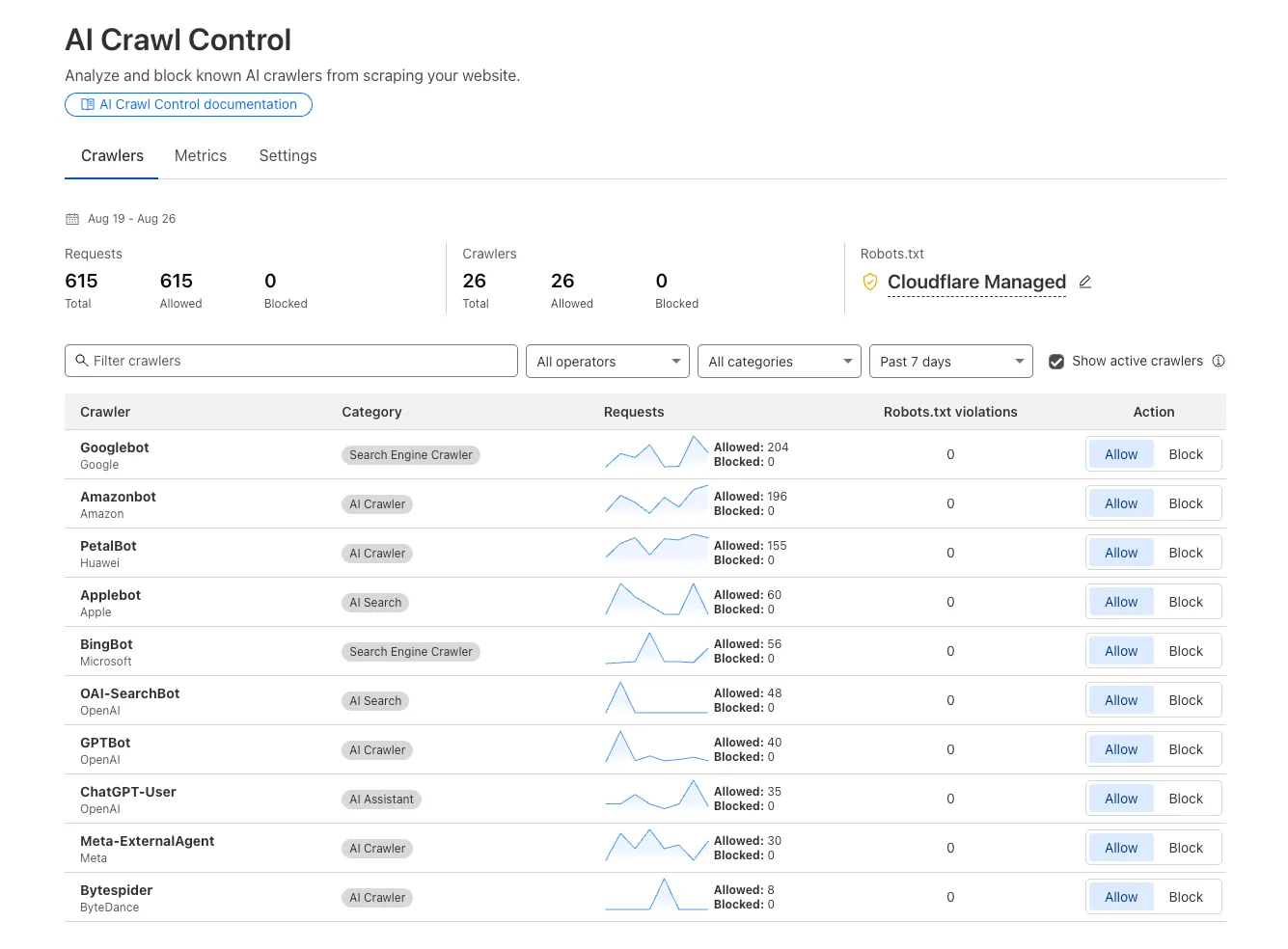
Custom block responses (paid plans): You can now return HTTP 402 "Payment Required" responses when blocking AI crawlers, enabling direct communication with crawler operators about licensing terms.
For users on paid plans, when blocking AI crawlers you can configure:
- Response code: Choose between 403 Forbidden or 402 Payment Required
- Response body: Add a custom message with your licensing contact information
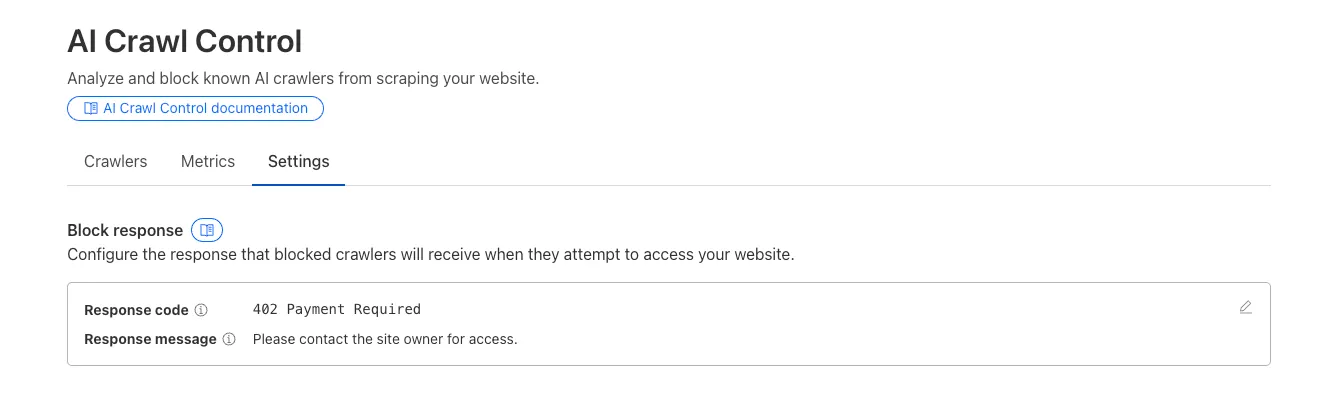
Example 402 response:
HTTP 402 Payment RequiredDate: Mon, 24 Aug 2025 12:56:49 GMTContent-type: application/jsonServer: cloudflareCf-Ray: 967e8da599d0c3fa-EWRCf-Team: 2902f6db750000c3fa1e2ef400000001{"message": "Please contact the site owner for access."}
Zero Trust has significantly upgraded its Shadow IT analytics, providing you with unprecedented visibility into your organizations use of SaaS tools. With this dashboard, you can review who is using an application and volumes of data transfer to the application.
You can review these metrics against application type, such as Artificial Intelligence or Social Media. You can also mark applications with an approval status, including Unreviewed, In Review, Approved, and Unapproved designating how they can be used in your organization.
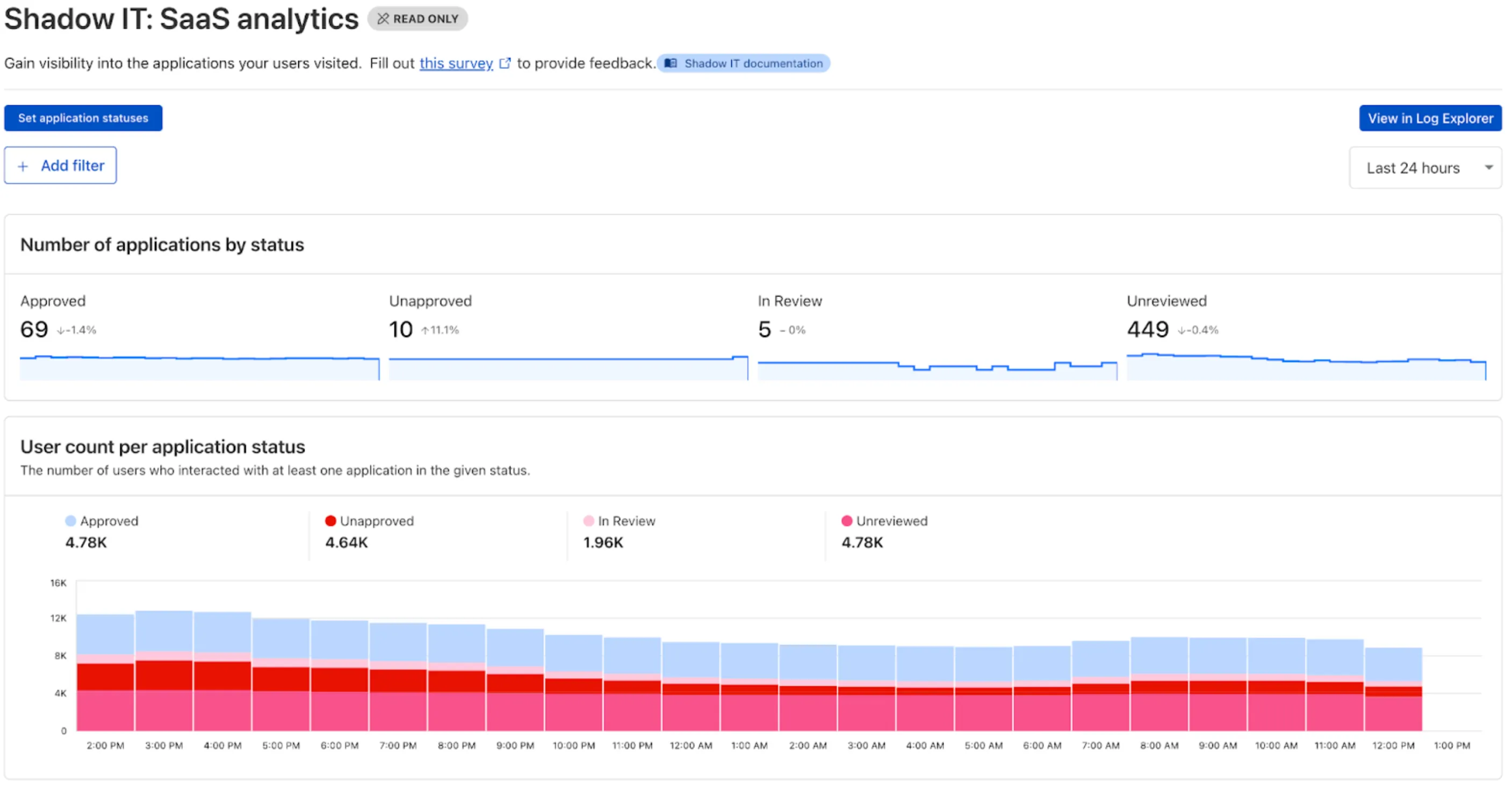
These application statuses can also be used in Gateway HTTP policies, so you can block, isolate, limit uploads and downloads, and more based on the application status.
Both the analytics and policies are accessible in the Cloudflare Zero Trust dashboard ↗, empowering organizations with better visibility and control.
New state-of-the-art models have landed on Workers AI! This time, we're introducing new partner models trained by our friends at Deepgram ↗ and Leonardo ↗, hosted on Workers AI infrastructure.
As well, we're introuding a new turn detection model that enables you to detect when someone is done speaking — useful for building voice agents!
Read the blog ↗ for more details and check out some of the new models on our platform:
@cf/deepgram/aura-1is a text-to-speech model that allows you to input text and have it come to life in a customizable voice@cf/deepgram/nova-3is speech-to-text model that transcribes multilingual audio at a blazingly fast speed@cf/pipecat-ai/smart-turn-v2helps you detect when someone is done speaking@cf/leonardo/lucid-originis a text-to-image model that generates images with sharp graphic design, stunning full-HD renders, or highly specific creative direction@cf/leonardo/phoenix-1.0is a text-to-image model with exceptional prompt adherence and coherent text
You can filter out new partner models with the
Partnercapability on our Models page.As well, we're introducing WebSocket support for some of our audio models, which you can filter though the
Realtimecapability on our Models page. WebSockets allows you to create a bi-directional connection to our inference server with low latency — perfect for those that are building voice agents.An example python snippet on how to use WebSockets with our new Aura model:
import jsonimport osimport asyncioimport websocketsuri = f"wss://api.cloudflare.com/client/v4/accounts/{ACCOUNT_ID}/ai/run/@cf/deepgram/aura-1"input = ["Line one, out of three lines that will be provided to the aura model.","Line two, out of three lines that will be provided to the aura model.","Line three, out of three lines that will be provided to the aura model. This is a last line.",]async def text_to_speech():async with websockets.connect(uri, additional_headers={"Authorization": os.getenv("CF_TOKEN")}) as websocket:print("connection established")for line in input:print(f"sending `{line}`")await websocket.send(json.dumps({"type": "Speak", "text": line}))print("line was sent, flushing")await websocket.send(json.dumps({"type": "Flush"}))print("flushed, recving")resp = await websocket.recv()print(f"response received {resp}")if __name__ == "__main__":asyncio.run(text_to_speech())
Cloudflare CASB ↗ now supports three of the most widely used GenAI platforms — OpenAI ChatGPT, Anthropic Claude, and Google Gemini. These API-based integrations give security teams agentless visibility into posture, data, and compliance risks across their organization’s use of generative AI.
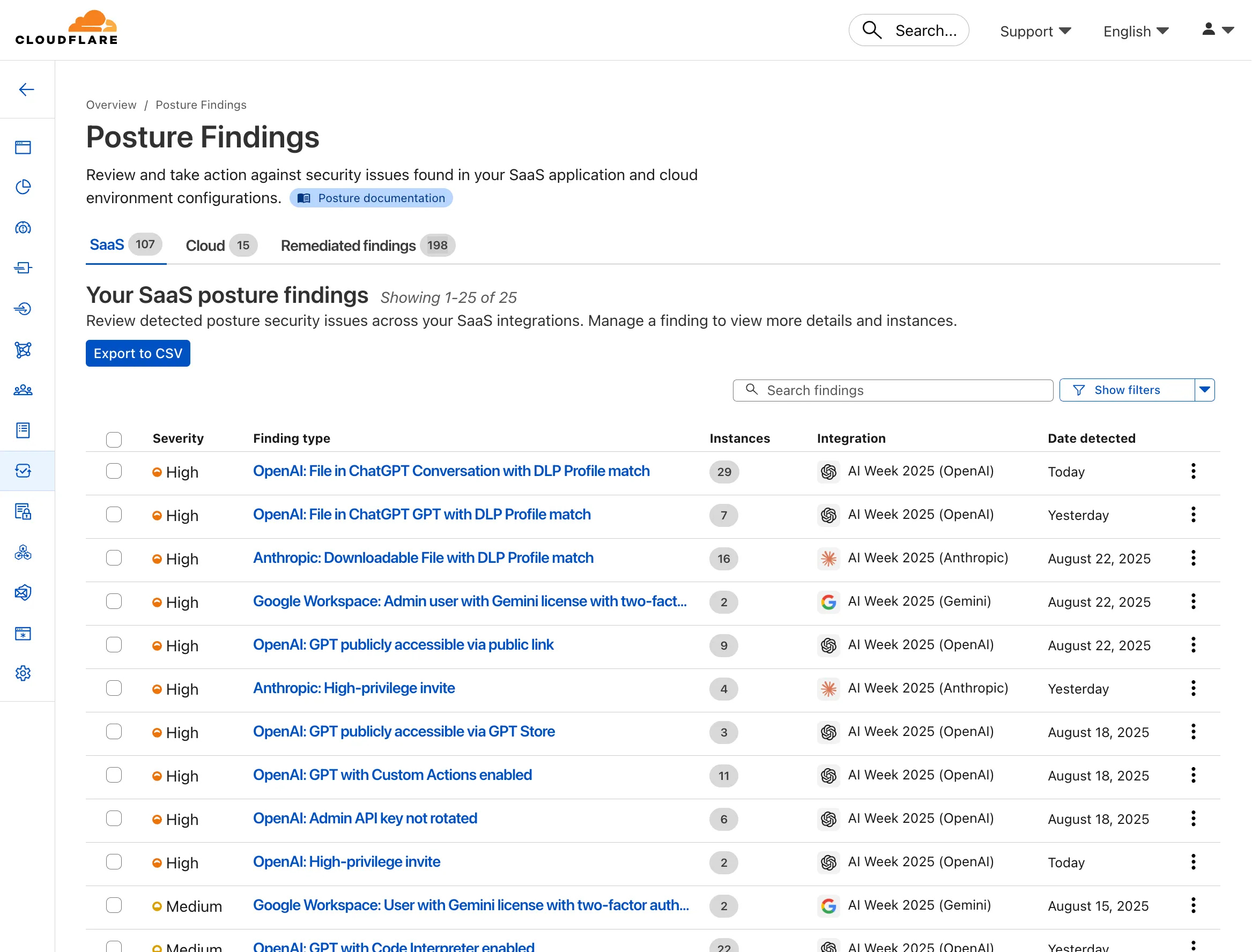
- Agentless connections — connect ChatGPT, Claude, and Gemini tenants via API; no endpoint software required
- Posture management — detect insecure settings and misconfigurations that could lead to data exposure
- DLP detection — identify sensitive data in uploaded chat attachments or files
- GenAI-specific insights — surface risks unique to each provider’s capabilities
These integrations are available to all Cloudflare One customers today.
You can now control who within your organization has access to internal MCP servers, by putting internal MCP servers behind Cloudflare Access.
Self-hosted applications in Cloudflare Access now support OAuth for MCP server authentication. This allows Cloudflare to delegate access from any self-hosted application to an MCP server via OAuth. The OAuth access token authorizes the MCP server to make requests to your self-hosted applications on behalf of the authorized user, using that user's specific permissions and scopes.
For example, if you have an MCP server designed for internal use within your organization, you can configure Access policies to ensure that only authorized users can access it, regardless of which MCP client they use. Support for internal, self-hosted MCP servers also works with MCP server portals, allowing you to provide a single MCP endpoint for multiple MCP servers. For more on MCP server portals, read the blog post ↗ on the Cloudflare Blog.
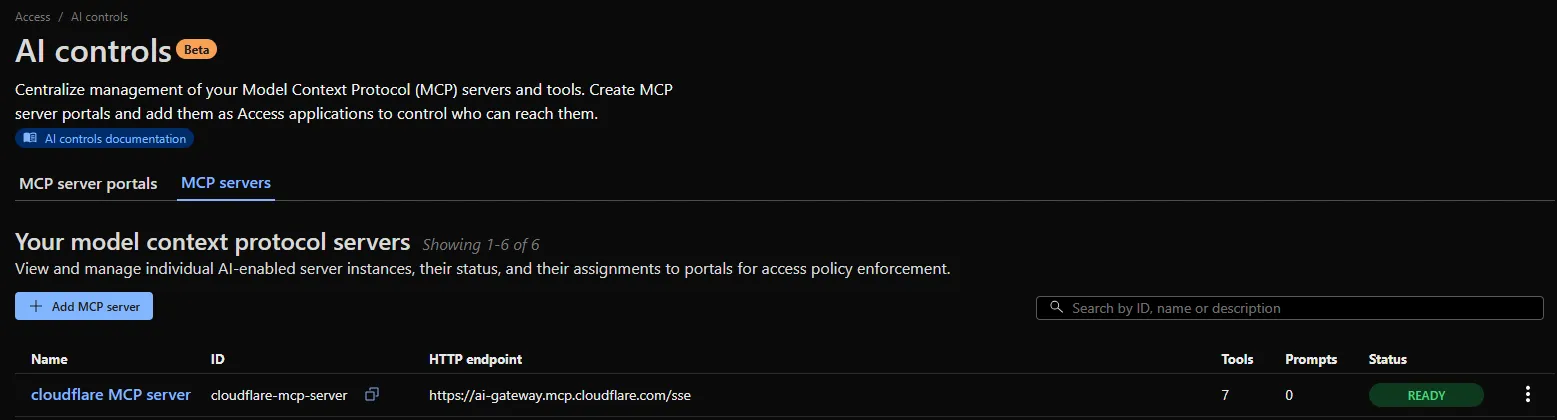
An MCP server portal centralizes multiple Model Context Protocol (MCP) servers onto a single HTTP endpoint. Key benefits include:
- Streamlined access to multiple MCP servers: MCP server portals support both unauthenticated MCP servers as well as MCP servers secured using any third-party or custom OAuth provider. Users log in to the portal URL through Cloudflare Access and are prompted to authenticate separately to each server that requires OAuth.
- Customized tools per portal: Admins can tailor an MCP portal to a particular use case by choosing the specific tools and prompt templates that they want to make available to users through the portal. This allows users to access a curated set of tools and prompts — the less external context exposed to the AI model, the better the AI responses tend to be.
- Observability: Once the user's AI agent is connected to the portal, Cloudflare Access logs the indiviudal requests made using the tools in the portal.
This is available in an open beta for all customers across all plans! For more information check out our blog ↗ for this release.
You can now list all vector identifiers in a Vectorize index using the new
list-vectorsoperation. This enables bulk operations, auditing, and data migration workflows through paginated requests that maintain snapshot consistency.The operation is available via Wrangler CLI and REST API. Refer to the list-vectors best practices guide for detailed usage guidance.
Cloudflare Secrets Store is now integrated with AI Gateway, allowing you to store, manage, and deploy your AI provider keys in a secure and seamless configuration through Bring Your Own Key ↗. Instead of passing your AI provider keys directly in every request header, you can centrally manage each key with Secrets Store and deploy in your gateway configuration using only a reference, rather than passing the value in plain text.
You can now create a secret directly from your AI Gateway in the dashboard ↗ by navigating into your gateway -> Provider Keys -> Add.
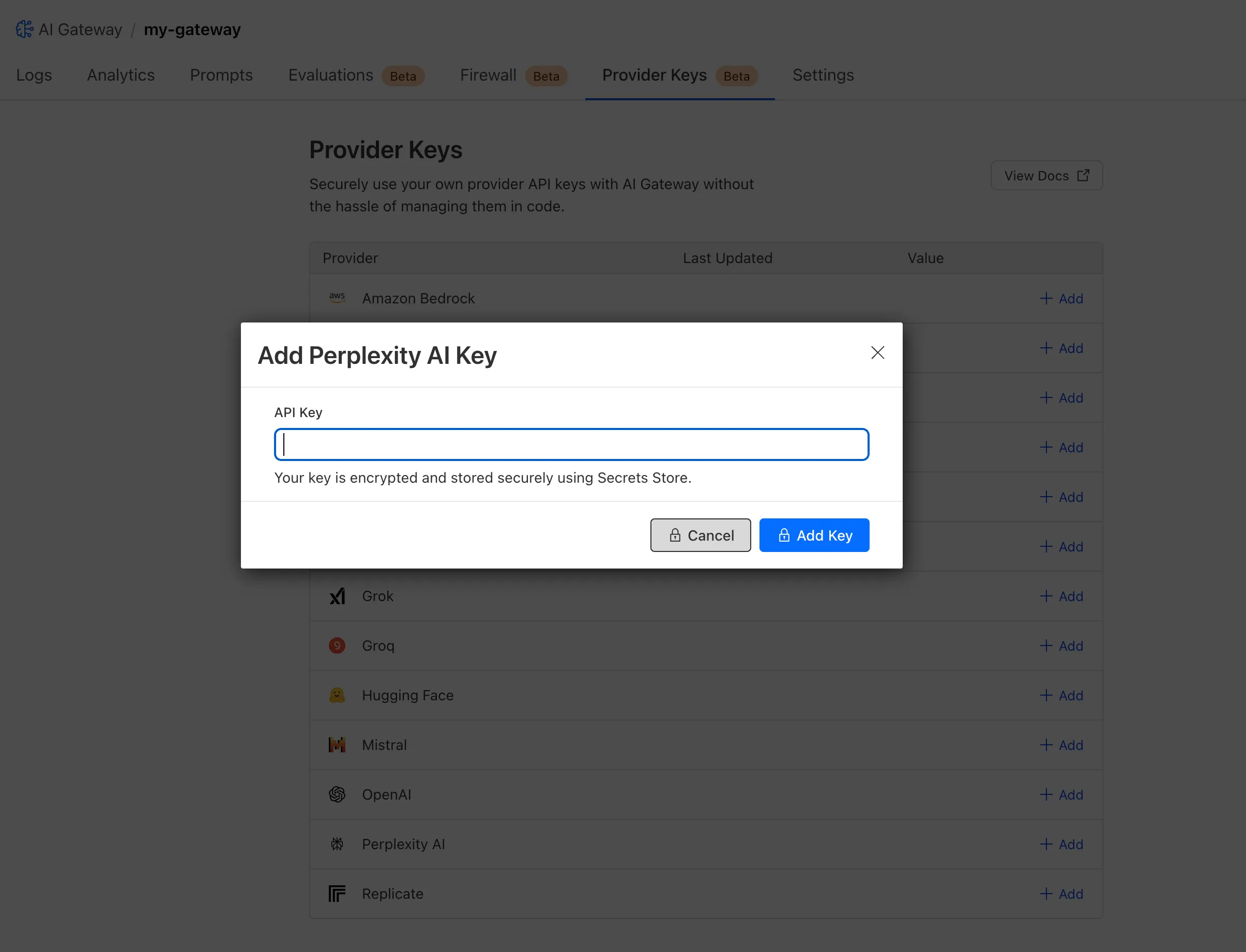
You can also create your secret with the newly available ai_gateway scope via wrangler ↗, the Secrets Store dashboard ↗, or the API ↗.
Then, pass the key in the request header using its Secrets Store reference:
curl -X POST https://gateway.ai.cloudflare.com/v1/<ACCOUNT_ID>/my-gateway/anthropic/v1/messages \--header 'cf-aig-authorization: ANTHROPIC_KEY_1 \--header 'anthropic-version: 2023-06-01' \--header 'Content-Type: application/json' \--data '{"model": "claude-3-opus-20240229", "messages": [{"role": "user", "content": "What is Cloudflare?"}]}'Or, using Javascript:
import Anthropic from '@anthropic-ai/sdk';const anthropic = new Anthropic({apiKey: "ANTHROPIC_KEY_1",baseURL: "https://gateway.ai.cloudflare.com/v1/<ACCOUNT_ID>/my-gateway/anthropic",});const message = await anthropic.messages.create({model: 'claude-3-opus-20240229',messages: [{role: "user", content: "What is Cloudflare?"}],max_tokens: 1024});For more information, check out the blog ↗!
You now have access to a comprehensive suite of capabilities to secure your organization's use of generative AI. AI prompt protection introduces four key features that work together to provide deep visibility and granular control.
- Prompt Detection for AI Applications
DLP can now natively detect and inspect user prompts submitted to popular AI applications, including Google Gemini, ChatGPT, Claude, and Perplexity.
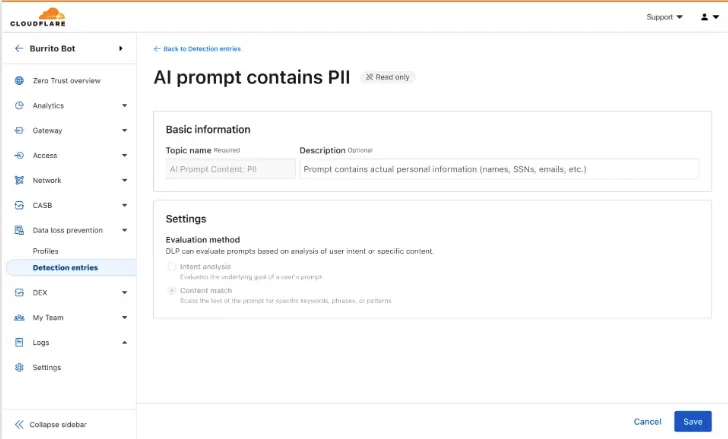
- Prompt Analysis and Topic Classification
Our DLP engine performs deep analysis on each prompt, applying topic classification. These topics are grouped into two evaluation categories:
-
Content: PII, Source Code, Credentials and Secrets, Financial Information, and Customer Data.
-
Intent: Jailbreak attempts, requests for malicious code, or attempts to extract PII.
To help you apply these topics quickly, we have also released five new predefined profiles (for example, AI Prompt: AI Security, AI Prompt: PII) that bundle these new topics.
-
Granular Guardrails
You can now build guardrails using Gateway HTTP policies with application granular controls. Apply a DLP profile containing an AI prompt topic detection to individual AI applications (for example,
ChatGPT) and specific user actions (for example,SendPrompt) to block sensitive prompts.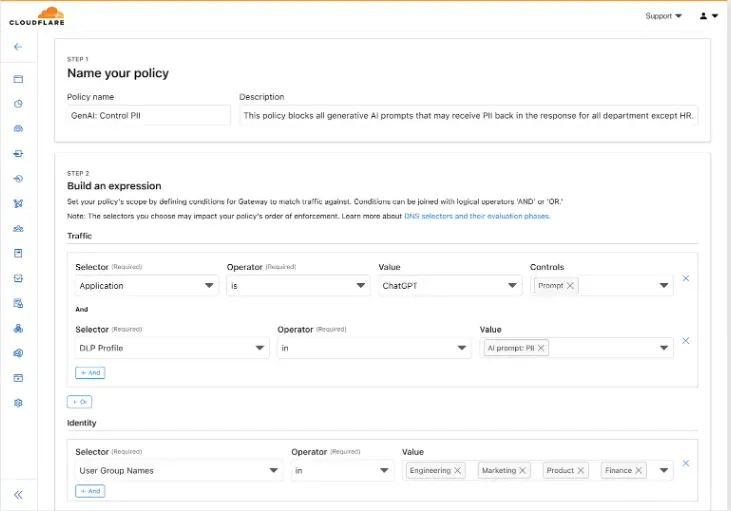
-
Full Prompt Logging
To aid in incident investigation, an optional setting in your Gateway policy allows you to capture prompt logs to store the full interaction of prompts that trigger a policy match. To make investigations easier, logs can be filtered by
conversation_id, allowing you to reconstruct the full context of an interaction that led to a policy violation.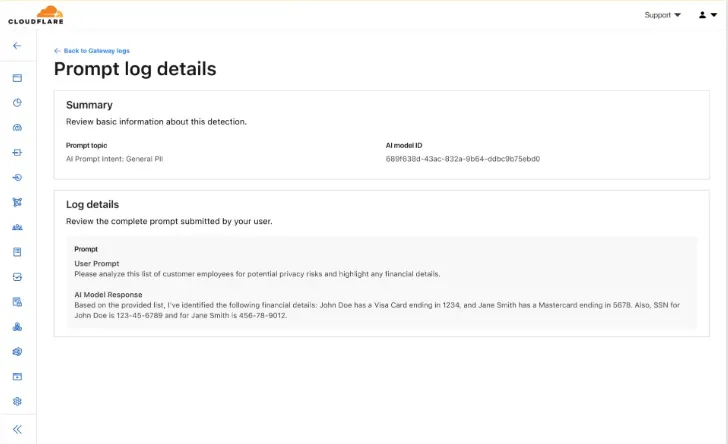
AI prompt protection is now available in open beta. To learn more about it, read the blog ↗ or refer to AI prompt topics.
This week's update
This week, critical vulnerabilities were disclosed that impact widely used open-source infrastructure, creating high-risk scenarios for code execution and operational disruption.
Key Findings
-
Apache HTTP Server – Code Execution (CVE-2024-38474): A flaw in Apache HTTP Server allows attackers to achieve remote code execution, enabling full compromise of affected servers. This vulnerability threatens the confidentiality, integrity, and availability of critical web services.
-
Laravel (CVE-2024-55661): A security flaw in Laravel introduces the potential for remote code execution under specific conditions. Exploitation could provide attackers with unauthorized access to application logic and sensitive backend data.
Impact
These vulnerabilities pose severe risks to enterprise environments and open-source ecosystems. Remote code execution enables attackers to gain deep system access, steal data, disrupt services, and establish persistent footholds for broader intrusions. Given the widespread deployment of Apache HTTP Server and Laravel in production systems, timely patching and mitigation are critical.
Ruleset Rule ID Legacy Rule ID Description Previous Action New Action Comments Cloudflare Managed Ruleset 100822_BETA WordPress:Plugin:WPBookit - Remote Code Execution - CVE:CVE-2025-6058 N/A Disabled This was merged in to the original rule "WordPress:Plugin:WPBookit - Remote Code Execution - CVE:CVE-2025-6058" (ID: Cloudflare Managed Ruleset 100831 Apache HTTP Server - Code Execution - CVE:CVE-2024-38474 Log Disabled This is a New Detection Cloudflare Managed Ruleset 100846 Laravel - Remote Code Execution - CVE:CVE-2024-55661 Log Disabled This is a New Detection -
JavaScript asset responses have been updated to use the
text/javascriptContent-Type header instead ofapplication/javascript. While both MIME types are widely supported by browsers, the HTML Living Standard explicitly recommendstext/javascriptas the preferred type going forward.This change improves:
- Standards alignment: Ensures consistency with the HTML spec and modern web platform guidance.
- Interoperability: Some developer tools, validators, and proxies expect text/javascript and may warn or behave inconsistently with application/javascript.
- Future-proofing: By following the spec-preferred MIME type, we reduce the risk of deprecation warnings or unexpected behavior in evolving browser environments.
- Consistency: Most frameworks, CDNs, and hosting providers now default to text/javascript, so this change matches common ecosystem practice.
Because all major browsers accept both MIME types, this update is backwards compatible and should not cause breakage.
Users will see this change on the next deployment of their assets.
Workers KV has completed rolling out performance improvements across all KV namespaces, providing a significant latency reduction on read operations for all KV users. This is due to architectural changes to KV's underlying storage infrastructure, which introduces a new metadata later and substantially improves redundancy.
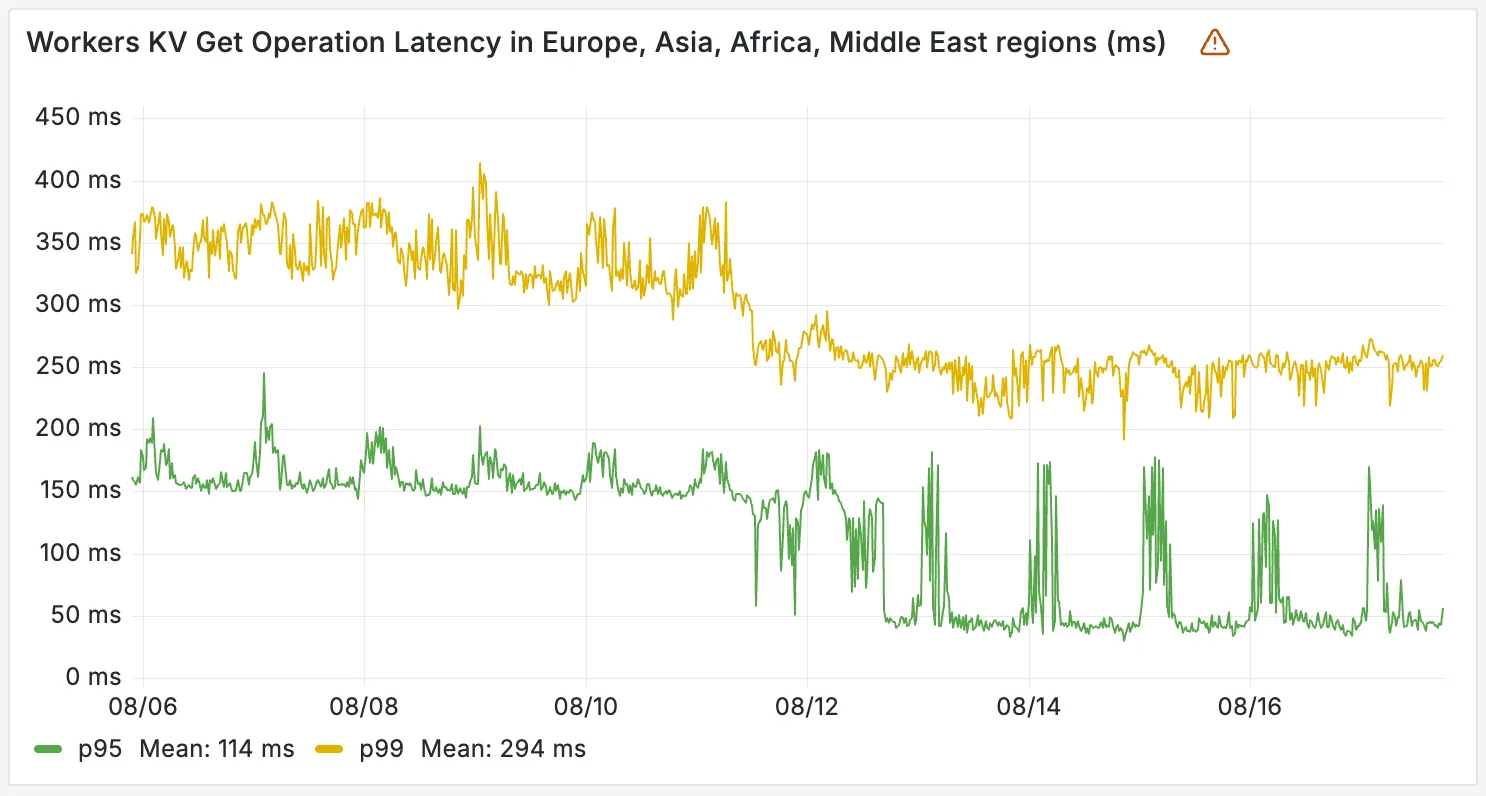
The new hybrid architecture delivers substantial latency reductions throughout Europe, Asia, Middle East, Africa regions. Over the past 2 weeks, we have observed the following:
- p95 latency: Reduced from ~150ms to ~50ms (67% decrease)
- p99 latency: Reduced from ~350ms to ~250ms (29% decrease)
Audit Logs v2 dataset is now available via Logpush.
This expands on earlier releases of Audit Logs v2 in the API and Dashboard UI.
We recommend creating a new Logpush job for the Audit Logs v2 dataset.
Timelines for General Availability (GA) of Audit Logs v2 and the retirement of Audit Logs v1 will be shared in upcoming updates.
For more details on Audit Logs v2, refer to the Audit Logs documentation ↗.
Cloudflare Logpush can now deliver logs from using fixed, dedicated egress IPs. By routing Logpush traffic through a Cloudflare zone enabled with Aegis IP, your log destination only needs to allow Aegis IPs making setup more secure.
Highlights:
- Fixed egress IPs ensure your destination only accepts traffic from known addresses.
- Works with any supported Logpush destination.
- Recommended to use a dedicated zone as a proxy for easier management.
To get started, work with your Cloudflare account team to provision Aegis IPs, then configure your Logpush job to deliver logs through the proxy zone. For full setup instructions, refer to the Logpush documentation.
Ruleset Rule ID Legacy Rule ID Description Previous Action New Action Comments Cloudflare Managed Ruleset 100850 Command Injection - Generic 2 N/A Disabled This is a New Detection Cloudflare Managed Ruleset 100851 Remote Code Execution - Java Deserialization N/A Disabled This is a New Detection Cloudflare Managed Ruleset 100852 Command Injection - Generic 3 N/A Disabled This is a New Detection Cloudflare Managed Ruleset 100853 Remote Code Execution - Common Bash Bypass Beta N/A Disabled This is a New Detection Cloudflare Managed Ruleset 100854 XSS - Generic JavaScript N/A Disabled This is a New Detection Cloudflare Managed Ruleset 100855 Command Injection - Generic 4 N/A Disabled This is a New Detection Cloudflare Managed Ruleset 100856 PHP Object Injection N/A Disabled This is a New Detection Cloudflare Managed Ruleset 100857 Generic - Parameter Fuzzing N/A Disabled This is a New Detection Cloudflare Managed Ruleset 100858 Code Injection - Generic 4 N/A Disabled This is a New Detection Cloudflare Managed Ruleset 100859 SQLi - UNION - 2 N/A Disabled This is a New Detection Cloudflare Managed Ruleset 100860 Command Injection - Generic 5 N/A Disabled This is a New Detection Cloudflare Managed Ruleset 100861 Command Execution - Generic N/A Disabled This is a New Detection Cloudflare Managed Ruleset 100862 GraphQL Injection - 2 N/A Disabled This is a New Detection Cloudflare Managed Ruleset 100863 Command Injection - Generic 6 N/A Disabled This is a New Detection Cloudflare Managed Ruleset 100864 Code Injection - Generic 2 N/A Disabled This is a New Detection Cloudflare Managed Ruleset 100865 PHP Object Injection - 2 N/A Disabled This is a New Detection Cloudflare Managed Ruleset 100866 SQLi - LIKE 2 N/A Disabled This is a New Detection Cloudflare Managed Ruleset 100867 SQLi - DROP - 2 N/A Disabled This is a New Detection Cloudflare Managed Ruleset 100868 Code Injection - Generic 3 N/A Disabled This is a New Detection Cloudflare Managed Ruleset 100869 Command Injection - Generic 7 N/A Disabled This is a New Detection Cloudflare Managed Ruleset 100870 Command Injection - Generic 8 N/A Disabled This is a New Detection Cloudflare Managed Ruleset 100871 SQLi - LIKE 3 N/A Disabled This is a New Detection
You can now build Workflows using Python. With Python Workflows, you get automatic retries, state persistence, and the ability to run multi-step operations that can span minutes, hours, or weeks using Python’s familiar syntax and the Python Workers runtime.
Python Workflows use the same step-based execution model as JavaScript Workflows, but with Python syntax and access to Python’s ecosystem. Python Workflows also enable DAG (Directed Acyclic Graph) workflows, where you can define complex dependencies between steps using the depends parameter.
Here’s a simple example:
Python from workers import Response, WorkflowEntrypointclass PythonWorkflowStarter(WorkflowEntrypoint):async def run(self, event, step):@step.do("my first step")async def my_first_step():# do some workreturn "Hello Python!"await my_first_step()await step.sleep("my-sleep-step", "10 seconds")@step.do("my second step")async def my_second_step():# do some more workreturn "Hello again!"await my_second_step()class Default(WorkerEntrypoint):async def fetch(self, request):await self.env.MY_WORKFLOW.create()return Response("Hello Workflow creation!")Python Workflows support the same core capabilities as JavaScript Workflows, including sleep scheduling, event-driven workflows, and built-in error handling with configurable retry policies.
To learn more and get started, refer to Python Workflows documentation.
A new GA release for the Windows WARP client is now available on the stable releases downloads page.
This release contains a hotfix for pre-login for multi-user for the 2025.6.1135.0 release.
Changes and improvements
- Fixes an issue where new pre-login registrations were not being properly created.
Known issues
For Windows 11 24H2 users, Microsoft has confirmed a regression that may lead to performance issues like mouse lag, audio cracking, or other slowdowns. Cloudflare recommends users experiencing these issues upgrade to a minimum Windows 11 24H2 KB5062553 or higher for resolution.
Devices using WARP client 2025.4.929.0 and up may experience Local Domain Fallback failures if a fallback server has not been configured. To configure a fallback server, refer to Route traffic to fallback server.
Devices with KB5055523 installed may receive a warning about Win32/ClickFix.ABA being present in the installer. To resolve this false positive, update Microsoft Security Intelligence to version 1.429.19.0 or later.
DNS resolution may be broken when the following conditions are all true:
- WARP is in Secure Web Gateway without DNS filtering (tunnel-only) mode.
- A custom DNS server address is configured on the primary network adapter.
- The custom DNS server address on the primary network adapter is changed while WARP is connected.
To work around this issue, please reconnect the WARP client by toggling off and back on.
You can now create a client (a Durable Object stub) to a Durable Object with the new
getByNamemethod, removing the need to convert Durable Object names to IDs and then create a stub.JavaScript // Before: (1) translate name to ID then (2) get a clientconst objectId = env.MY_DURABLE_OBJECT.idFromName("foo"); // or .newUniqueId()const stub = env.MY_DURABLE_OBJECT.get(objectId);// Now: retrieve client to Durable Object directly via its nameconst stub = env.MY_DURABLE_OBJECT.getByName("foo");// Use client to send request to the remote Durable Objectconst rpcResponse = await stub.sayHello();Each Durable Object has a globally-unique name, which allows you to send requests to a specific object from anywhere in the world. Thus, a Durable Object can be used to coordinate between multiple clients who need to work together. You can have billions of Durable Objects, providing isolation between application tenants.
To learn more, visit the Durable Objects API Documentation or the getting started guide.
Enterprise Gateway users can now use Bring Your Own IP (BYOIP) for dedicated egress IPs.
Admins can now onboard and use their own IPv4 or IPv6 prefixes to egress traffic from Cloudflare, delivering greater control, flexibility, and compliance for network traffic.
Get started by following the BYOIP onboarding process. Once your IPs are onboarded, go to Gateway > Egress policies and select or create an egress policy. In Select an egress IP, choose Use dedicated egress IPs (Cloudflare or BYOIP), then select your BYOIP address from the dropdown menu.
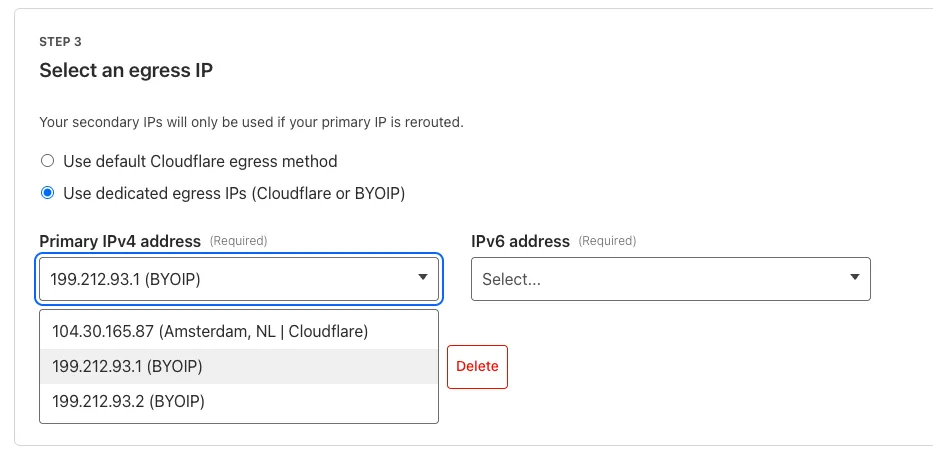
For more information, refer to BYOIP for dedicated egress IPs.
A new GA release for the Windows WARP client is now available on the stable releases downloads page.
This release contains minor fixes and improvements.
Changes and improvements
- Improvements to better manage multi-user pre-login registrations.
- Fixed an issue preventing devices from reaching split-tunneled traffic even when WARP was disconnected.
- Fix to prevent WARP from re-enabling its firewall rules after a user-initiated disconnect.
- Improvement for faster client connectivity on high-latency captive portal networks.
- Fixed an issue where recursive CNAME records could cause intermittent WARP connectivity issues.
Known issues
For Windows 11 24H2 users, Microsoft has confirmed a regression that may lead to performance issues like mouse lag, audio cracking, or other slowdowns. Cloudflare recommends users experiencing these issues upgrade to a minimum Windows 11 24H2 version KB5062553 or higher for resolution.
Devices using WARP client 2025.4.929.0 and up may experience Local Domain Fallback failures if a fallback server has not been configured. To configure a fallback server, refer to Route traffic to fallback server.
Devices with KB5055523 installed may receive a warning about
Win32/ClickFix.ABAbeing present in the installer. To resolve this false positive, update Microsoft Security Intelligence to version 1.429.19.0 or later.DNS resolution may be broken when the following conditions are all true:
- WARP is in Secure Web Gateway without DNS filtering (tunnel-only) mode.
- A custom DNS server address is configured on the primary network adapter.
- The custom DNS server address on the primary network adapter is changed while WARP is connected.
To work around this issue, reconnect the WARP client by toggling off and back on.
A new GA release for the macOS WARP client is now available on the stable releases downloads page.
This release contains minor fixes and improvements.
Changes and improvements
- Fixed an issue preventing devices from reaching split-tunneled traffic even when WARP was disconnected.
- Fix to prevent WARP from re-enabling its firewall rules after a user-initiated disconnect.
- Improvement for faster client connectivity on high-latency captive portal networks.
- Fixed an issue where recursive CNAME records could cause intermittent WARP connectivity issues.
Known issues
- macOS Sequoia: Due to changes Apple introduced in macOS 15.0.x, the WARP client may not behave as expected. Cloudflare recommends the use of macOS 15.4 or later.
- Devices using WARP client 2025.4.929.0 and up may experience Local Domain Fallback failures if a fallback server has not been configured. To configure a fallback server, refer to Route traffic to fallback server.
A new GA release for the Linux WARP client is now available on the stable releases downloads page.
This release contains minor fixes and improvements.
Changes and improvements
- Fixed an issue preventing devices from reaching split-tunneled traffic even when WARP was disconnected.
- Fix to prevent WARP from re-enabling its firewall rules after a user-initiated disconnect.
- Improvement for faster client connectivity on high-latency captive portal networks.
- Fixed an issue where recursive CNAME records could cause intermittent WARP connectivity issues.
Known issues
- Devices using WARP client 2025.4.929.0 and up may experience Local Domain Fallback failures if a fallback server has not been configured. To configure a fallback server, refer to Route traffic to fallback server.
You can now subscribe to events from other Cloudflare services (for example, Workers KV, Workers AI, Workers) and consume those events via Queues, allowing you to build custom workflows, integrations, and logic in response to account activity.
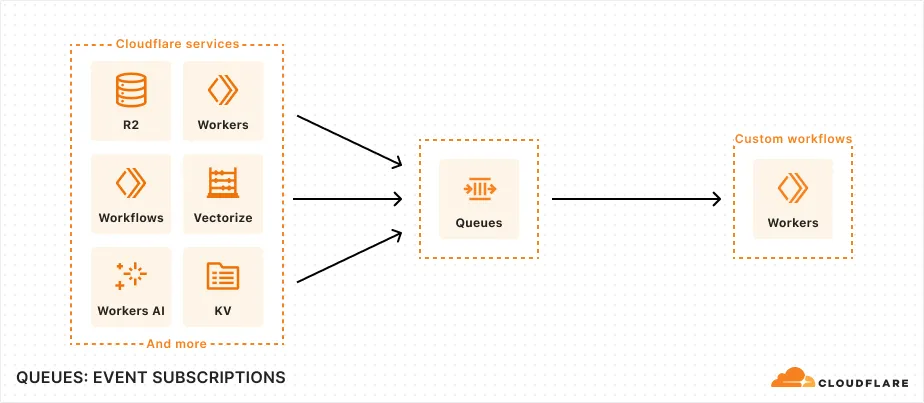
Event subscriptions allow you to receive messages when events occur across your Cloudflare account. Cloudflare products can publish structured events to a queue, which you can then consume with Workers or pull via HTTP from anywhere.
To create a subscription, use the dashboard or Wrangler:
Terminal window npx wrangler queues subscription create my-queue --source r2 --events bucket.createdAn event is a structured record of something happening in your Cloudflare account – like a Workers AI batch request being queued, a Worker build completing, or an R2 bucket being created. Events follow a consistent structure:
Example R2 bucket created event {"type": "cf.r2.bucket.created","source": {"type": "r2"},"payload": {"name": "my-bucket","location": "WNAM"},"metadata": {"accountId": "f9f79265f388666de8122cfb508d7776","eventTimestamp": "2025-07-28T10:30:00Z"}}Current event sources include R2, Workers KV, Workers AI, Workers Builds, Vectorize, Super Slurper, and Workflows. More sources and events are on the way.
For more information on event subscriptions, available events, and how to get started, refer to our documentation.
Wrangler's error screen has received several improvements to enhance your debugging experience!
The error screen now features a refreshed design thanks to youch ↗, with support for both light and dark themes, improved source map resolution logic that handles missing source files more reliably, and better error cause display.
Before After (Light) After (Dark) 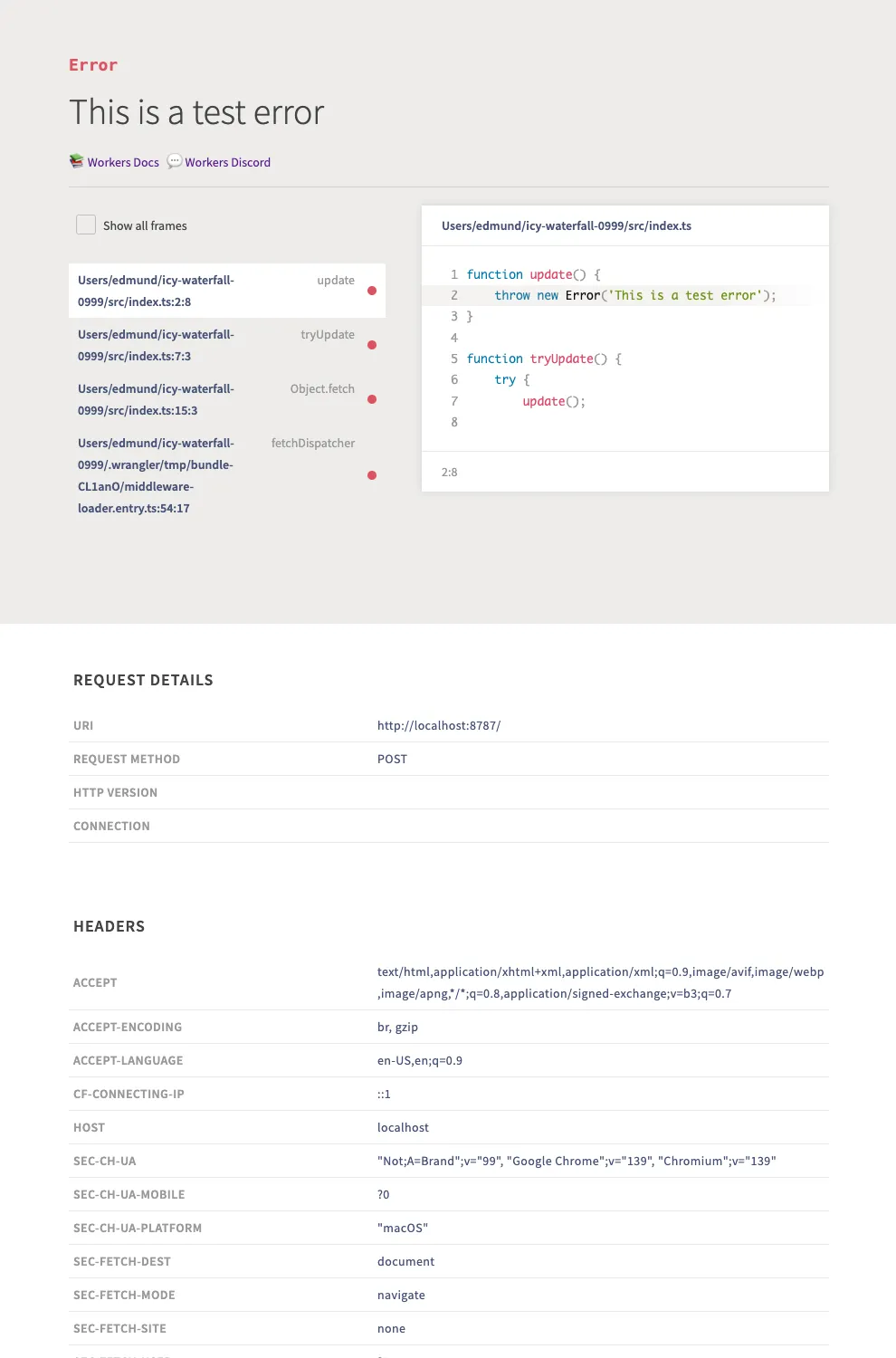
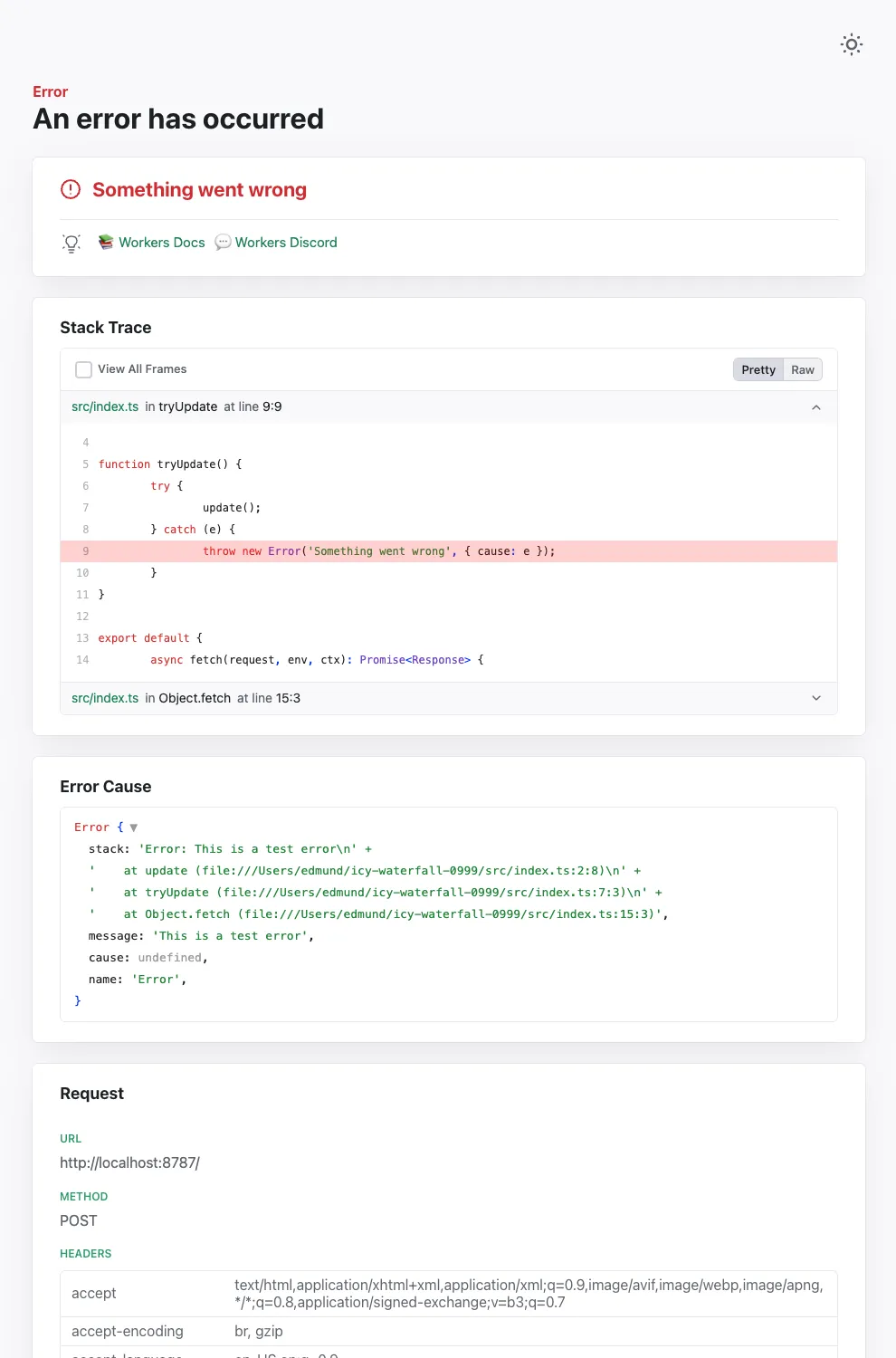
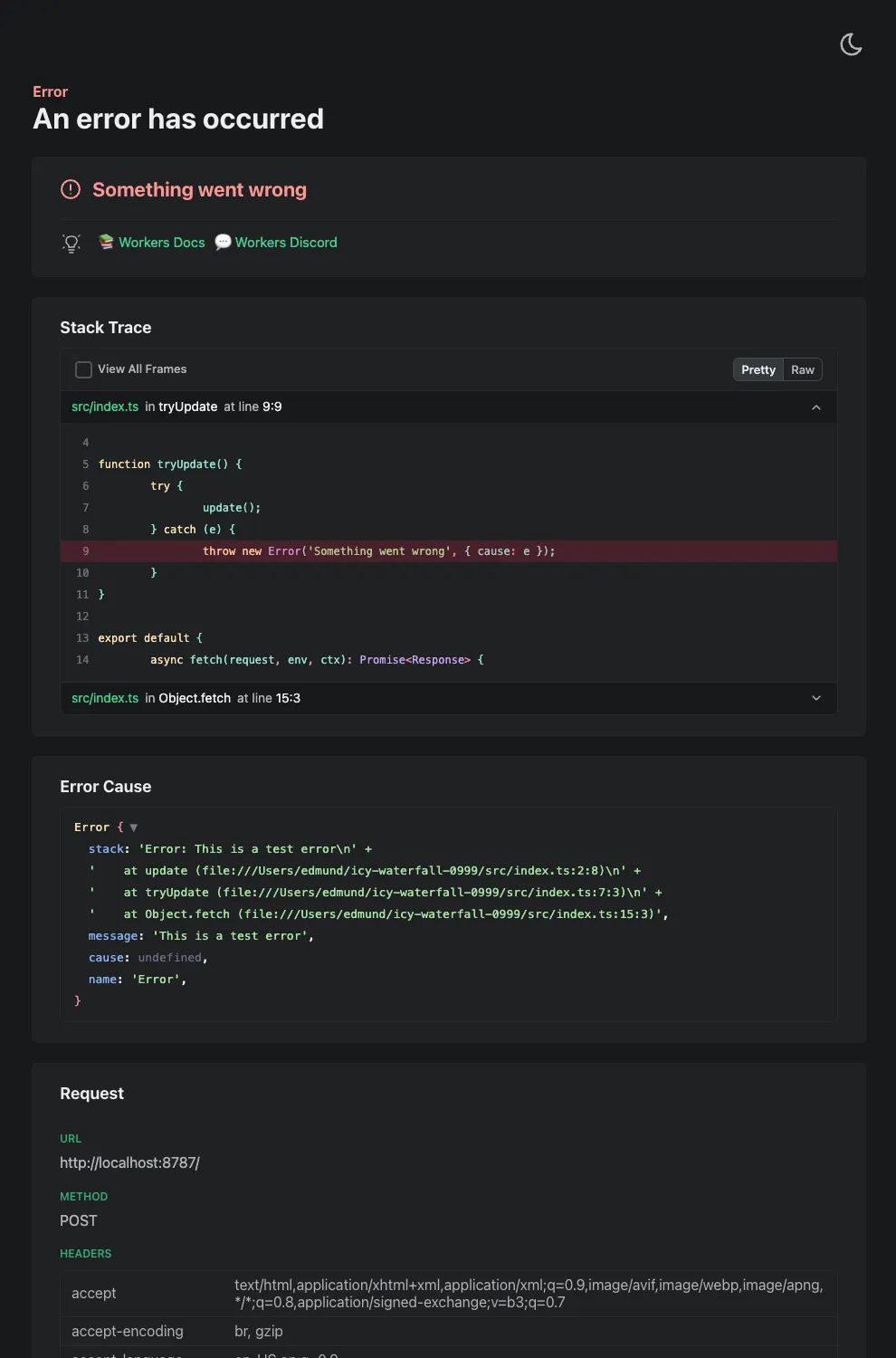
Try it out now with
npx wrangler@latest devin your Workers project.
This week's update
This week, a series of critical vulnerabilities were discovered impacting core enterprise and open-source infrastructure. These flaws present a range of risks, providing attackers with distinct pathways for remote code execution, methods to breach internal network boundaries, and opportunities for critical data exposure and operational disruption.
Key Findings
-
SonicWall SMA (CVE-2025-32819, CVE-2025-32820, CVE-2025-32821): A remote authenticated attacker with SSLVPN user privileges can bypass path traversal protections. These vulnerabilities enable a attacker to bypass security checks to read, modify, or delete arbitrary files. An attacker with administrative privileges can escalate this further, using a command injection flaw to upload malicious files, which could ultimately force the appliance to reboot to its factory default settings.
-
Ms-Swift Project (CVE-2025-50460): An unsafe deserialization vulnerability exists in the Ms-Swift project's handling of YAML configuration files. If an attacker can control the content of a configuration file passed to the application, they can embed a malicious payload that will execute arbitrary code and it can be executed during deserialization.
-
Apache Druid (CVE-2023-25194): This vulnerability in Apache Druid allows an attacker to cause the server to connect to a malicious LDAP server. By sending a specially crafted LDAP response, the attacker can trigger an unrestricted deserialization of untrusted data. If specific "gadgets" (classes that can be abused) are present in the server's classpath, this can be escalated to achieve Remote Code Execution (RCE).
-
Tenda AC8v4 (CVE-2025-51087, CVE-2025-51088): Vulnerabilities allow an authenticated attacker to trigger a stack-based buffer overflow. By sending malformed arguments in a request to specific endpoints, an attacker can crash the device or potentially achieve arbitrary code execution.
-
Open WebUI (CVE-2024-7959): This vulnerability allows a user to change the OpenAI URL endpoint to an arbitrary internal network address without proper validation. This flaw can be exploited to access internal services or cloud metadata endpoints, potentially leading to remote command execution if the attacker can retrieve instance secrets or access sensitive internal APIs.
-
BentoML (CVE-2025-54381): The vulnerability exists in the serialization/deserialization handlers for multipart form data and JSON requests, which automatically download files from user-provided URLs without proper validation of internal network addresses. This allows attackers to fetch from unintended internal services, including cloud metadata and localhost.
-
Adobe Experience Manager Forms (CVE-2025-54254): An Improper Restriction of XML External Entity Reference ('XXE') vulnerability that could lead to arbitrary file system read in Adobe AEM (≤6.5.23).
Impact
These vulnerabilities affect core infrastructure, from network security appliances like SonicWall to data platforms such as Apache Druid and ML frameworks like BentoML. The code execution and deserialization flaws are particularly severe, offering deep system access that allows attackers to steal data, disrupt services, and establish a foothold for broader intrusions. Simultaneously, SSRF and XXE vulnerabilities undermine network boundaries, exposing sensitive internal data and creating pathways for lateral movement. Beyond data-centric threats, flaws in edge devices like the Tenda router introduce the tangible risk of operational disruption, highlighting a multi-faceted threat to the security and stability of key enterprise systems.
Ruleset Rule ID Legacy Rule ID Description Previous Action New Action Comments Cloudflare Managed Ruleset 100574 SonicWall SMA - Remote Code Execution - CVE:CVE-2025-32819, CVE:CVE-2025-32820, CVE:CVE-2025-32821 Log Disabled This is a New Detection Cloudflare Managed Ruleset 100576 Ms-Swift Project - Remote Code Execution - CVE:CVE-2025-50460 Log Block This is a New Detection Cloudflare Managed Ruleset 100585 Apache Druid - Remote Code Execution - CVE:CVE-2023-25194 Log Block This is a New Detection Cloudflare Managed Ruleset 100834 Tenda AC8v4 - Auth Bypass - CVE:CVE-2025-51087, CVE:CVE-2025-51088 Log Block This is a New Detection Cloudflare Managed Ruleset 100835 Open WebUI - SSRF - CVE:CVE-2024-7959 Log Block This is a New Detection Cloudflare Managed Ruleset 100837 SQLi - OOB Log Block This is a New Detection Cloudflare Managed Ruleset 100841 BentoML - SSRF - CVE:CVE-2025-54381 Log Disabled This is a New Detection Cloudflare Managed Ruleset 100841A BentoML - SSRF - CVE:CVE-2025-54381 - 2 Log Disabled This is a New Detection Cloudflare Managed Ruleset 100841B BentoML - SSRF - CVE:CVE-2025-54381 - 3 Log Disabled This is a New Detection Cloudflare Managed Ruleset 100845 Adobe Experience Manager Forms - XSS - CVE:CVE-2025-54254 Log Block This is a New Detection Cloudflare Managed Ruleset 100845A Adobe Experience Manager Forms - XSS - CVE:CVE-2025-54254 - 2 Log Block This is a New Detection -