

SSH with Cloudflare Access for Infrastructure now supports SFTP. It is compatible with SFTP clients, such as Cyberduck.
You can now create more granular, network-aware Custom Rules in Cloudflare Load Balancing using the Autonomous System Number (ASN) of an incoming request.
This allows you to steer traffic with greater precision based on the network source of a request. For example, you can route traffic from specific Internet Service Providers (ISPs) or enterprise customers to dedicated infrastructure, optimize performance, or enforce compliance by directing certain networks to preferred data centers.
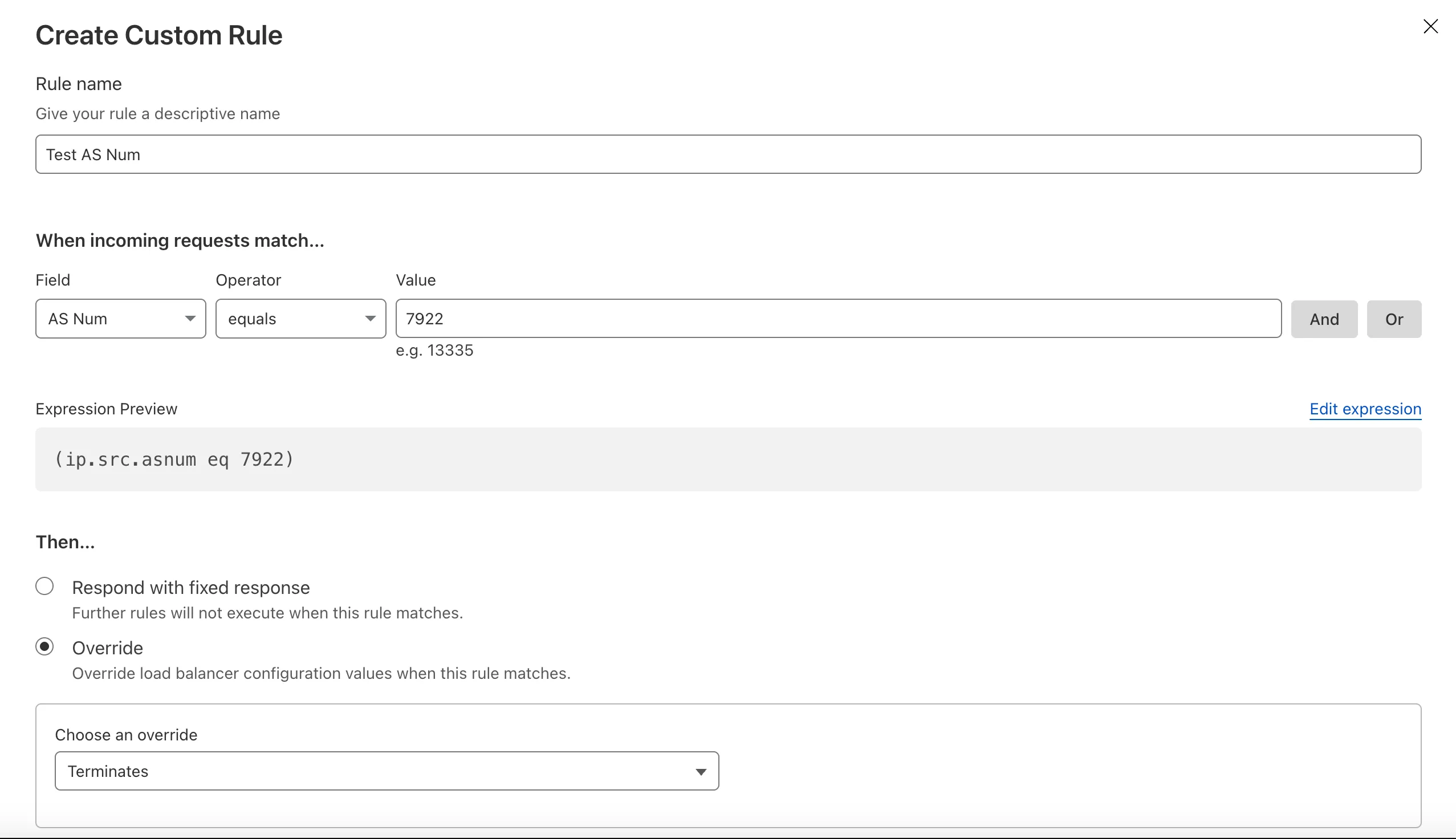
To get started, create a Custom Rule ↗ in your Load Balancer and select AS Num from the Field dropdown.
Customers can now rely on Log Explorer to meet their log retention compliance requirements.
Contract customers can choose to store their logs in Log Explorer for up to two years, at an additional cost of $0.10 per GB per month. Customers interested in this feature can contact their account team to have it added to their contract.
Brand Protection detects domains that may be impersonating your brand — from common misspellings (
cloudfalre.com) to malicious concatenations (cloudflare-okta.com). Saved search queries run continuously and alert you when suspicious domains appear.You can now create and save multiple queries in a single step, streamlining setup and management. Available now via the Brand Protection bulk query creation API.
Earlier this year, we announced the launch of the new Terraform v5 Provider. We are aware of the high number of issues ↗ reported by the Cloudflare Community related to the v5 release. We have committed to releasing improvements on a two week cadence to ensure stability and reliability.
One key change we adopted in recent weeks is a pivot to more comprehensive, test-driven development. We are still evaluating individual issues, but are also investing in much deeper testing to drive our stabilization efforts. We will subsequently be investing in comprehensive migration scripts. As a result, you will see several of the highest traffic APIs have been stabilized in the most recent release, and are supported by comprehensive acceptance tests.
Thank you for continuing to raise issues. We triage them weekly and they help make our products stronger.
- Resources stabilized:
cloudflare_argo_smart_routingcloudflare_bot_managementcloudflare_listcloudflare_list_itemcloudflare_load_balancercloudflare_load_balancer_monitorcloudflare_load_balancer_poolcloudflare_spectrum_applicationcloudflare_managed_transformscloudflare_url_normalization_settingscloudflare_snippetcloudflare_snippet_rulescloudflare_zero_trust_access_applicationcloudflare_zero_trust_access_groupcloudflare_zero_trust_access_identity_providercloudflare_zero_trust_access_mtls_certificatecloudflare_zero_trust_access_mtls_hostname_settingscloudflare_zero_trust_access_policycloudflare_zone
- Multipart handling restored for
cloudflare_snippet cloudflare_bot_managementdiff issues resolves when runningterraform planandterraform apply- Other bug fixes
For a more detailed look at all of the changes, refer to the changelog ↗ in GitHub.
- #5017: 'Uncaught Error: No such module' using cloudflare_snippets ↗
- #5701: cloudflare_workers_script migrations for Durable Objects not recorded in tfstate; cannot be upgraded between versions ↗
- #5640: cloudflare_argo_smart_routing importing doesn't read the actual value ↗
If you have an unaddressed issue with the provider, we encourage you to check the open issues ↗ and open a new one if one does not already exist for what you are experiencing.
We suggest holding off on migration to v5 while we work on stablization. This help will you avoid any blocking issues while the Terraform resources are actively being stablized.
If you'd like more information on migrating to v5, please make use of the migration guide ↗. We have provided automated migration scripts using Grit which simplify the transition. These migration scripts do not support implementations which use Terraform modules, so customers making use of modules need to migrate manually. Please make use of
terraform planto test your changes before applying, and let us know if you encounter any additional issues by reporting to our GitHub repository ↗.- Resources stabilized:
Implementations of the
node:fsmodule ↗ and the Web File System API ↗ are now available in Workers.The
node:fsmodule provides access to a virtual file system in Workers. You can use it to read and write files, create directories, and perform other file system operations.The virtual file system is ephemeral with each individual request havig its own isolated temporary file space. Files written to the file system will not persist across requests and will not be shared across requests or across different Workers.
Workers running with the
nodejs_compatcompatibility flag will have access to thenode:fsmodule by default when the compatibility date is set to2025-09-01or later. Support for the API can also be enabled using theenable_nodejs_fs_modulecompatibility flag together with thenodejs_compatflag. Thenode:fsmodule can be disabled using thedisable_nodejs_fs_modulecompatibility flag.JavaScript import fs from "node:fs";const config = JSON.parse(fs.readFileSync("/bundle/config.json", "utf-8"));export default {async fetch(request) {return new Response(`Config value: ${config.value}`);},};There are a number of initial limitations to the
node:fsimplementation:- The glob APIs (e.g.
fs.globSync(...)) are not implemented. - The file watching APIs (e.g.
fs.watch(...)) are not implemented. - The file timestamps (modified time, access time, etc) are only partially supported. For now, these will always return the Unix epoch.
Refer to the Node.js documentation ↗ for more information on the
node:fsmodule and its APIs.The Web File System API provides access to the same virtual file system as the
node:fsmodule, but with a different API surface. The Web File System API is only available in Workers running with theenable_web_file_systemcompatibility flag. Thenodejs_compatcompatibility flag is not required to use the Web File System API.JavaScript const root = navigator.storage.getDirectory();export default {async fetch(request) {const tmp = await root.getDirectoryHandle("/tmp");const file = await tmp.getFileHandle("data.txt", { create: true });const writable = await file.createWritable();const writer = writable.getWriter();await writer.write("Hello, World!");await writer.close();return new Response("File written successfully!");},};As there are still some parts of the Web File System API tht are not fully standardized, there may be some differences between the Workers implementation and the implementations in browsers.
- The glob APIs (e.g.
Static Assets: Fixed a bug in how redirect rules ↗ defined in your Worker's
_redirectsfile are processed.If you're serving Static Assets with a
_redirectsfile containing a rule like/ja/* /:splat, paths with double slashes were previously misinterpreted as external URLs. For example, visiting/ja//example.comwould incorrectly redirect tohttps://example.cominstead of/example.comon your domain. This has been fixed and double slashes now correctly resolve as local paths. Note: Cloudflare Pages was not affected by this issue.
We've updated preview URLs for Cloudflare Workers to support long branch names.
Previously, branch and Worker names exceeding the 63-character DNS limit would cause alias generation to fail, leaving pull requests without aliased preview URLs. This particularly impacted teams relying on descriptive branch naming.
Now, Cloudflare automatically truncates long branch names and appends a unique hash, ensuring every pull request gets a working preview link.
- 63 characters or less:
<branch-name>-<worker-name>→ Uses actual branch name as is - 64 characters or more:
<truncated-branch-name>--<hash>-<worker-name>→ Uses truncated name with 4-character hash - Hash generation: The hash is derived from the full branch name to ensure uniqueness
- Stable URLs: The same branch always generates the same hash across all commits
- Wrangler 4.30.0 or later: This feature requires updating to wrangler@4.30.0+
- No configuration needed: Works automatically with existing preview URL setups
- 63 characters or less:
Cloudflare Access logs now support the Customer Metadata Boundary (CMB). If you have configured the CMB for your account, all Access logging will respect that configuration.
We are changing how Python Workers are structured by default. Previously, handlers were defined at the top-level of a module as
on_fetch,on_scheduled, etc. methods, but now they live in an entrypoint class.Here's an example of how to now define a Worker with a fetch handler:
Python from workers import Response, WorkerEntrypointclass Default(WorkerEntrypoint):async def fetch(self, request):return Response("Hello World!")To keep using the old-style handlers, you can specify the
disable_python_no_global_handlerscompatibility flag in your wrangler file:{"compatibility_flags": ["disable_python_no_global_handlers"]}compatibility_flags = [ "disable_python_no_global_handlers" ]Consult the Python Workers documentation for more details.
The recent Cloudflare Terraform Provider ↗ and SDK releases (such as cloudflare-typescript ↗) bring significant improvements to the Workers developer experience. These updates focus on reliability, performance, and adding Python Workers support.
Resolved several issues with the
cloudflare_workers_scriptresource that resulted in unwarranted plan diffs, including:- Using Durable Objects migrations
- Using some bindings such as
secret_text - Using smart placement
A resource should never show a plan diff if there isn't an actual change. This fix reduces unnecessary noise in your Terraform plan and is available in Cloudflare Terraform Provider 5.8.0.
You can now specify
content_fileandcontent_sha256instead ofcontent. This prevents the Workers script content from being stored in the state file which greatly reduces plan diff size and noise. If your workflow synced plans remotely, this should now happen much faster since there is less data to sync. This is available in Cloudflare Terraform Provider 5.7.0.resource "cloudflare_workers_script" "my_worker" {account_id = "123456789"script_name = "my_worker"main_module = "worker.mjs"content_file = "worker.mjs"content_sha256 = filesha256("worker.mjs")}Fixed the
cloudflare_workers_scriptresource to properly support headers and redirects for Assets:resource "cloudflare_workers_script" "my_worker" {account_id = "123456789"script_name = "my_worker"main_module = "worker.mjs"content_file = "worker.mjs"content_sha256 = filesha256("worker.mjs")assets = {config = {headers = file("_headers")redirects = file("_redirects")}# Completion jwt from:# https://developers.cloudflare.com/api/resources/workers/subresources/assets/subresources/upload/jwt = "jwt"}}Available in Cloudflare Terraform Provider 5.8.0.
Added support for uploading Python Workers (beta) in Terraform. You can now deploy Python Workers with:
resource "cloudflare_workers_script" "my_worker" {account_id = "123456789"script_name = "my_worker"content_file = "worker.py"content_sha256 = filesha256("worker.py")content_type = "text/x-python"}Available in Cloudflare Terraform Provider 5.8.0.
Fixed an issue where Workers script versions in the SDK did not allow uploading files. This now works, and also has an improved files upload interface:
JavaScript const scriptContent = `export default {async fetch(request, env, ctx) {return new Response('Hello World!', { status: 200 });}};`;client.workers.scripts.versions.create('my-worker', {account_id: '123456789',metadata: {main_module: 'my-worker.mjs',},files: [await toFile(Buffer.from(scriptContent),'my-worker.mjs',{type: "application/javascript+module",})]});Will be available in cloudflare-typescript 4.6.0. A similar change will be available in cloudflare-python 4.4.0.
Previously when creating a KV value like this:
JavaScript await cf.kv.namespaces.values.update("my-kv-namespace", "key1", {account_id: "123456789",metadata: "my metadata",value: JSON.stringify({hello: "world"})});...and recalling it in your Worker like this:
TypeScript const value = await c.env.KV.get<{hello: string}>("key1", "json");You'd get back this:
{metadata:'my metadata', value:"{'hello':'world'}"}instead of the correct value of{hello: 'world'}This is fixed in cloudflare-typescript 4.5.0 and will be fixed in cloudflare-python 4.4.0.
Cloudflare Logpush now supports IBM Cloud Logs as a native destination.
Logs from Cloudflare can be sent to IBM Cloud Logs ↗ via Logpush. The setup can be done through the Logpush UI in the Cloudflare Dashboard or by using the Logpush API. The integration requires IBM Cloud Logs HTTP Source Address and an IBM API Key. The feature also allows for filtering events and selecting specific log fields.
For more information, refer to Destination Configuration documentation.
A minimal implementation of the MessageChannel API ↗ is now available in Workers. This means that you can use
MessageChannelto send messages between different parts of your Worker, but not across different Workers.The
MessageChannelandMessagePortAPIs will be available by default at the global scope with any worker using a compatibility date of2025-08-15or later. It is also available using theexpose_global_message_channelcompatibility flag, or can be explicitly disabled using theno_expose_global_message_channelcompatibility flag.JavaScript const { port1, port2 } = new MessageChannel();port2.onmessage = (event) => {console.log('Received message:', event.data);};port2.postMessage('Hello from port2!');Any value that can be used with the
structuredClone(...)API can be sent over the port.There are a number of key limitations to the
MessageChannelAPI in Workers:- Transfer lists are currently not supported. This means that you will not be able to transfer
ownership of objects like
ArrayBufferorMessagePortbetween ports. - The
MessagePortis not yet serializable. This means that you cannot send aMessagePortobject through thepostMessagemethod or via JSRPC calls. - The
'messageerror'event is only partially supported. If the'onmessage'handler throws an error, the'messageerror'event will be triggered, however, it will not be triggered when there are errors serializing or deserializing the message data. Instead, the error will be thrown when thepostMessagemethod is called on the sending port. - The
'close'event will be emitted on both ports when one of the ports is closed, however it will not be emitted when the Worker is terminated or when one of the ports is garbage collected.
- Transfer lists are currently not supported. This means that you will not be able to transfer
ownership of objects like
This week's update focuses on a wide range of enterprise software, from network infrastructure and security platforms to content management systems and development frameworks. Flaws include unsafe deserialization, OS command injection, SSRF, authentication bypass, and arbitrary file upload — many of which allow unauthenticated remote code execution. Notable risks include Cisco Identity Services Engine and Ivanti EPMM, where successful exploitation could grant attackers full administrative control of core network infrastructure and popular web services such as WordPress, SharePoint, and Ingress-Nginx, where security bypasses and arbitrary file uploads could lead to complete site or server compromise.
Key Findings
-
Cisco Identity Services Engine (CVE-2025-20281): Insufficient input validation in a specific API of Cisco Identity Services Engine (ISE) and ISE-PIC allows an unauthenticated, remote attacker to execute arbitrary code with root privileges on an affected device.
-
Wazuh Server (CVE-2025-24016): An unsafe deserialization vulnerability in Wazuh Server (versions 4.4.0 to 4.9.0) allows for remote code execution and privilege escalation. By injecting unsanitized data, an attacker can trigger an exception to execute arbitrary code on the server.
-
CrushFTP (CVE-2025-54309): A flaw in AS2 validation within CrushFTP allows remote attackers to gain administrative access via HTTPS on systems not using the DMZ proxy feature. This flaw can lead to unauthorized file access and potential system compromise.
-
Kentico Xperience CMS (CVE-2025-2747, CVE-2025-2748): Vulnerabilities in Kentico Xperience CMS could enable cross-site scripting (XSS), allowing attackers to inject malicious scripts into web pages. Additionally, a flaw could allow unauthenticated attackers to bypass the Staging Sync Server's authentication, potentially leading to administrative control over the CMS.
-
Node.js (CVE-2025-27210): An incomplete fix for a previous vulnerability (CVE-2025-23084) in Node.js affects the
path.join()API method on Windows systems. The vulnerability can be triggered using reserved Windows device names such asCON,PRN, orAUX. -
WordPress:Plugin:Simple File List (CVE-2025-34085, CVE-2020-36847): This vulnerability in the Simple File List plugin for WordPress allows an unauthenticated remote attacker to upload arbitrary files to a vulnerable site. This can be exploited to achieve remote code execution on the server.
(Note: CVE-2025-34085 has been rejected as a duplicate.) -
GeoServer (CVE-2024-29198): A Server-Side Request Forgery (SSRF) vulnerability exists in GeoServer's Demo request endpoint, which can be exploited where the Proxy Base URL has not been configured.
-
Ivanti EPMM (CVE-2025-6771): An OS command injection vulnerability in Ivanti Endpoint Manager Mobile (EPMM) before versions 12.5.0.2, 12.4.0.3, and 12.3.0.3 allows a remote, authenticated attacker with high privileges to execute arbitrary code.
-
Microsoft SharePoint (CVE-2024-38018): This is a remote code execution vulnerability affecting Microsoft SharePoint Server.
-
Manager-IO (CVE-2025-54122): A critical unauthenticated full read Server-Side Request Forgery (SSRF) vulnerability is present in the proxy handler of both Manager Desktop and Server editions up to version 25.7.18.2519. This allows an unauthenticated attacker to bypass network isolation and access internal services.
-
Ingress-Nginx (CVE-2025-1974): A vulnerability in the Ingress-Nginx controller for Kubernetes allows an attacker to bypass access control rules. An unauthenticated attacker with access to the pod network can achieve arbitrary code execution in the context of the ingress-nginx controller.
-
PaperCut NG/MF (CVE-2023-2533): A Cross-Site Request Forgery (CSRF) vulnerability has been identified in PaperCut NG/MF. Under specific conditions, an attacker could exploit this to alter security settings or execute arbitrary code if they can deceive an administrator with an active login session into clicking a malicious link.
-
SonicWall SMA (CVE-2025-40598): This vulnerability could allow an unauthenticated attacker to bypass security controls. This allows a remote, unauthenticated attacker to potentially execute arbitrary JavaScript code.
-
WordPress (CVE-2025-5394): The "Alone – Charity Multipurpose Non-profit WordPress Theme" for WordPress is vulnerable to arbitrary file uploads. A missing capability check allows unauthenticated attackers to upload ZIP files containing webshells disguised as plugins, leading to remote code execution.
Impact
These vulnerabilities span a broad range of enterprise technologies, including network access control systems, monitoring platforms, web servers, CMS platforms, cloud services, and collaboration tools. Exploitation techniques range from remote code execution and command injection to authentication bypass, SQL injection, path traversal, and configuration weaknesses.
A critical flaw in perimeter devices like Ivanti EPMM or SonicWall SMA could allow an unauthenticated attacker to gain remote code execution, completely breaching the primary network defense. A separate vulnerability within Cisco's Identity Services Engine could then be exploited to bypass network segmentation, granting an attacker widespread internal access. Insecure deserialization issues in platforms like Wazuh Server and CrushFTP could then be used to run malicious payloads or steal sensitive files from administrative consoles. Weaknesses in web delivery controllers like Ingress-Nginx or popular content management systems such as WordPress, SharePoint, and Kentico Xperience create vectors to bypass security controls, exfiltrate confidential data, or fully compromise servers.
Ruleset Rule ID Legacy Rule ID Description Previous Action New Action Comments Cloudflare Managed Ruleset 100538 GeoServer - SSRF - CVE:CVE-2024-29198 Log Block This is a New Detection Cloudflare Managed Ruleset 100548 Ivanti EPMM - Remote Code Execution - CVE:CVE-2025-6771 Log Block This is a New Detection Cloudflare Managed Ruleset 100550 Microsoft SharePoint - Remote Code Execution - CVE:CVE-2024-38018 Log Block This is a New Detection Cloudflare Managed Ruleset 100562 Manager-IO - SSRF - CVE:CVE-2025-54122 Log Block This is a New Detection Cloudflare Managed Ruleset 100565 Cisco Identity Services Engine - Remote Code Execution - CVE:CVE-2025-20281
Log Block This is a New Detection Cloudflare Managed Ruleset 100567 Ingress-Nginx - Remote Code Execution - CVE:CVE-2025-1974 Log Disabled This is a New Detection Cloudflare Managed Ruleset 100569 PaperCut NG/MF - Remote Code Execution - CVE:CVE-2023-2533 Log Block This is a New Detection Cloudflare Managed Ruleset 100571 SonicWall SMA - XSS - CVE:CVE-2025-40598 Log Block This is a New Detection Cloudflare Managed Ruleset 100573 WordPress - Dangerous File Upload - CVE:CVE-2025-5394 Log Block This is a New Detection Cloudflare Managed Ruleset 100806 Wazuh Server - Remote Code Execution - CVE:CVE-2025-24016 Log Block This is a New Detection Cloudflare Managed Ruleset 100824 CrushFTP - Remote Code Execution - CVE:CVE-2025-54309 Log Block This is a New Detection Cloudflare Managed Ruleset 100824A CrushFTP - Remote Code Execution - CVE:CVE-2025-54309 - 2 Log Block This is a New Detection Cloudflare Managed Ruleset 100825 AMI MegaRAC - Auth Bypass - CVE:CVE-2024-54085 Log Block This is a New Detection Cloudflare Managed Ruleset 100826 Kentico Xperience CMS - Auth Bypass - CVE:CVE-2025-2747 Log Block This is a New Detection Cloudflare Managed Ruleset 100827 Kentico Xperience CMS - XSS - CVE:CVE-2025-2748 Log Block This is a New Detection Cloudflare Managed Ruleset 100828 Node.js - Directory Traversal - CVE:CVE-2025-27210 Log Block This is a New Detection Cloudflare Managed Ruleset 100829 WordPress:Plugin:Simple File List - Remote Code Execution - CVE:CVE-2025-34085
Log Block This is a New Detection Cloudflare Managed Ruleset 100829A WordPress:Plugin:Simple File List - Remote Code Execution - CVE:CVE-2025-34085 - 2
Log Disabled This is a New Detection -
Now, you can use
.envfiles to provide secrets and override environment variables on theenvobject during local development with Wrangler and the Cloudflare Vite plugin.Previously in local development, if you wanted to provide secrets or environment variables during local development, you had to use
.dev.varsfiles. This is still supported, but you can now also use.envfiles, which are more familiar to many developers.You can create a
.envfile in your project root to define environment variables that will be used when runningwrangler devorvite dev. The.envfile should be formatted like adotenvfile, such asKEY="VALUE":.env TITLE="My Worker"API_TOKEN="dev-token"When you run
wrangler devorvite dev, the environment variables defined in the.envfile will be available in your Worker code via theenvobject:JavaScript export default {async fetch(request, env) {const title = env.TITLE; // "My Worker"const apiToken = env.API_TOKEN; // "dev-token"const response = await fetch(`https://api.example.com/data?token=${apiToken}`,);return new Response(`Title: ${title} - ` + (await response.text()));},};If your Worker defines multiple environments, you can set different variables for each environment (ex: production or staging) by creating files named
.env.<environment-name>.When you use
wrangler <command> --env <environment-name>orCLOUDFLARE_ENV=<environment-name> vite dev, the corresponding environment-specific file will also be loaded and merged with the.envfile.For example, if you want to set different environment variables for the
stagingenvironment, you can create a file named.env.staging:.env.staging API_TOKEN="staging-token"When you run
wrangler dev --env stagingorCLOUDFLARE_ENV=staging vite dev, the environment variables from.env.stagingwill be merged onto those from.env.JavaScript export default {async fetch(request, env) {const title = env.TITLE; // "My Worker" (from `.env`)const apiToken = env.API_TOKEN; // "staging-token" (from `.env.staging`, overriding the value from `.env`)const response = await fetch(`https://api.example.com/data?token=${apiToken}`,);return new Response(`Title: ${title} - ` + (await response.text()));},};For more information on how to use
.envfiles with Wrangler and the Cloudflare Vite plugin, see the following documentation:
New information about broadcast metrics and events is now available in Cloudflare Stream in the Live Input details of the Dashboard.
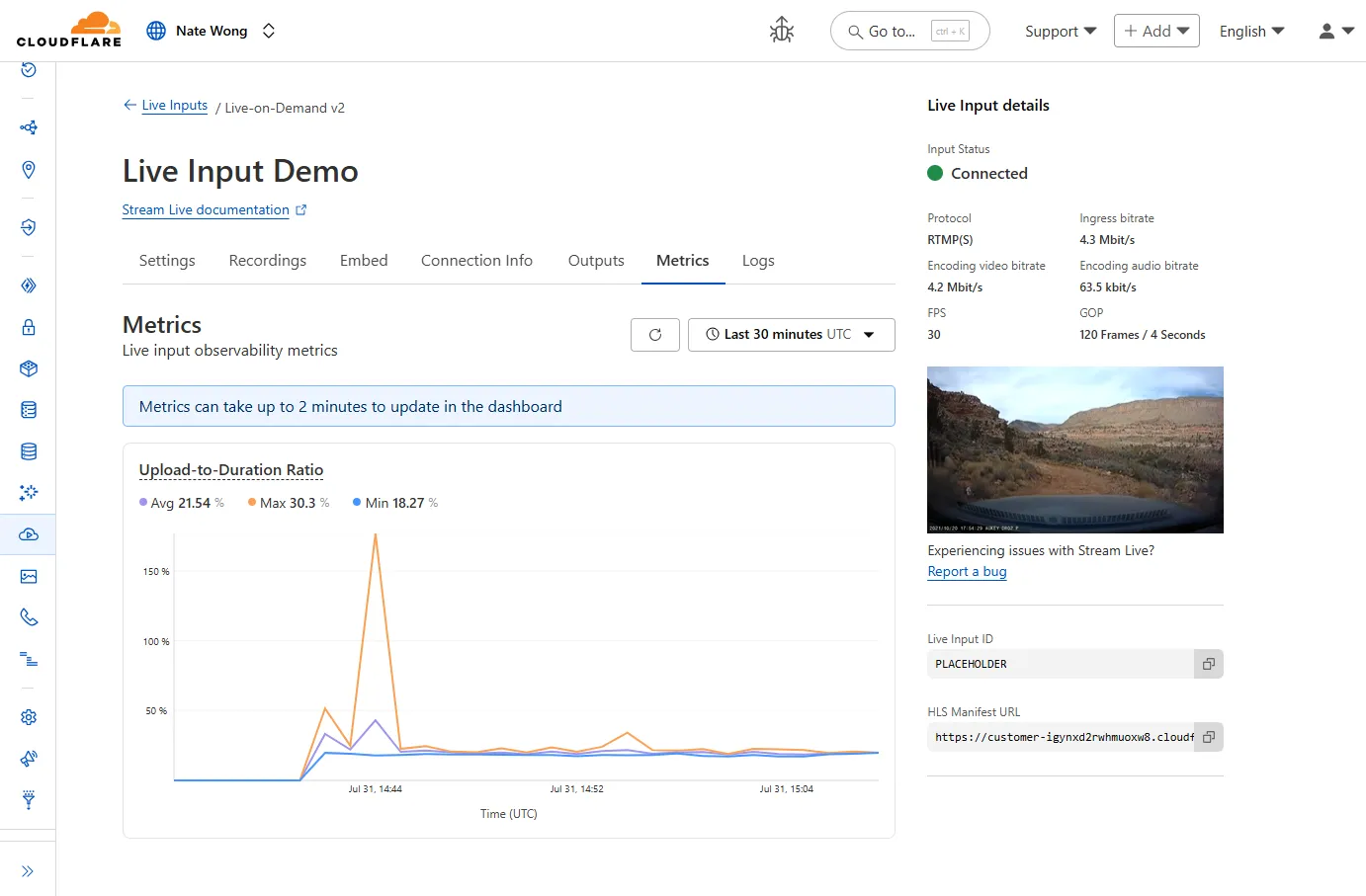
You can now easily understand broadcast-side health and performance with new observability, which can help when troubleshooting common issues, particularly for new customers who are just getting started, and platform customers who may have limited visibility into how their end-users configure their encoders.
To get started, start a live stream (just getting started?), then visit the Live Input details page in Dash.
See our new live Troubleshooting guide to learn what these metrics mean and how to use them to address common broadcast issues.
You can now import
waitUntilfromcloudflare:workersto extend your Worker's execution beyond the request lifecycle from anywhere in your code.Previously,
waitUntilcould only be accessed through the execution context (ctx) parameter passed to your Worker's handler functions. This meant that if you needed to schedule background tasks from deeply nested functions or utility modules, you had to pass thectxobject through multiple function calls to accesswaitUntil.Now, you can import
waitUntildirectly and use it anywhere in your Worker without needing to passctxas a parameter:JavaScript import { waitUntil } from "cloudflare:workers";export function trackAnalytics(eventData) {const analyticsPromise = fetch("https://analytics.example.com/track", {method: "POST",body: JSON.stringify(eventData),});// Extend execution to ensure analytics tracking completeswaitUntil(analyticsPromise);}This is particularly useful when you want to:
- Schedule background tasks from utility functions or modules
- Extend execution for analytics, logging, or cleanup operations
- Avoid passing the execution context through multiple layers of function calls
JavaScript import { waitUntil } from "cloudflare:workers";export default {async fetch(request, env, ctx) {// Background task that should complete even after response is sentcleanupTempData(env.KV_NAMESPACE);return new Response("Hello, World!");}};function cleanupTempData(kvNamespace) {// This function can now use waitUntil without needing ctxconst deletePromise = kvNamespace.delete("temp-key");waitUntil(deletePromise);}For more information, see the
waitUntildocumentation.
When you deploy MX or Inline, not only can you apply email link isolation to suspicious links in all emails (including benign), you can now also apply email link isolation to all links of a specified disposition. This provides more flexibility in controlling user actions within emails.
For example, you may want to deliver suspicious messages but isolate the links found within them so that users who choose to interact with the links will not accidentally expose your organization to threats. This means your end users are more secure than ever before.
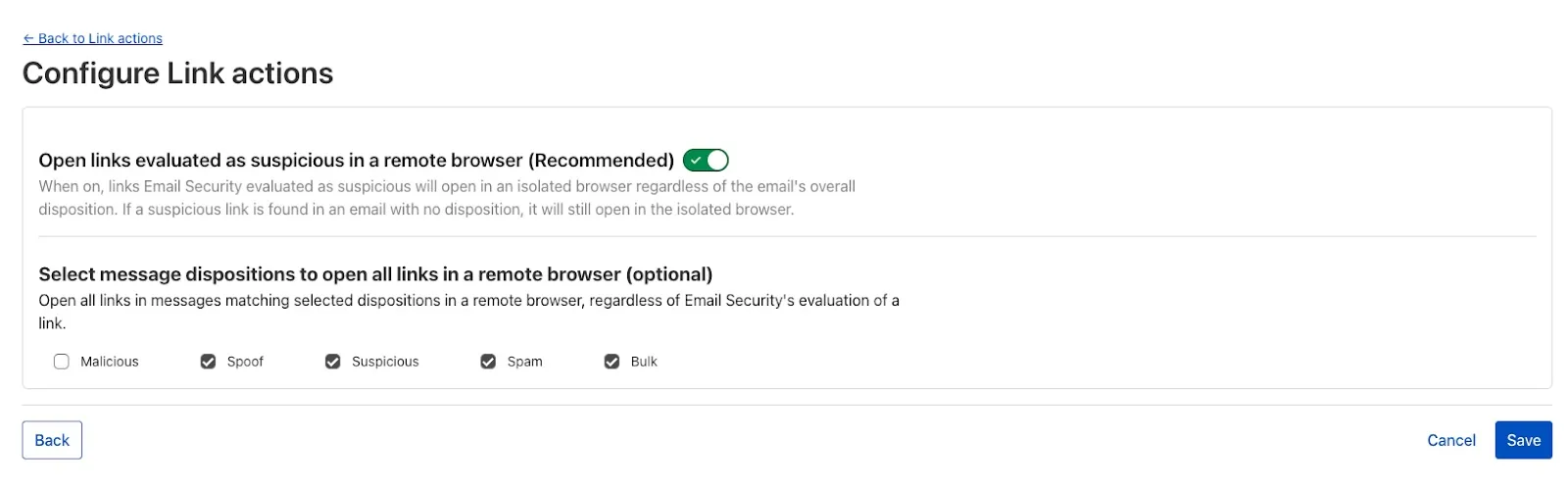
To isolate all links within a message based on the disposition, select Settings > Link Actions > View and select Configure. As with other other links you isolate, an interstitial will be provided to warn users that this site has been isolated and the link will be recrawled live to evaluate if there are any changes in our threat intel. Learn more about this feature on Configure link actions ↗.
This feature is available across these Email security packages:
- Enterprise
- Enterprise + PhishGuard
This week’s highlight focuses on two critical vulnerabilities affecting key infrastructure and enterprise content management platforms. Both flaws present significant remote code execution risks that can be exploited with minimal or no user interaction.
Key Findings
-
Squid (≤6.3) — CVE-2025-54574: A heap buffer overflow occurs when processing Uniform Resource Names (URNs). This vulnerability may allow remote attackers to execute arbitrary code on the server. The issue has been resolved in version 6.4.
-
Adobe AEM (≤6.5.23) — CVE-2025-54253: Due to a misconfiguration, attackers can achieve remote code execution without requiring any user interaction, posing a severe threat to affected deployments.
Impact
Both vulnerabilities expose critical attack vectors that can lead to full server compromise. The Squid heap buffer overflow allows remote code execution by crafting malicious URNs, which can lead to server takeover or denial of service. Given Squid’s widespread use as a caching proxy, this flaw could be exploited to disrupt network traffic or gain footholds inside secure environments.
Adobe AEM’s remote code execution vulnerability enables attackers to run arbitrary code on the content management server without any user involvement. This puts sensitive content, application integrity, and the underlying infrastructure at extreme risk. Exploitation could lead to data theft, defacement, or persistent backdoor installation.
These findings reinforce the urgency of updating to the patched versions — Squid 6.4 and Adobe AEM 6.5.24 or later — and reviewing configurations to prevent exploitation.
Ruleset Rule ID Legacy Rule ID Description Previous Action New Action Comments Cloudflare Managed Ruleset 100844 Adobe Experience Manager Forms - Remote Code Execution - CVE:CVE-2025-54253 N/A Block This is a New Detection Cloudflare Managed Ruleset 100840 Squid - Buffer Overflow - CVE:CVE-2025-54574 N/A Block This is a New Detection -
By setting the value of the
cacheproperty tono-cache, you can force Cloudflare's cache to revalidate its contents with the origin when making subrequests from Cloudflare Workers.index.js export default {async fetch(req, env, ctx) {const request = new Request("https://cloudflare.com", {cache: "no-cache",});const response = await fetch(request);return response;},};index.ts export default {async fetch(req, env, ctx): Promise<Response> {const request = new Request("https://cloudflare.com", { cache: 'no-cache'});const response = await fetch(request);return response;}} satisfies ExportedHandler<Environment>When
no-cacheis set, the Worker request will first look for a match in Cloudflare's cache, then:- If there is a match, a conditional request is sent to the origin, regardless of whether or not the match is fresh or stale. If the resource has not changed, the cached version is returned. If the resource has changed, it will be downloaded from the origin, updated in the cache, and returned.
- If there is no match, Workers will make a standard request to the origin and cache the response.
This increases compatibility with NPM packages and JavaScript frameworks that rely on setting the
cacheproperty, which is a cross-platform standard part of theRequestinterface. Previously, if you set thecacheproperty onRequestto'no-cache', the Workers runtime threw an exception.- Learn how the Cache works with Cloudflare Workers
- Enable Node.js compatibility for your Cloudflare Worker
- Explore Runtime APIs and Bindings available in Cloudflare Workers
Cloudflare Load Balancing Monitors support loading and applying settings for a specific zone to monitoring requests to origin endpoints. This feature has been migrated to new infrastructure to improve reliability, performance, and accuracy.
All zone monitors have been tested against the new infrastructure. There should be no change to health monitoring results of currently healthy and active pools. Newly created or re-enabled pools may need validation of their monitor zone settings before being introduced to service, especially regarding correct application of mTLS.
- More reliable application of zone settings to monitoring requests, including
- Authenticated Origin Pulls
- Aegis Egress IP Pools
- Argo Smart Routing
- HTTP/2 to Origin
- Improved support and bug fixes for retries, redirects, and proxied origin resolution
- Improved performance and reliability of monitoring requests withing the Cloudflare network
- Unrelated CDN or WAF configuration changes should have no risk of impact to pool health
- More reliable application of zone settings to monitoring requests, including
Radar now introduces Certificate Transparency (CT) insights, providing visibility into certificate issuance trends based on Certificate Transparency logs currently monitored by Cloudflare.
The following API endpoints are now available:
/ct/timeseries: Retrieves certificate issuance time series./ct/summary/{dimension}: Retrieves certificate distribution by dimension./ct/timeseries_groups/{dimension}: Retrieves time series of certificate distribution by dimension./ct/authorities: Lists certification authorities./ct/authorities/{ca_slug}: Retrieves details about a Certification Authority (CA). CA information is derived from the Common CA Database (CCADB) ↗./ct/logs: Lists CT logs./ct/logs/{log_slug}: Retrieves details about a CT log. CT log information is derived from the Google Chrome log list ↗.
For the
summaryandtimeseries_groupsendpoints, the following dimensions are available (and also usable as filters):ca: Certification Authority (certificate issuer)ca_owner: Certification Authority Ownerduration: Certificate validity duration (between NotBefore and NotAfter dates)entry_type: Entry type (certificate vs. pre-certificate)expiration_status: Expiration status (valid vs. expired)has_ips: Presence of IP addresses in certificate Subject Alternative Names (SANs) ↗has_wildcards: Presence of wildcard DNS names in certificate SANslog: CT log namelog_api: CT log API (RFC6962 ↗ vs. Static ↗)log_operator: CT log operatorpublic_key_algorithm: Public key algorithm of certificate's keysignature_algorithm: Signature algorithm used by CA to sign certificatetld: Top-level domain for DNS names found in certificates SANsvalidation_level: Validation level ↗
Check out the new Certificate Transparency insights in the new Radar page ↗.
The latest releases of @cloudflare/agents ↗ brings major improvements to MCP transport protocols support and agents connectivity. Key updates include:
MCP servers can now request user input during tool execution, enabling interactive workflows like confirmations, forms, and multi-step processes. This feature uses durable storage to preserve elicitation state even during agent hibernation, ensuring seamless user interactions across agent lifecycle events.
TypeScript // Request user confirmation via elicitationconst confirmation = await this.elicitInput({message: `Are you sure you want to increment the counter by ${amount}?`,requestedSchema: {type: "object",properties: {confirmed: {type: "boolean",title: "Confirm increment",description: "Check to confirm the increment",},},required: ["confirmed"],},});Check out our demo ↗ to see elicitation in action.
MCP now supports HTTP streamable transport which is recommended over SSE. This transport type offers:
- Better performance: More efficient data streaming and reduced overhead
- Improved reliability: Enhanced connection stability and error recover- Automatic fallback: If streamable transport is not available, it gracefully falls back to SSE
TypeScript export default MyMCP.serve("/mcp", {binding: "MyMCP",});The SDK automatically selects the best available transport method, gracefully falling back from streamable-http to SSE when needed.
Significant improvements to MCP server connections and transport reliability:
- Auto transport selection: Automatically determines the best transport method, falling back from streamable-http to SSE as needed
- Improved error handling: Better connection state management and error reporting for MCP servers
- Reliable prop updates: Centralized agent property updates ensure consistency across different contexts
You can use
.queue()to enqueue background work — ideal for tasks like processing user messages, sending notifications etc.TypeScript class MyAgent extends Agent {doSomethingExpensive(payload) {// a long running process that you want to run in the background}queueSomething() {await this.queue("doSomethingExpensive", somePayload); // this will NOT block further execution, and runs in the backgroundawait this.queue("doSomethingExpensive", someOtherPayload); // the callback will NOT run until the previous callback is complete// ... call as many times as you want}}Want to try it yourself? Just define a method like processMessage in your agent, and you’re ready to scale.
Want to build an AI agent that can receive and respond to emails automatically? With the new email adapter and onEmail lifecycle method, now you can.
TypeScript export class EmailAgent extends Agent {async onEmail(email: AgentEmail) {const raw = await email.getRaw();const parsed = await PostalMime.parse(raw);// create a response based on the email contents// and then send a replyawait this.replyToEmail(email, {fromName: "Email Agent",body: `Thanks for your email! You've sent us "${parsed.subject}". We'll process it shortly.`,});}}You route incoming mail like this:
TypeScript export default {async email(email, env) {await routeAgentEmail(email, env, {resolver: createAddressBasedEmailResolver("EmailAgent"),});},};You can find a full example here ↗.
Custom methods are now automatically wrapped with the agent's context, so calling
getCurrentAgent()should work regardless of where in an agent's lifecycle it's called. Previously this would not work on RPC calls, but now just works out of the box.TypeScript export class MyAgent extends Agent {async suggestReply(message) {// getCurrentAgent() now correctly works, even when called inside an RPC methodconst { agent } = getCurrentAgent()!;return generateText({prompt: `Suggest a reply to: "${message}" from "${agent.name}"`,tools: [replyWithEmoji],});}}Try it out and tell us what you build!
We’ve shipped a major release for the @cloudflare/sandbox ↗ SDK, turning it into a full-featured, container-based execution platform that runs securely on Cloudflare Workers.
This update adds live streaming of output, persistent Python and JavaScript code interpreters with rich output support (charts, tables, HTML, JSON), file system access, Git operations, full background process control, and the ability to expose running services via public URLs.
This makes it ideal for building AI agents, CI runners, cloud REPLs, data analysis pipelines, or full developer tools — all without managing infrastructure.
Create persistent code contexts with support for rich visual + structured outputs.
Creates a new code execution context with persistent state.
TypeScript // Create a Python contextconst pythonCtx = await sandbox.createCodeContext({ language: "python" });// Create a JavaScript contextconst jsCtx = await sandbox.createCodeContext({ language: "javascript" });Options:
- language: Programming language ('python' | 'javascript' | 'typescript')
- cwd: Working directory (default: /workspace)
- envVars: Environment variables for the context
Executes code with optional streaming callbacks.
TypeScript // Simple executionconst execution = await sandbox.runCode('print("Hello World")', {context: pythonCtx,});// With streaming callbacksawait sandbox.runCode(`for i in range(5):print(f"Step {i}")time.sleep(1)`,{context: pythonCtx,onStdout: (output) => console.log("Real-time:", output.text),onResult: (result) => console.log("Result:", result),},);Options:
- language: Programming language ('python' | 'javascript' | 'typescript')
- cwd: Working directory (default: /workspace)
- envVars: Environment variables for the context
Returns a streaming response for real-time processing.
TypeScript const stream = await sandbox.runCodeStream("import time; [print(i) for i in range(10)]",);// Process the stream as neededInterpreter outputs are auto-formatted and returned in multiple formats:
- text
- html (e.g., Pandas tables)
- png, svg (e.g., Matplotlib charts)
- json (structured data)
- chart (parsed visualizations)
TypeScript const result = await sandbox.runCode(`import seaborn as snsimport matplotlib.pyplot as pltdata = sns.load_dataset("flights")pivot = data.pivot("month", "year", "passengers")sns.heatmap(pivot, annot=True, fmt="d")plt.title("Flight Passengers")plt.show()pivot.to_dict()`,{ context: pythonCtx },);if (result.png) {console.log("Chart output:", result.png);}Start background processes and expose them with live URLs.
TypeScript await sandbox.startProcess("python -m http.server 8000");const preview = await sandbox.exposePort(8000);console.log("Live preview at:", preview.url);Start, inspect, and terminate long-running background processes.
TypeScript const process = await sandbox.startProcess("node server.js");console.log(`Started process ${process.id} with PID ${process.pid}`);// Monitor the processconst logStream = await sandbox.streamProcessLogs(process.id);for await (const log of parseSSEStream<LogEvent>(logStream)) {console.log(`Server: ${log.data}`);}- listProcesses() - List all running processes
- getProcess(id) - Get detailed process status
- killProcess(id, signal) - Terminate specific processes
- killAllProcesses() - Kill all processes
- streamProcessLogs(id, options) - Stream logs from running processes
- getProcessLogs(id) - Get accumulated process output
Clone Git repositories directly into the sandbox.
TypeScript await sandbox.gitCheckout("https://github.com/user/repo", {branch: "main",targetDir: "my-project",});Sandboxes are still experimental. We're using them to explore how isolated, container-like workloads might scale on Cloudflare — and to help define the developer experience around them.
We're thrilled to be a Day 0 partner with OpenAI ↗ to bring their latest open models ↗ to Workers AI, including support for Responses API, Code Interpreter, and Web Search (coming soon).
Get started with the new models at
@cf/openai/gpt-oss-120band@cf/openai/gpt-oss-20b. Check out the blog ↗ for more details about the new models, and thegpt-oss-120bandgpt-oss-20bmodel pages for more information about pricing and context windows.If you call the model through:
- Workers Binding, it will accept/return Responses API –
env.AI.run(“@cf/openai/gpt-oss-120b”) - REST API on
/runendpoint, it will accept/return Responses API –https://api.cloudflare.com/client/v4/accounts/<account_id>/ai/run/@cf/openai/gpt-oss-120b - REST API on new
/responsesendpoint, it will accept/return Responses API –https://api.cloudflare.com/client/v4/accounts/<account_id>/ai/v1/responses - REST API for OpenAI Compatible endpoint, it will return Chat Completions (coming soon) –
https://api.cloudflare.com/client/v4/accounts/<account_id>/ai/v1/chat/completions
curl https://api.cloudflare.com/client/v4/accounts/<account_id>/ai/v1/responses \-H "Content-Type: application/json" \-H "Authorization: Bearer $CLOUDFLARE_API_KEY" \-d '{"model": "@cf/openai/gpt-oss-120b","reasoning": {"effort": "medium"},"input": [{"role": "user","content": "What are the benefits of open-source models?"}]}'The model is natively trained to support stateful code execution, and we've implemented support for this feature using our Sandbox SDK ↗ and Containers ↗. Cloudflare's Developer Platform is uniquely positioned to support this feature, so we're very excited to bring our products together to support this new use case.
We are working to implement Web Search for the model, where users can bring their own Exa API Key so the model can browse the Internet.
- Workers Binding, it will accept/return Responses API –