

As part of the ongoing open beta for Workers Builds, we’ve increased the available disk space for builds from 8 GB to 20 GB for both Free and Paid plans.
This provides more space for larger projects, dependencies, and build artifacts while improving overall build reliability.
Metric Free Plan Paid Plans Disk Space 20 GB 20 GB All other build limits — including CPU, memory, build minutes, and timeout remain unchanged.
This week's highlight focuses on a series of significant vulnerabilities identified across widely adopted web platforms, from enterprise-grade CMS to essential backend administration tools. The findings reveal multiple vectors for attack, including critical flaws that allow for full server compromise and others that enable targeted attacks against users.
Key Findings
-
Sitecore (CVE-2025-34509, CVE-2025-34510, CVE-2025-34511): A hardcoded credential allows remote attackers to access administrative APIs. Once authenticated, they can exploit an additional vulnerability to upload arbitrary files, leading to remote code execution.
-
Grafana (CVE-2025-4123): A cross-site scripting (XSS) vulnerability allows an attacker to redirect users to a malicious website, which can then execute arbitrary JavaScript in the victim's browser.
-
LaRecipe (CVE-2025-53833): Through Server-Side Template Injection, attackers can execute arbitrary commands on the server, potentially access sensitive environment variables, and escalate access depending on server configuration.
-
CentOS WebPanel (CVE-2025-48703): A command injection vulnerability could allow a remote attacker to execute arbitrary commands on the server.
-
WordPress (CVE-2023-5561): This vulnerability allows unauthenticated attackers to determine the email addresses of users who have published public posts on an affected website.
-
WordPress Plugin - WPBookit (CVE-2025-6058): A missing file type validation allows unauthenticated attackers to upload arbitrary files to the server, creating the potential for remote code execution.
-
WordPress Theme - Motors (CVE-2025-4322): Due to improper identity validation, an unauthenticated attacker can change the passwords of arbitrary users, including administrators, to gain access to their accounts.
Impact
These vulnerabilities pose a multi-layered threat to widely adopted web technologies, ranging from enterprise-grade platforms like Sitecore to everyday solutions such as WordPress, and backend tools like CentOS WebPanel. The most severe risks originate in remote code execution (RCE) flaws found in Sitecore, CentOS WebPanel, LaRecipe, and the WPBookit plugin. These allow attackers to bypass security controls and gain deep access to the server, enabling them to steal sensitive data, deface websites, install persistent malware, or use the compromised server as a launchpad for further attacks.
The privilege escalation vulnerability is the Motors theme, which allows for a complete administrative account takeover on WordPress sites. This effectively hands control of the application to an attacker, who can then manipulate content, exfiltrate user data, and alter site functionality without needing to breach the server itself.
The Grafana cross-site scripting (XSS) flaw can be used to hijack authenticated user sessions or steal credentials, turning a trusted user's browser into an attack vector.
Meanwhile, the information disclosure flaw in WordPress core provides attackers with valid user emails, fueling targeted phishing campaigns that aim to secure the same account access achievable through the other exploits.
Ruleset Rule ID Legacy Rule ID Description Previous Action New Action Comments Cloudflare Managed Ruleset 100535A Sitecore - Dangerous File Upload - CVE:CVE-2025-34510, CVE:CVE-2025-34511 Log Block This is a New Detection Cloudflare Managed Ruleset 100535 Sitecore - Information Disclosure - CVE:CVE-2025-34509 Log Block This is a New Detection Cloudflare Managed Ruleset 100543 Grafana - Directory Traversal - CVE:CVE-2025-4123 Log Block This is a New Detection Cloudflare Managed Ruleset 100545 WordPress - Information Disclosure - CVE:CVE-2023-5561 Log Block This is a New Detection Cloudflare Managed Ruleset 100820 CentOS WebPanel - Remote Code Execution - CVE:CVE-2025-48703 Log Block This is a New Detection Cloudflare Managed Ruleset 100821 LaRecipe - SSTI - CVE:CVE-2025-53833 Log Block This is a New Detection Cloudflare Managed Ruleset 100822 WordPress:Plugin:WPBookit - Remote Code Execution - CVE:CVE-2025-6058 Log Block This is a New Detection Cloudflare Managed Ruleset 100823 WordPress:Theme:Motors - Privilege Escalation - CVE:CVE-2025-4322 Log Block This is a New Detection -
Earlier this year, we announced the launch of the new Terraform v5 Provider. We are aware of the high mumber of issues ↗ reported by the Cloudflare community related to the v5 release. We have committed to releasing improvements on a 2 week cadeance to ensure it's stability and reliability. We have also pivoted from an issue-to-issue approach to a resource-per-resource approach - we will be focusing on specific resources for every release, stablizing the release and closing all associated bugs with that resource before moving onto resolving migration issues.
Thank you for continuing to raise issues. We triage them weekly and they help make our products stronger.
- Resources stablized:
cloudflare_custom_pagescloudflare_page_rulecloudflare_dns_recordcloudflare_argo_tiered_caching
- Addressed chronic drift issues in
cloudflare_logpush_job,cloudflare_zero_trust_dns_location,cloudflare_ruleset&cloudflare_api_token cloudflare_zone_subscriptonreturns expected valuesrate_plan.idfrom former versionscloudflare_workers_scriptcan now successfully be destroyed with bindings & migration for Durable Objects now recorded in tfstate- Ability to configure
add_headersundercloudflare_zero_trust_gateway_policy - Other bug fixes
For a more detailed look at all of the changes, see the changelog ↗ in GitHub.
- #5666: cloudflare_ruleset example lists id which is a read-only field ↗
- #5578: cloudflare_logpush_job plan always suggests changes ↗
- #5552: 5.4.0: Since provider update, existing cloudflare_list_item would be recreated "created" state ↗
- #5670: cloudflare_zone_subscription: uses wrong ID field in Read/Update ↗
- #5548: cloudflare_api_token resource always shows changes (drift) ↗
- #5634: cloudflare_workers_script with bindings fails to be destroyed ↗
- #5616: cloudflare_workers_script Unable to deploy worker assets ↗
- #5331: cloudflare_workers_script 500 internal server error when uploading python ↗
- #5701: cloudflare_workers_script migrations for Durable Objects not recorded in tfstate; cannot be upgraded between versions ↗
- #5704: cloudflare_workers_script randomly fails to deploy when changing compatibility_date ↗
- #5439: cloudflare_workers_script (v5.2.0) ignoring content and bindings properties ↗
- #5522: cloudflare_workers_script always detects changes after apply ↗
- #5693: cloudflare_zero_trust_access_identity_provider gives recurring change on OTP pin login ↗
- #5567: cloudflare_r2_custom_domain doesn't roundtrip jurisdiction properly ↗
- #5179: Bad request with when creating cloudflare_api_shield_schema resource ↗
If you have an unaddressed issue with the provider, we encourage you to check the open issues ↗ and open a new one if one does not already exist for what you are experiencing.
We suggest holding off on migration to v5 while we work on stablization. This help will you avoid any blocking issues while the Terraform resources are actively being stablized.
If you'd like more information on migrating from v4 to v5, please make use of the migration guide ↗. We have provided automated migration scripts using Grit which simplify the transition, although these do not support implementations which use Terraform modules, so customers making use of modules need to migrate manually. Please make use of
terraform planto test your changes before applying, and let us know if you encounter any additional issues by reporting to our GitHub repository ↗.- Resources stablized:
You can now configure and run Containers alongside your Worker during local development when using the Cloudflare Vite plugin. Previously, you could only develop locally when using Wrangler as your local development server.
You can simply configure your Worker and your Container(s) in your Wrangler configuration file:
{"name": "container-starter","main": "src/index.js","containers": [{"class_name": "MyContainer","image": "./Dockerfile","instances": 5}],"durable_objects": {"bindings": [{"class_name": "MyContainer","name": "MY_CONTAINER"}]},"migrations": [{"new_sqlite_classes": ["MyContainer"],"tag": "v1"}],}name = "container-starter"main = "src/index.js"[[containers]]class_name = "MyContainer"image = "./Dockerfile"instances = 5[[durable_objects.bindings]]class_name = "MyContainer"name = "MY_CONTAINER"[[migrations]]new_sqlite_classes = [ "MyContainer" ]tag = "v1"Once your Worker and Containers are configured, you can access the Container instances from your Worker code:
TypeScript import { Container, getContainer } from "@cloudflare/containers";export class MyContainer extends Container {defaultPort = 4000; // Port the container is listening onsleepAfter = "10m"; // Stop the instance if requests not sent for 10 minutes}async fetch(request, env) {const { "session-id": sessionId } = await request.json();// Get the container instance for the given session IDconst containerInstance = getContainer(env.MY_CONTAINER, sessionId)// Pass the request to the container instance on its default portreturn containerInstance.fetch(request);}To develop your Worker locally, start a local dev server by running
Terminal window vite devin your terminal.
Learn more about Cloudflare Containers ↗ or the Cloudflare Vite plugin ↗ in our developer docs.
The Cloudflare Terraform provider resources for Cloudflare WAN tunnels and routes now support Terraform provider version 5. Customers using infrastructure-as-code workflows can manage their tunnel and route configuration with the latest provider version.
For more information, refer to the Cloudflare Terraform provider documentation ↗.
Today, we are excited to announce that all Magic Transit and Magic WAN customers with CMB EU (Customer Metadata Boundary - Europe) enabled in their account will be able to access GRE, IPsec, and CNI health check and traffic volume data in the Cloudflare dashboard and via API.
This ensures that all Magic Transit and Magic WAN customers with CMB EU enabled will be able to access all Magic Transit and Magic WAN features.
Specifically, these two GraphQL endpoints are now compatible with CMB EU:
magicTransitTunnelHealthChecksAdaptiveGroupsmagicTransitTunnelTrafficAdaptiveGroups
Any template which uses Worker environment variables, secrets, or Secrets Store secrets can now be deployed using a Deploy to Cloudflare button.
Define environment variables and secrets store bindings in your Wrangler configuration file as normal:
{"name": "my-worker","main": "./src/index.ts",// Set this to today's date"compatibility_date": "2026-03-26","vars": {"API_HOST": "https://example.com",},"secrets_store_secrets": [{"binding": "API_KEY","store_id": "demo","secret_name": "api-key"}]}name = "my-worker"main = "./src/index.ts"# Set this to today's datecompatibility_date = "2026-03-26"[vars]API_HOST = "https://example.com"[[secrets_store_secrets]]binding = "API_KEY"store_id = "demo"secret_name = "api-key"Add secrets to a
.dev.vars.exampleor.env.examplefile:.dev.vars.example COOKIE_SIGNING_KEY=my-secret # commentAnd optionally, you can add a description for these bindings in your template's
package.jsonto help users understand how to configure each value:package.json {"name": "my-worker","private": true,"cloudflare": {"bindings": {"API_KEY": {"description": "Select your company's API key for connecting to the example service."},"COOKIE_SIGNING_KEY": {"description": "Generate a random string using `openssl rand -hex 32`."}}}}These secrets and environment variables will be presented to users in the dashboard as they deploy this template, allowing them to configure each value. Additional information about creating templates and Deploy to Cloudflare buttons can be found in our documentation.
The Audit Logs v2 UI is now available to all Cloudflare customers in Beta. This release builds on the public Beta of the Audit Logs v2 API and introduces a redesigned user interface with powerful new capabilities to make it easier to investigate account activity.
Enabling the new UI
To try the new user interface, go to Manage Account > Audit Logs. The previous version of Audit Logs remains available and can be re-enabled at any time using the Switch back to old Audit Logs link in the banner at the top of the page.
New Features:
- Advanced Filtering: Filter logs by actor, resource, method, and more for faster insights.
- On-hover filter controls: Easily include or exclude values in queries by hovering over fields within a log entry.
- Detailed Log Sidebar: View rich context for each log entry without leaving the main view.
- JSON Log View: Inspect the raw log data in a structured JSON format.
- Custom Time Ranges: Define your own time windows to view historical activity.
- Infinite Scroll: Seamlessly browse logs without clicking through pages.
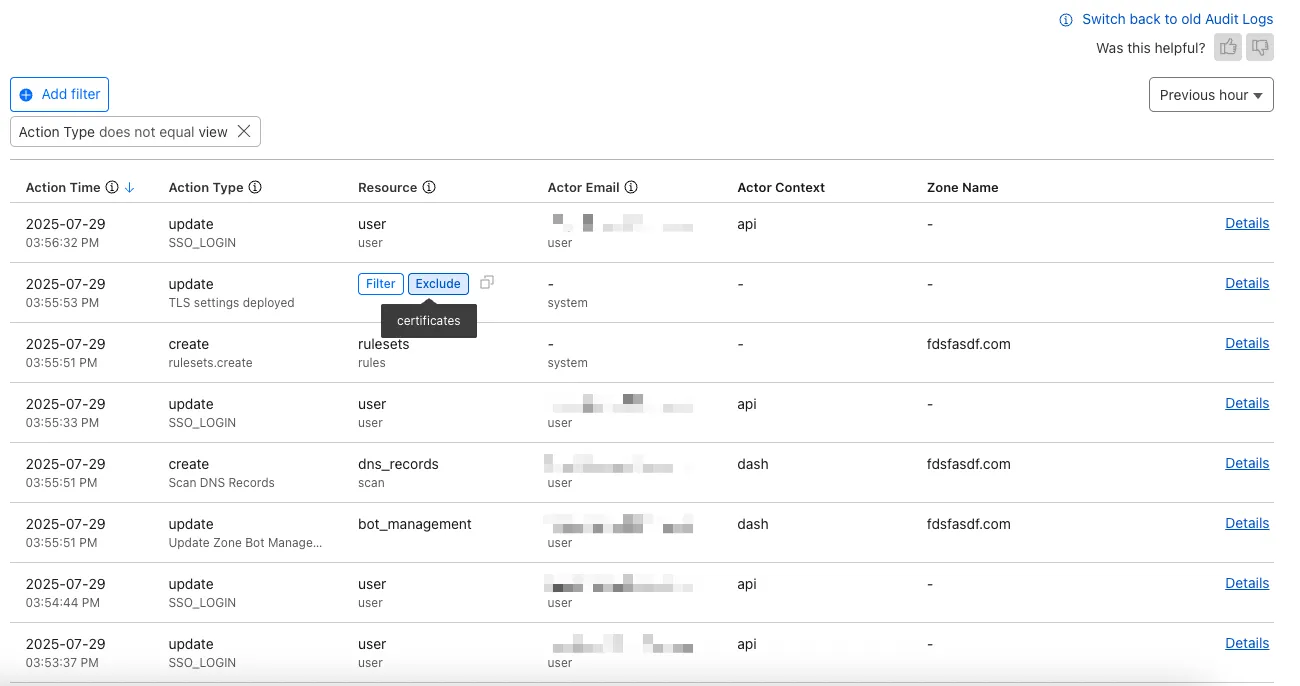
For more details on Audit Logs v2, see the Audit Logs documentation ↗.
Known issues
- A small number of audit logs may currently be unavailable in Audit Logs v2. In some cases, certain fields such as actor information may be missing in certain audit logs. We are actively working to improve coverage and completeness for General Availability.
- Export to CSV is not supported in the new UI.
We are actively refining the Audit Logs v2 experience and welcome your feedback. You can share overall feedback by clicking the thumbs up or thumbs down icons at the top of the page, or provide feedback on specific audit log entries using the thumbs icons next to each audit log line or by filling out our feedback form ↗.
We’ve launched pricing for Browser Rendering, including a free tier and a pay-as-you-go model that scales with your needs. Starting August 20, 2025, Cloudflare will begin billing for Browser Rendering.
There are two ways to use Browser Rendering. Depending on the method you use, here’s how billing will work:
- REST API: Charged for Duration only ($/browser hour)
- Workers Bindings: Charged for both Duration and Concurrency ($/browser hour and # of concurrent browsers)
Included usage and pricing by plan
Plan Included duration Included concurrency Price (beyond included) Workers Free 10 minutes per day 3 concurrent browsers N/A Workers Paid 10 hours per month 10 concurrent browsers (averaged monthly) 1. REST API: $0.09 per additional browser hour
2. Workers Bindings: $0.09 per additional browser hour
$2.00 per additional concurrent browserWhat you need to know:
- Workers Free Plan: 10 minutes of browser usage per day with 3 concurrent browsers at no charge.
- Workers Paid Plan: 10 hours of browser usage per month with 10 concurrent browsers (averaged monthly) at no charge. Additional usage is charged as shown above.
You can monitor usage via the Cloudflare dashboard ↗. Go to Compute (Workers) > Browser Rendering.
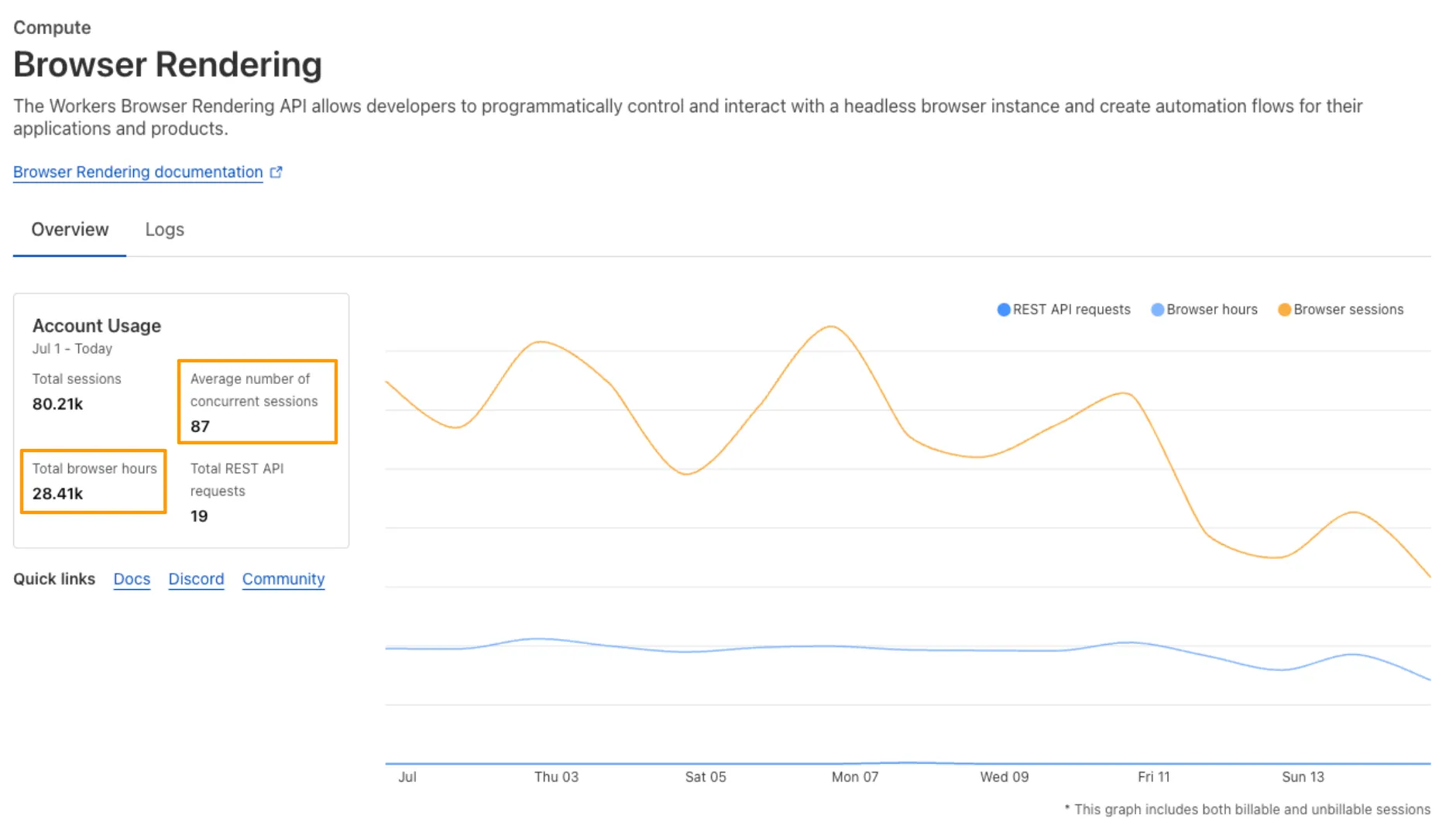
If you've been using Browser Rendering and do not wish to incur charges, ensure your usage stays within your plan's included usage. To estimate costs, take a look at these example pricing scenarios.
We have introduced a new Security Threat category called Scam. Relevant domains are marked with the Scam category. Scam typically refers to fraudulent websites and schemes designed to trick victims into giving away money or personal information.
New category added
Parent ID Parent Name Category ID Category Name 21 Security Threats 191 Scam Refer to Gateway domain categories to learn more.
This week’s update spotlights several vulnerabilities across Apache Tomcat, MongoDB, and Fortinet FortiWeb. Several flaws related with a memory leak in Apache Tomcat can lead to a denial-of-service attack. Additionally, a code injection flaw in MongoDB's Mongoose library allows attackers to bypass security controls to access restricted data.
Key Findings
-
Fortinet FortiWeb (CVE-2025-25257): An improper neutralization of special elements used in a SQL command vulnerability in Fortinet FortiWeb versions allows an unauthenticated attacker to execute unauthorized SQL code or commands.
-
Apache Tomcat (CVE-2025-31650): A improper Input Validation vulnerability in Apache Tomcat that could create memory leak when incorrect error handling for some invalid HTTP priority headers resulted in incomplete clean-up of the failed request.
-
MongoDB (CVE-2024-53900, CVE:CVE-2025-23061): Improper use of
$wherein match and a nested$wherefilter with apopulate()match in Mongoose can lead to search injection.
Impact
These vulnerabilities target user-facing components, web application servers, and back-end databases. A SQL injection flaw in Fortinet FortiWeb can lead to data theft or system compromise. A separate issue in Apache Tomcat involves a memory leak from improper input validation, which could be exploited for a denial-of-service (DoS) attack. Finally, a vulnerability in MongoDB's Mongoose library allows attackers to bypass security filters and access unauthorized data through malicious search queries.
Ruleset Rule ID Legacy Rule ID Description Previous Action New Action Comments Cloudflare Managed Ruleset 100804 BerriAI - SSRF - CVE:CVE-2024-6587 Log Disabled This is a New Detection Cloudflare Managed Ruleset 100812 Fortinet FortiWeb - Remote Code Execution - CVE:CVE-2025-25257 Log Block This is a New Detection Cloudflare Managed Ruleset 100813 Apache Tomcat - DoS - CVE:CVE-2025-31650 Log Disabled This is a New Detection Cloudflare Managed Ruleset 100815 MongoDB - Remote Code Execution - CVE:CVE-2024-53900, CVE:CVE-2025-23061 Log Block This is a New Detection Cloudflare Managed Ruleset 100816 MongoDB - Remote Code Execution - CVE:CVE-2024-53900, CVE:CVE-2025-23061 Log Block This is a New Detection -
A new Beta release for the Windows WARP client is now available on the beta releases downloads page.
This release contains minor fixes and improvements.
Changes and improvements
- Improvements to better manage multi-user pre-login registrations.
- Fixed an issue preventing devices from reaching split-tunneled traffic even when WARP was disconnected.
- Fix to prevent WARP from re-enabling its firewall rules after a user-initiated disconnect.
- Improvement to managed network detection checks for faster switching between managed networks.
Known issues
For Windows 11 24H2 users, Microsoft has confirmed a regression that may lead to performance issues like mouse lag, audio cracking, or other slowdowns. Cloudflare recommends users experiencing these issues upgrade to a minimum Windows 11 24H2 version KB5062553 or higher for resolution.
Devices using WARP client 2025.4.929.0 and up may experience Local Domain Fallback failures if a fallback server has not been configured. To configure a fallback server, refer to Route traffic to fallback server.
Devices with
KB5055523installed may receive a warning aboutWin32/ClickFix.ABAbeing present in the installer. To resolve this false positive, update Microsoft Security Intelligence to version 1.429.19.0 or later.DNS resolution may be broken when the following conditions are all true:
- WARP is in Secure Web Gateway without DNS filtering (tunnel-only) mode.
- A custom DNS server address is configured on the primary network adapter.
- The custom DNS server address on the primary network adapter is changed while WARP is connected.
To work around this issue, reconnect the WARP client by toggling off and back on.
A new Beta release for the macOS WARP client is now available on the beta releases downloads page.
This release contains minor fixes and improvements.
Changes and improvements
- Fixed an issue preventing devices from reaching split-tunneled traffic even when WARP was disconnected.
- Fix to prevent WARP from re-enabling its firewall rules after a user-initiated disconnect.
- Improvement to managed network detection checks for faster switching between managed networks.
Known issues
- macOS Sequoia: Due to changes Apple introduced in macOS 15.0.x, the WARP client may not behave as expected. Cloudflare recommends the use of macOS 15.4 or later.
- Devices using WARP client 2025.4.929.0 and up may experience Local Domain Fallback failures if a fallback server has not been configured. To configure a fallback server, refer to Route traffic to fallback server.
Gateway can now apply HTTP filtering to all proxied HTTP requests, not just traffic on standard HTTP (
80) and HTTPS (443) ports. This means all requests can now be filtered by A/V scanning, file sandboxing, Data Loss Prevention (DLP), and more.You can turn this setting on by going to Settings > Network > Firewall and choosing Inspect on all ports.
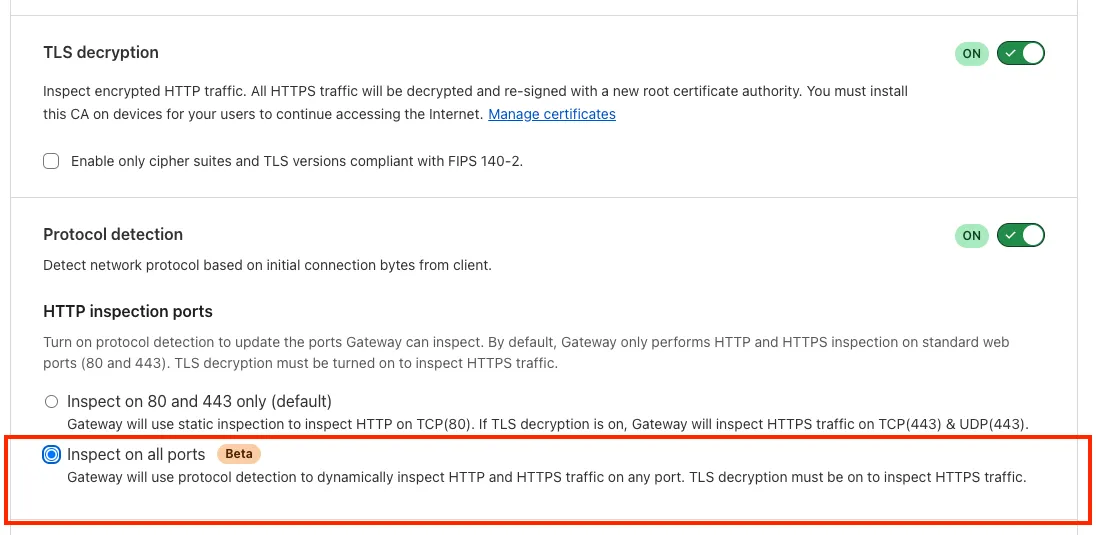
To learn more, refer to Inspect on all ports (Beta).
A new GA release for the Windows WARP client is now available on the stable releases downloads page.
This release contains minor fixes and improvements.
Changes and improvements
- WARP proxy mode now uses the operating system's DNS settings. Changes made to system DNS settings while in proxy mode require the client to be turned off then back on to take effect.
- Changes to the SCCM VPN boundary support feature to no longer restart the SMS Agent Host (
ccmexec.exe) service. - Fixed an issue affecting clients in Split Tunnel Include mode, where access to split-tunneled traffic was blocked after reconnecting the client.
Known issues
For Windows 11 24H2 users, Microsoft has confirmed a regression that may lead to performance issues like mouse lag, audio cracking, or other slowdowns. Cloudflare recommends users experiencing these issues upgrade to a minimum Windows 11 24H2 version KB5062553 or higher for resolution.
Devices using WARP client 2025.4.929.0 and up may experience Local Domain Fallback failures if a fallback server has not been configured. To configure a fallback server, refer to Route traffic to fallback server.
Devices with
KB5055523installed may receive a warning aboutWin32/ClickFix.ABAbeing present in the installer. To resolve this false positive, update Microsoft Security Intelligence to version 1.429.19.0 or later.DNS resolution may be broken when the following conditions are all true:
- WARP is in Secure Web Gateway without DNS filtering (tunnel-only) mode.
- A custom DNS server address is configured on the primary network adapter.
- The custom DNS server address on the primary network adapter is changed while WARP is connected.
To work around this issue, reconnect the WARP client by toggling off and back on.
A new GA release for the macOS WARP client is now available on the stable releases downloads page.
This release contains minor fixes and improvements.
Changes and improvements
- WARP proxy mode now uses the operating system's DNS settings. Changes made to system DNS settings while in proxy mode require the client to be turned off then back on to take effect.
- Fixed an issue affecting clients in Split Tunnel Include mode, where access to split-tunneled traffic was blocked after reconnecting the client.
- For macOS deployments, the WARP client can now be managed using an
mdm.xmlfile placed in/Library/Application Support/Cloudflare/mdm.xml. This new configuration option offers an alternative to the still supported method of deploying a managed plist through an MDM solution.
Known issues
- macOS Sequoia: Due to changes Apple introduced in macOS 15.0.x, the WARP client may not behave as expected. Cloudflare recommends the use of macOS 15.4 or later.
- Devices using WARP client 2025.4.929.0 and up may experience Local Domain Fallback failures if a fallback server has not been configured. To configure a fallback server, refer to Route traffic to fallback server.
A new GA release for the Linux WARP client is now available on the stable releases downloads page.
This release contains minor fixes and improvements.
Changes and improvements
- WARP proxy mode now uses the operating system's DNS settings. Changes made to system DNS settings while in proxy mode require the client to be turned off then back on to take effect.
- Fixed an issue affecting clients in Split Tunnel Include mode, where access to split-tunneled traffic was blocked after reconnecting the client.
Known issues
- Devices using WARP client 2025.4.929.0 and up may experience Local Domain Fallback failures if a fallback server has not been configured. To configure a fallback server, refer to Route traffic to fallback server.
You can now run your Browser Rendering locally using
npx wrangler dev, which spins up a browser directly on your machine before deploying to Cloudflare's global network. By running tests locally, you can quickly develop, debug, and test changes without needing to deploy or worry about usage costs.Get started with this example guide that shows how to use Cloudflare's fork of Puppeteer (you can also use Playwright) to take screenshots of webpages and store the results in Workers KV.
Now, when you connect your Cloudflare Worker to a git repository on GitHub or GitLab, each branch of your repository has its own stable preview URL, that you can use to preview code changes before merging the pull request and deploying to production.
This works the same way that Cloudflare Pages does — every time you create a pull request, you'll automatically get a shareable preview link where you can see your changes running, without affecting production. The link stays the same, even as you add commits to the same branch. These preview URLs are named after your branch and are posted as a comment to each pull request. The URL stays the same with every commit and always points to the latest version of that branch.
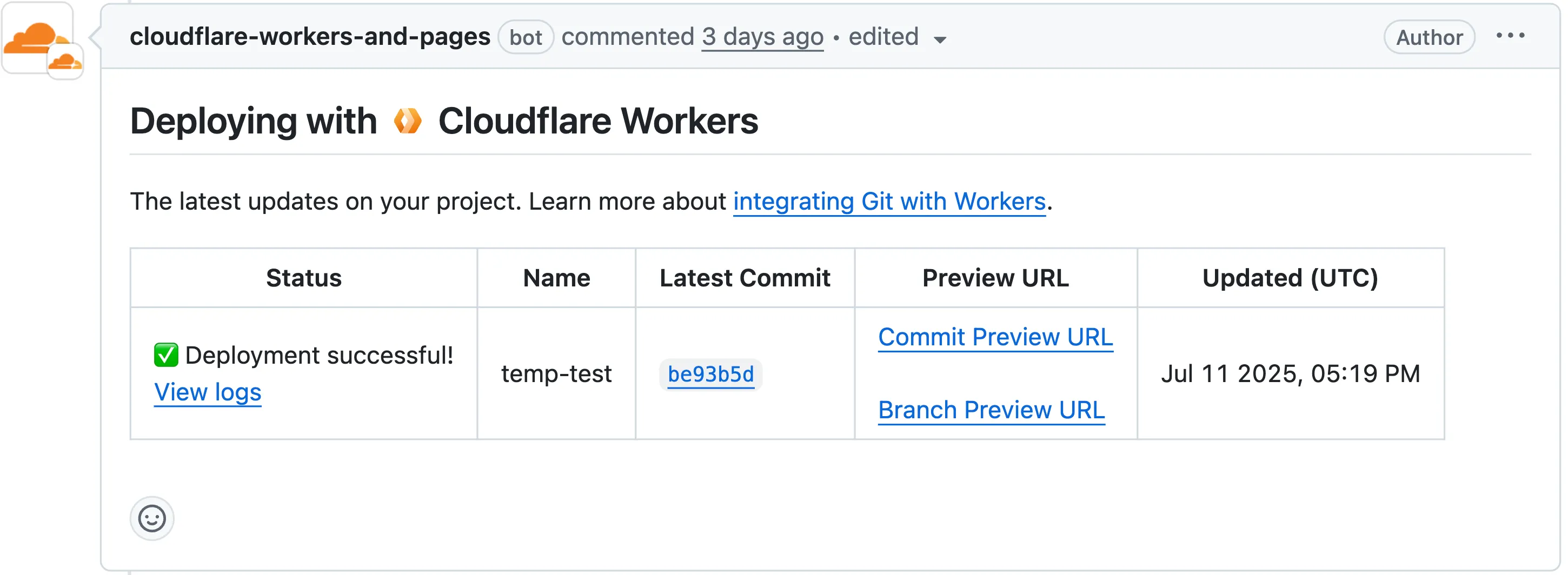
Each comment includes two preview URLs as shown above:
- Commit Preview URL: Unique to the specific version/commit (e.g.,
<version-prefix>-<worker-name>.<subdomain>.workers.dev) - Branch Preview URL: A stable alias based on the branch name (e.g.,
<branch-name>-<worker-name>.<subdomain>.workers.dev)
When you create a pull request:
- A preview alias is automatically created based on the Git branch name (e.g.,
<branch-name>becomes<branch-name>-<worker-name>.<subdomain>.workers.dev) - No configuration is needed, the alias is generated for you
- The link stays the same even as you add commits to the same branch
- Preview URLs are posted directly to your pull request as comments (just like they are in Cloudflare Pages)
You can also assign a custom preview alias using the Wrangler CLI, by passing the
--preview-aliasflag when uploading a version of your Worker:Terminal window wrangler versions upload --preview-alias staging- Only available on the workers.dev subdomain (custom domains not yet supported)
- Requires Wrangler v4.21.0+
- Preview URLs are not generated for Workers that use Durable Objects
- Not yet supported for Workers for Platforms
- Commit Preview URL: Unique to the specific version/commit (e.g.,
The Google Bard application (ID: 1198) has been deprecated and fully removed from the system. It has been replaced by the Gemini application (ID: 1340). Any existing Gateway policies that reference the old Google Bard application will no longer function. To ensure your policies continue to work as intended, you should update them to use the new Gemini application. We recommend replacing all instances of the deprecated Bard application with the new Gemini application in your Gateway policies. For more information about application policies, please see the Cloudflare Gateway documentation.
We now support
audiomode! Use this feature to extract audio from a source video, outputting an M4A file to use in downstream workflows like AI inference, content moderation, or transcription.For example,
Example URL https://example.com/cdn-cgi/media/<OPTIONS>/<SOURCE-VIDEO>https://example.com/cdn-cgi/media/mode=audio,time=3s,duration=60s/<input video with diction>For more information, learn about Transforming Videos.
The KVM-based virtual Cloudflare One Appliance is now in open beta with official support for Proxmox VE.
Customers can deploy the virtual appliance on KVM hypervisors to connect branch or data center networks to Cloudflare WAN without dedicated hardware.
For setup instructions, refer to Configure a virtual Cloudflare One Appliance.
Subaddressing, as defined in RFC 5233 ↗, also known as plus addressing, is now supported in Email Routing. This enables using the "+" separator to augment your custom addresses with arbitrary detail information.
Now you can send an email to
user+detail@example.comand it will be captured by theuser@example.comcustom address. The+detailpart is ignored by Email Routing, but it can be captured next in the processing chain in the logs, an Email Worker or an Agent application ↗.Customers can use this feature to dynamically add context to their emails, such as tracking the source of an email or categorizing emails without needing to create multiple custom addresses.
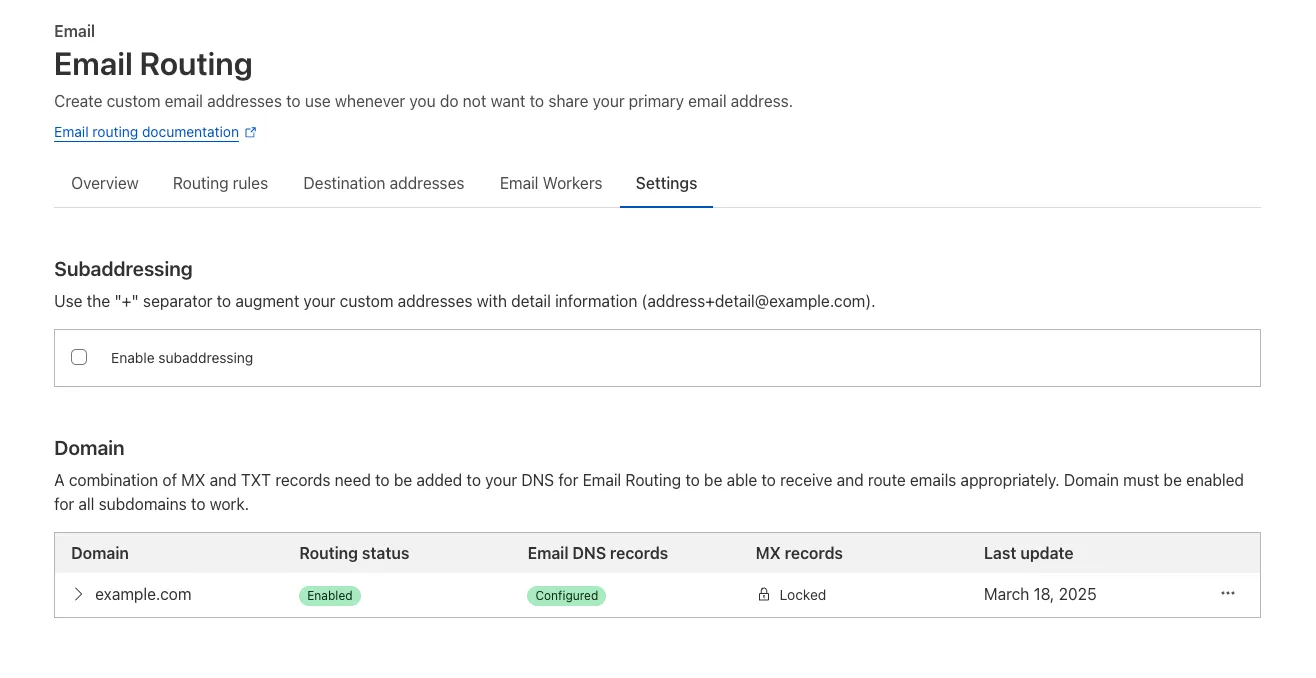
Check our Developer Docs to learn on to enable subaddressing in Email Routing.
This week's update highlights several high-impact vulnerabilities affecting Microsoft SharePoint Server. These flaws, involving unsafe deserialization, allow unauthenticated remote code execution over the network, posing a critical threat to enterprise environments relying on SharePoint for collaboration and document management.
Key Findings
- Microsoft SharePoint Server (CVE-2025-53770): A critical vulnerability involving unsafe deserialization of untrusted data, enabling unauthenticated remote code execution over the network. This flaw allows attackers to execute arbitrary code on vulnerable SharePoint servers without user interaction.
- Microsoft SharePoint Server (CVE-2025-53771): A closely related deserialization issue that can be exploited by unauthenticated attackers, potentially leading to full system compromise. The vulnerability highlights continued risks around insecure serialization logic in enterprise collaboration platforms.
Impact
Together, these vulnerabilities significantly weaken the security posture of on-premise Microsoft SharePoint Server deployments. By enabling remote code execution without authentication, they open the door for attackers to gain persistent access, deploy malware, and move laterally across enterprise environments.
Ruleset Rule ID Legacy Rule ID Description Previous Action New Action Comments Cloudflare Managed Ruleset 100817 Microsoft SharePoint - Deserialization - CVE:CVE-2025-53770 N/A Block This is a New Detection Cloudflare Managed Ruleset 100818 Microsoft SharePoint - Deserialization - CVE:CVE-2025-53771 N/A Block This is a New Detection For more details, also refer to our blog ↗.
This week's update spotlights several critical vulnerabilities across Citrix NetScaler Memory Disclosure, FTP servers and network application. Several flaws enable unauthenticated remote code execution or sensitive data exposure, posing a significant risk to enterprise security.
Key Findings
- Wing FTP Server (CVE-2025-47812): A critical Remote Code Execution (RCE) vulnerability that enables unauthenticated attackers to execute arbitrary code with root/SYSTEM-level privileges by exploiting a Lua injection flaw.
- Infoblox NetMRI (CVE-2025-32813): A remote unauthenticated command injection flaw that allows an attacker to execute arbitrary commands, potentially leading to unauthorized access.
- Citrix Netscaler ADC (CVE-2025-5777, CVE-2023-4966): A sensitive information disclosure vulnerability, also known as "Citrix Bleed2", that allows the disclosure of memory and subsequent remote access session hijacking.
- Akamai CloudTest (CVE-2025-49493): An XML External Entity (XXE) injection that could lead to read local files on the system by manipulating XML input.
Impact
These vulnerabilities affect critical enterprise infrastructure, from file transfer services and network management appliances to application delivery controllers. The Wing FTP RCE and Infoblox command injection flaws offer direct paths to deep system compromise, while the Citrix "Bleed2" and Akamai XXE vulnerabilities undermine system integrity by enabling session hijacking and sensitive data theft.
Ruleset Rule ID Legacy Rule ID Description Previous Action New Action Comments Cloudflare Managed Ruleset 100804 BerriAI - SSRF - CVE:CVE-2024-6587 Log Log This is a New Detection Cloudflare Managed Ruleset 100805 Wing FTP Server - Remote Code Execution - CVE:CVE-2025-47812 Log Block This is a New Detection Cloudflare Managed Ruleset 100807 Infoblox NetMRI - Command Injection - CVE:CVE-2025-32813 Log Block This is a New Detection Cloudflare Managed Ruleset 100808 Citrix Netscaler ADC - Buffer Error - CVE:CVE-2025-5777 Log Disabled This is a New Detection Cloudflare Managed Ruleset 100809 Citrix Netscaler ADC - Information Disclosure - CVE:CVE-2023-4966 Log Block This is a New Detection Cloudflare Managed Ruleset 100810 Akamai CloudTest - XXE - CVE:CVE-2025-49493 Log Block This is a New Detection