

A new GA release for the Windows WARP client is now available on the stable releases downloads page.
This release contains minor fixes, improvements, and new features.
Changes and improvements
- Improvements to multi-user mode. Fixed an issue where when switching from a pre-login registration to a user registration, Mobile Device Management (MDM) configuration association could be lost.
- Added a new feature to manage NetBIOS over TCP/IP functionality on the Windows client. NetBIOS over TCP/IP on the Windows client is now disabled by default and can be enabled in device profile settings.
- Fixed an issue causing failure of the local network exclusion feature when configured with a timeout of
0. - Improvement for the Windows client certificate posture check to ensure logged results are from checks that run once users log in.
- Improvement for more accurate reporting of device colocation information in the Cloudflare One dashboard.
- Fixed an issue where misconfigured DEX HTTP tests prevented new registrations.
- Fixed an issue causing DNS requests to fail with clients in Traffic and DNS mode.
- Improved service shutdown behavior in cases where the daemon is unresponsive.
Known issues
For Windows 11 24H2 users, Microsoft has confirmed a regression that may lead to performance issues like mouse lag, audio cracking, or other slowdowns. Cloudflare recommends users experiencing these issues upgrade to a minimum Windows 11 24H2 KB5062553 or higher for resolution.
Devices with KB5055523 installed may receive a warning about
Win32/ClickFix.ABAbeing present in the installer. To resolve this false positive, update Microsoft Security Intelligence to version 1.429.19.0 or later.DNS resolution may be broken when the following conditions are all true:
- WARP is in Secure Web Gateway without DNS filtering (tunnel-only) mode.
- A custom DNS server address is configured on the primary network adapter.
- The custom DNS server address on the primary network adapter is changed while WARP is connected.
To work around this issue, reconnect the WARP client by toggling off and back on.
A new GA release for the macOS WARP client is now available on the stable releases downloads page.
This release contains minor fixes and improvements.
Changes and improvements
- Fixed an issue causing failure of the local network exclusion feature when configured with a timeout of
0. - Improvement for more accurate reporting of device colocation information in the Cloudflare One dashboard.
- Fixed an issue with DNS server configuration failures that caused tunnel connection delays.
- Fixed an issue where misconfigured DEX HTTP tests prevented new registrations.
- Fixed an issue causing DNS requests to fail with clients in Traffic and DNS mode.
- Fixed an issue causing failure of the local network exclusion feature when configured with a timeout of
A new GA release for the Linux WARP client is now available on the stable releases downloads page.
This release contains minor fixes and improvements.
WARP client version 2025.8.779.0 introduced an updated public key for Linux packages. The public key must be updated if it was installed before September 12, 2025 to ensure the repository remains functional after December 4, 2025. Instructions to make this update are available at pkg.cloudflareclient.com.
Changes and improvements
- Fixed an issue causing failure of the local network exclusion feature when configured with a timeout of
0. - Improvement for more accurate reporting of device colocation information in the Cloudflare One dashboard.
- Fixed an issue where misconfigured DEX HTTP tests prevented new registrations.
- Fixed issues causing DNS requests to fail with clients in Traffic and DNS mode or DNS only mode.
- Fixed an issue causing failure of the local network exclusion feature when configured with a timeout of
deleteAll()now deletes a Durable Object alarm in addition to stored data for Workers with a compatibility date of2026-02-24or later. This change simplifies clearing a Durable Object's storage with a single API call.Previously,
deleteAll()only deleted user-stored data for an object. Alarm usage stores metadata in an object's storage, which required a separatedeleteAlarm()call to fully clean up all storage for an object. ThedeleteAll()change applies to both KV-backed and SQLite-backed Durable Objects.JavaScript // Before: two API calls required to clear all storageawait this.ctx.storage.deleteAlarm();await this.ctx.storage.deleteAll();// Now: a single call clears both data and the alarmawait this.ctx.storage.deleteAll();For more information, refer to the Storage API documentation.
Cloudflare Pipelines ingests streaming data via Workers or HTTP endpoints, transforms it with SQL, and writes it to R2 as Apache Iceberg tables. Today we're shipping three improvements to help you understand why streaming events get dropped, catch data quality issues early, and set up Pipelines faster.
When stream events don't match the expected schema, Pipelines accepts them during ingestion but drops them when attempting to deliver them to the sink. To help you identify the root cause of these issues, we are introducing a new dashboard and metrics that surface dropped events with detailed error messages.
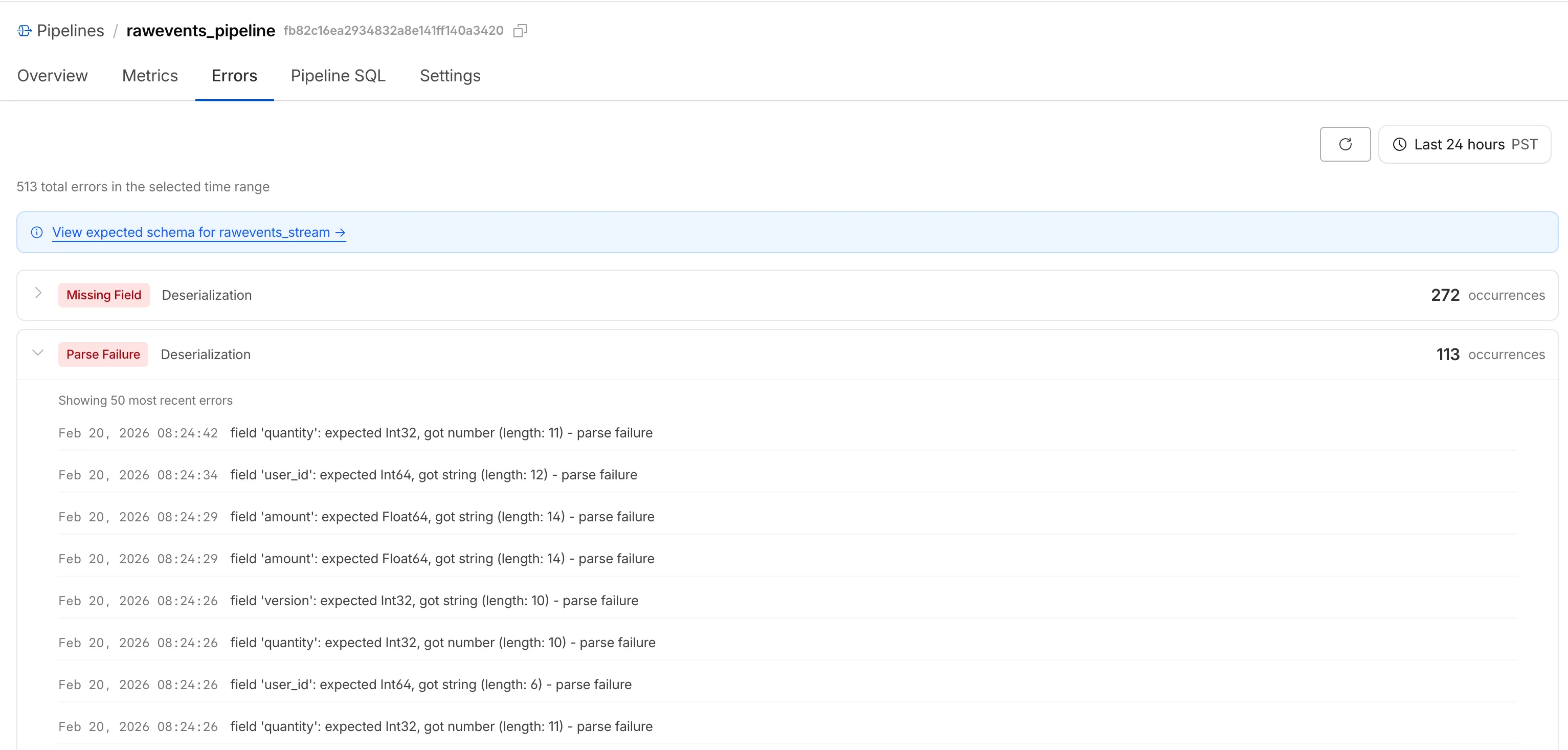
Dropped events can also be queried programmatically via the new
pipelinesUserErrorsAdaptiveGroupsGraphQL dataset. The dataset breaks down failures by specific error type (missing_field,type_mismatch,parse_failure, ornull_value) so you can trace issues back to the source.query GetPipelineUserErrors($accountTag: String!$pipelineId: String!$datetimeStart: Time!$datetimeEnd: Time!) {viewer {accounts(filter: { accountTag: $accountTag }) {pipelinesUserErrorsAdaptiveGroups(limit: 100filter: {pipelineId: $pipelineIddatetime_geq: $datetimeStartdatetime_leq: $datetimeEnd}orderBy: [count_DESC]) {countdimensions {errorFamilyerrorType}}}}}For the full list of dimensions, error types, and additional query examples, refer to User error metrics.
Sending data to a Pipeline from a Worker previously used a generic
Pipeline<PipelineRecord>type, which meant schema mismatches (wrong field names, incorrect types) were only caught at runtime as dropped events.Running
wrangler typesnow generates schema-specific TypeScript types for your Pipeline bindings. TypeScript catches missing required fields and incorrect field types at compile time, before your code is deployed.TypeScript declare namespace Cloudflare {type EcommerceStreamRecord = {user_id: string;event_type: string;product_id?: string;amount?: number;};interface Env {STREAM: import("cloudflare:pipelines").Pipeline<Cloudflare.EcommerceStreamRecord>;}}For more information, refer to Typed Pipeline bindings.
Setting up a new Pipeline previously required multiple manual steps: creating an R2 bucket, enabling R2 Data Catalog, generating an API token, and configuring format, compression, and rolling policies individually.
The
wrangler pipelines setupcommand now offers a Simple setup mode that applies recommended defaults and automatically creates the R2 bucket and enables R2 Data Catalog if they do not already exist. Validation errors during setup prompt you to retry inline rather than restarting the entire process.For a full walkthrough, refer to the Getting started guide.
You can now disable a live input to reject incoming RTMPS and SRT connections. When a live input is disabled, any broadcast attempts will fail to connect.
This gives you more control over your live inputs:
- Temporarily pause an input without deleting it
- Programmatically end creator broadcasts
- Prevent new broadcasts from starting on a specific input
To disable a live input via the API, set the
enabledproperty tofalse:Terminal window curl --request PUT \https://api.cloudflare.com/client/v4/accounts/{account_id}/stream/live_inputs/{input_id} \--header "Authorization: Bearer <API_TOKEN>" \--data '{"enabled": false}'You can also disable or enable a live input from the Live inputs list page or the live input detail page in the Dashboard.
All existing live inputs remain enabled by default. For more information, refer to Start a live stream.
Sandboxes now support
createBackup()andrestoreBackup()methods for creating and restoring point-in-time snapshots of directories.This allows you to restore environments quickly. For instance, in order to develop in a sandbox, you may need to include a user's codebase and run a build step. Unfortunately
git cloneandnpm installcan take minutes, and you don't want to run these steps every time the user starts their sandbox.Now, after the initial setup, you can just call
createBackup(), thenrestoreBackup()the next time this environment is needed. This makes it practical to pick up exactly where a user left off, even after days of inactivity, without repeating expensive setup steps.TypeScript const sandbox = getSandbox(env.Sandbox, "my-sandbox");// Make non-trivial changes to the file systemawait sandbox.gitCheckout(endUserRepo, { targetDir: "/workspace" });await sandbox.exec("npm install", { cwd: "/workspace" });// Create a point-in-time backup of the directoryconst backup = await sandbox.createBackup({ dir: "/workspace" });// Store the handle for later useawait env.KV.put(`backup:${userId}`, JSON.stringify(backup));// ... in a future session...// Restore instead of re-cloning and reinstallingawait sandbox.restoreBackup(backup);Backups are stored in R2 and can take advantage of R2 object lifecycle rules to ensure they do not persist forever.
Key capabilities:
- Persist and reuse across sandbox sessions — Easily store backup handles in KV, D1, or Durable Object storage for use in subsequent sessions
- Usable across multiple instances — Fork a backup across many sandboxes for parallel work
- Named backups — Provide optional human-readable labels for easier management
- TTLs — Set time-to-live durations so backups are automatically removed from storage once they are no longer neeeded
To get started, refer to the backup and restore guide for setup instructions and usage patterns, or the Backups API reference for full method documentation.
Hyperdrive now treats queries containing PostgreSQL
STABLEfunctions as uncacheable, in addition toVOLATILEfunctions.Previously, only functions that PostgreSQL categorizes ↗ as
VOLATILE(for example,RANDOM(),LASTVAL()) were detected as uncacheable.STABLEfunctions (for example,NOW(),CURRENT_TIMESTAMP,CURRENT_DATE) were incorrectly allowed to be cached.Because
STABLEfunctions can return different results across different SQL statements within the same transaction, caching their results could serve stale or incorrect data. This change aligns Hyperdrive's caching behavior with PostgreSQL's function volatility semantics.If your queries use
STABLEfunctions, and you were relying on them being cached, move the function call to your application code and pass the result as a query parameter. For example, instead ofWHERE created_at > NOW(), compute the timestamp in your Worker and pass it asWHERE created_at > $1.Hyperdrive uses text-based pattern matching to detect uncacheable functions. References to function names like
NOW()in SQL comments also cause the query to be marked as uncacheable.For more information, refer to Query caching and Troubleshoot and debug.
TL;DR: You can now create and save custom configurations of the Threat Events dashboard, allowing you to instantly return to specific filtered views — such as industry-specific attacks or regional Sankey flows — without manual reconfiguration.
Threat intelligence is most effective when it is personalized. Previously, analysts had to manually re-apply complex filters (like combining specific industry datasets with geographic origins) every time they logged in. This update provides material value by:
- Analysts can now jump straight into "Known Ransomware Infrastructure" or "Retail Sector Targets" views with a single click, eliminating repetitive setup tasks
- Teams can ensure everyone is looking at the same data subsets by using standardized saved views, reducing the risk of missing critical patterns due to inconsistent filtering.
Cloudforce One subscribers can start saving their custom views now in Application Security > Threat Intelligence > Threat Events ↗.
The
@cloudflare/codemode↗ package has been rewritten into a modular, runtime-agnostic SDK.Code Mode ↗ enables LLMs to write and execute code that orchestrates your tools, instead of calling them one at a time. This can (and does) yield significant token savings, reduces context window pressure and improves overall model performance on a task.
The new
Executorinterface is runtime agnostic and comes with a prebuiltDynamicWorkerExecutorto run generated code in a Dynamic Worker Loader.- Removed
experimental_codemode()andCodeModeProxy— the package no longer owns an LLM call or model choice - New import path:
createCodeTool()is now exported from@cloudflare/codemode/ai
createCodeTool()— Returns a standard AI SDKToolto use in your AI agents.Executorinterface — Minimalexecute(code, fns)contract. Implement for any code sandboxing primitive or runtime.
Runs code in a Dynamic Worker. It comes with the following features:
- Network isolation —
fetch()andconnect()blocked by default (globalOutbound: null) when usingDynamicWorkerExecutor - Console capture —
console.log/warn/errorcaptured and returned inExecuteResult.logs - Execution timeout — Configurable via
timeoutoption (default 30s)
JavaScript import { createCodeTool } from "@cloudflare/codemode/ai";import { DynamicWorkerExecutor } from "@cloudflare/codemode";import { streamText } from "ai";const executor = new DynamicWorkerExecutor({ loader: env.LOADER });const codemode = createCodeTool({ tools: myTools, executor });const result = streamText({model,tools: { codemode },messages,});TypeScript import { createCodeTool } from "@cloudflare/codemode/ai";import { DynamicWorkerExecutor } from "@cloudflare/codemode";import { streamText } from "ai";const executor = new DynamicWorkerExecutor({ loader: env.LOADER });const codemode = createCodeTool({ tools: myTools, executor });const result = streamText({model,tools: { codemode },messages,});{"worker_loaders": [{ "binding": "LOADER" }],}[[worker_loaders]]binding = "LOADER"See the Code Mode documentation for full API reference and examples.
Terminal window npm i @cloudflare/codemode@latest- Removed
You can now easily understand your SaaS security posture findings and why they were detected with Cloudy Summaries in CASB. This feature integrates Cloudflare's Cloudy AI directly into your CASB Posture Findings to automatically generate clear, plain-language summaries of complex security misconfigurations, third-party app risks, and data exposures.
This allows security teams and IT administrators to drastically reduce triage time by immediately understanding the context, potential impact, and necessary remediation steps for any given finding—without needing to be an expert in every connected SaaS application.
To view a summary, simply navigate to your Posture Findings in the Cloudflare One dashboard (under Cloud and SaaS findings) and open the finding details of a specific instance of a Finding.
Cloudy Summaries are supported on all available integrations, including Microsoft 365, Google Workspace, Salesforce, GitHub, AWS, Slack, and Dropbox. See the full list of supported integrations here.
- Contextual explanations — Quickly understand the specifics of a finding with plain-language summaries detailing exactly what was detected, from publicly shared sensitive files to risky third-party app scopes.
- Clear risk assessment — Instantly grasp the potential security impact of the finding, such as data breach risks, unauthorized account access, or email spoofing vulnerabilities.
- Actionable guidance — Get clear recommendations and next steps on how to effectively remediate the issue and secure your environment.
- Built-in feedback — Help improve future AI summarization accuracy by submitting feedback directly using the thumbs-up and thumbs-down buttons.
- Learn more about managing CASB Posture Findings in Cloudflare.
Cloudy Summaries in CASB are available to all Cloudflare CASB users today.
Cloudflare Tunnel is now available in the main Cloudflare Dashboard at Networking > Tunnels ↗, bringing first-class Tunnel management to developers using Tunnel for securing origin servers.

This new experience provides everything you need to manage Tunnels for public applications, including:
- Full Tunnel lifecycle management: Create, configure, delete, and monitor all your Tunnels in one place.
- Native integrations: View Tunnels by name when configuring DNS records and Workers VPC — no more copy-pasting UUIDs.
- Real-time visibility: Monitor replicas and Tunnel health status directly in the dashboard.
- Routing map: Manage all ingress routes for your Tunnel, including public applications, private hostnames, private CIDRs, and Workers VPC services, from a single interactive interface.
Core Dashboard: Navigate to Networking > Tunnels ↗ to manage Tunnels for:
- Securing origin servers and public applications with CDN, WAF, Load Balancing, and DDoS protection
- Connecting Workers to private services via Workers VPC
Cloudflare One Dashboard: Navigate to Zero Trust > Networks > Connectors ↗ to manage Tunnels for:
- Securing your public applications with Zero Trust access policies
- Connecting users to private applications
- Building a private mesh network
Both dashboards provide complete Tunnel management capabilities — choose based on your primary workflow.
New to Tunnel? Learn how to get started with Cloudflare Tunnel or explore advanced use cases like securing SSH servers or running Tunnels in Kubernetes.
Workers AI and AI Gateway have received a series of dashboard improvements to help you get started faster and manage your AI workloads more easily.
Navigation and discoverability
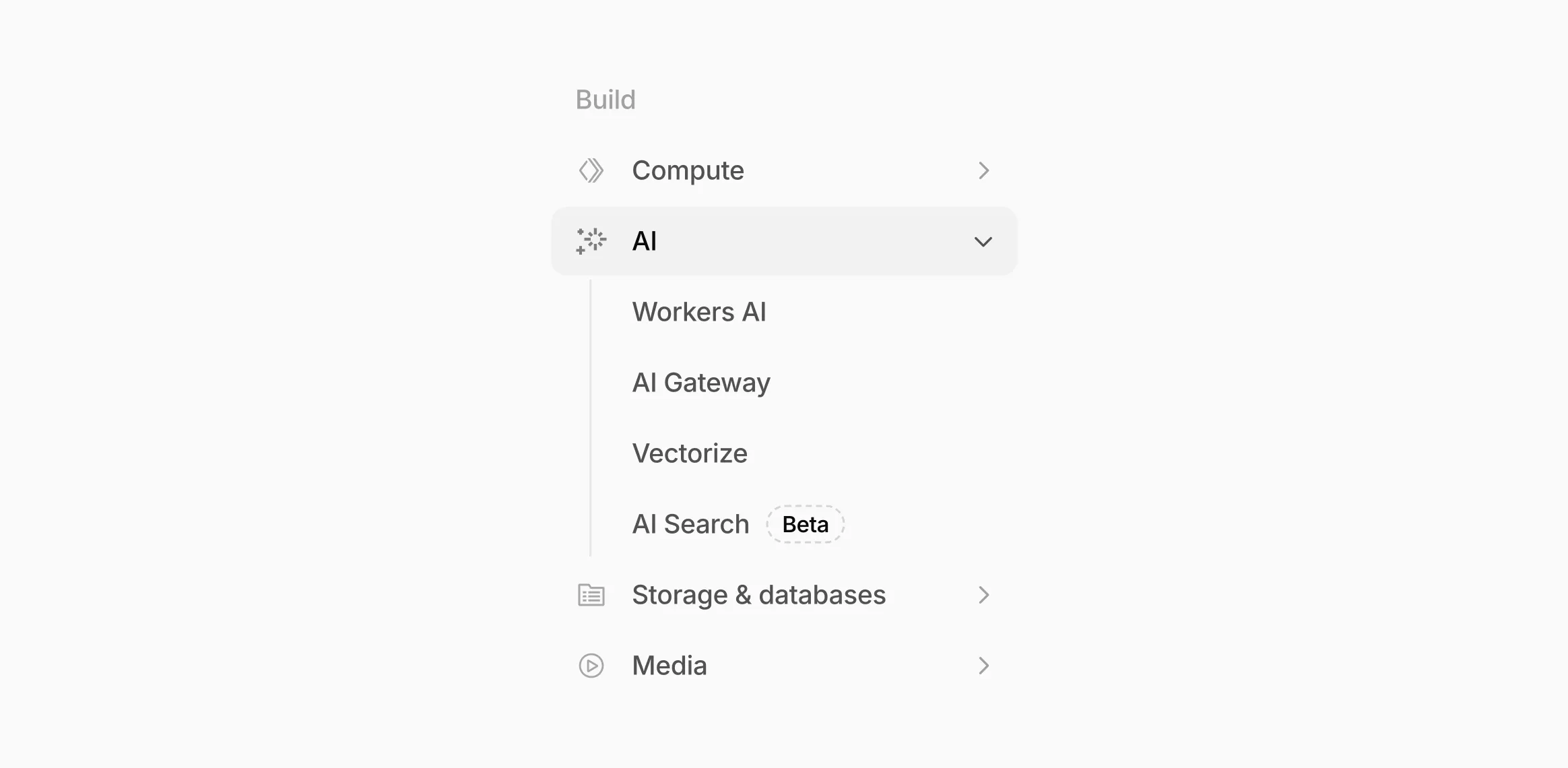
AI now has its own top-level section in the Cloudflare dashboard sidebar, so you can find AI features without digging through menus.
Onboarding and getting started
Getting started with AI Gateway is now simpler. When you create your first gateway, we now show your gateway's OpenAI-compatible endpoint and step-by-step guidance to help you configure it. The Playground also includes helpful prompts, and usage pages have clear next steps if you have not made any requests yet.
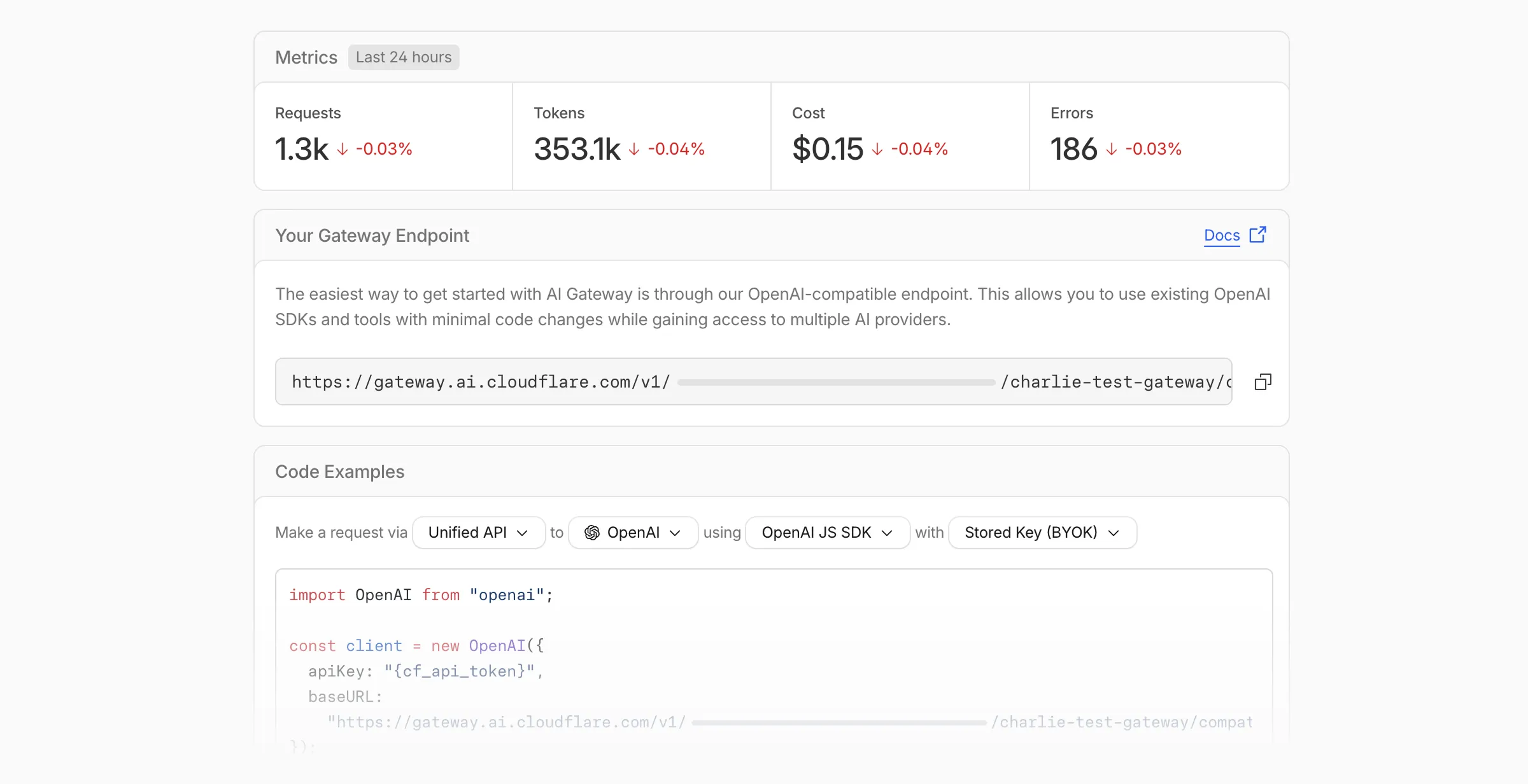
We've also combined the previously separate code example sections into one view with dropdown selectors for API type, provider, SDK, and authentication method so you can now customize the exact code snippet you need from one place.
Dynamic Routing
- The route builder is now more performant and responsive.
- You can now copy route names to your clipboard with a single click.
- Code examples use the Universal Endpoint format, making it easier to integrate routes into your application.
Observability and analytics
- Small monetary values now display correctly in cost analytics charts, so you can accurately track spending at any scale.
Accessibility
- Improvements to keyboard navigation within the AI Gateway, specifically when exploring usage by provider.
- Improvements to sorting and filtering components on the Workers AI models page.
For more information, refer to the AI Gateway documentation.
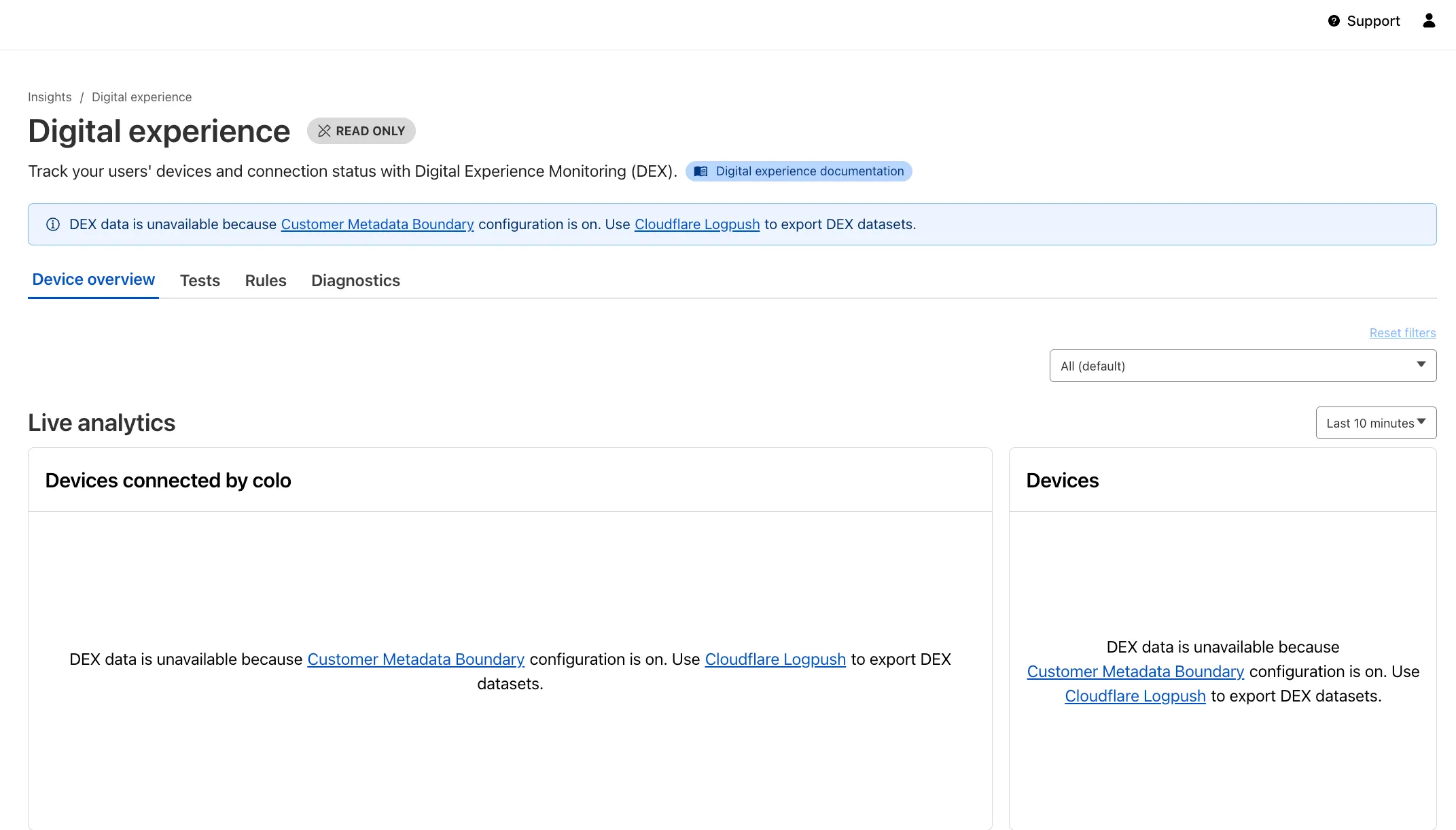
Digital Experience Monitoring (DEX) provides visibility into WARP device connectivity and performance to any internal or external application.
Now, all DEX logs are fully compatible with Cloudflare's Customer Metadata Boundary (CMB) setting for the 'EU' (European Union), which ensures that DEX logs will not be stored outside the 'EU' when the option is configured.
If a Cloudflare One customer using DEX enables CMB 'EU', they will not see any DEX data in the Cloudflare One dashboard. Customers can ingest DEX data via LogPush, and build their own analytics and dashboards.
If a customer enables CMB in their account, they will see the following message in the Digital Experience dashboard: "DEX data is unavailable because Customer Metadata Boundary configuration is on. Use Cloudflare LogPush to export DEX datasets."
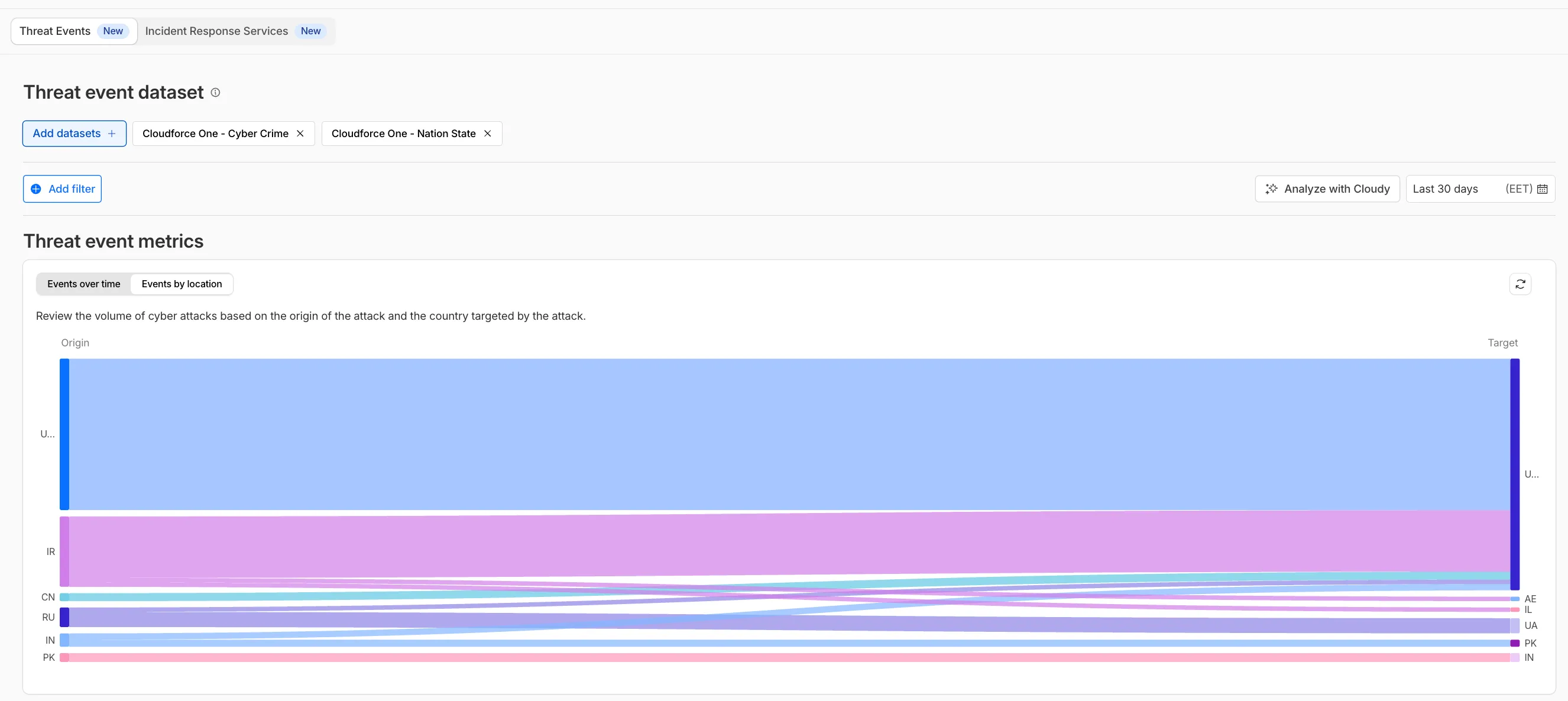
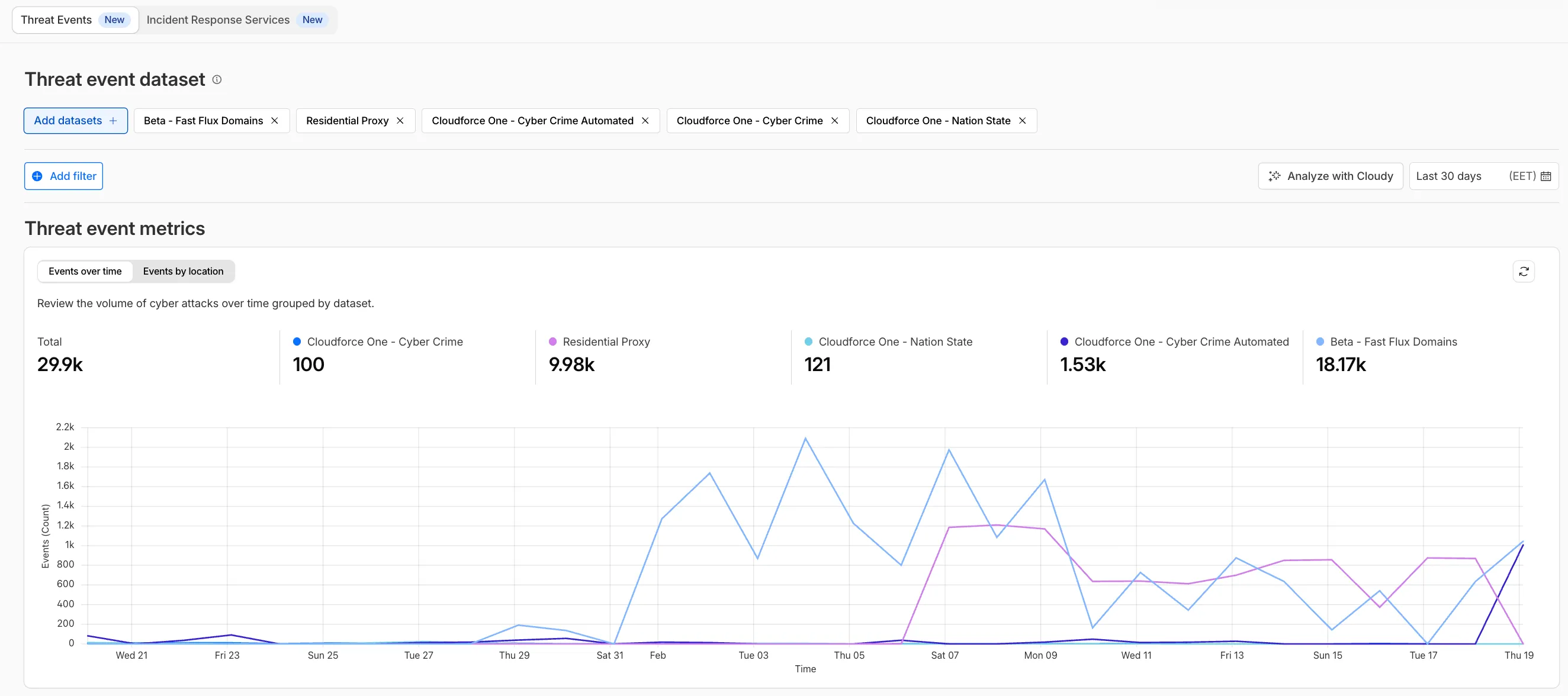
We have introduced dynamic visualizations to the Threat Events dashboard to help you better understand the threat landscape and identify emerging patterns at a glance.
What's new:
- Sankey Diagrams: Trace the flow of attacks from country of origin to target country to identify which regions are being hit hardest and where the threat infrastructure resides.
- Dataset Distribution over time: Instantly pivot your view to understand if a specific campaign is targeting your sector or if it is a broad-spectrum commodity attack.
- Enhanced Filtering: Use these visual tools to filter and drill down into specific attack vectors directly from the charts.
Cloudforce One subscribers can explore these new views now in Application Security > Threat Intelligence > Threat Events ↗.
The Server-Timing header now includes a new
cfWorkermetric that measures time spent executing Cloudflare Workers, including any subrequests performed by the Worker. This helps developers accurately identify whether high Time to First Byte (TTFB) is caused by Worker processing or slow upstream dependencies.Previously, Worker execution time was included in the
edgemetric, making it harder to identify true edge performance. The newcfWorkermetric provides this visibility:Metric Description edgeTotal time spent on the Cloudflare edge, including Worker execution originTime spent fetching from the origin server cfWorkerTime spent in Worker execution, including subrequests but excluding origin fetch time Server-Timing: cdn-cache; desc=DYNAMIC, edge; dur=20, origin; dur=100, cfWorker; dur=7In this example, the edge took 20ms, the origin took 100ms, and the Worker added just 7ms of processing time.
The
cfWorkermetric is enabled by default if you have Real User Monitoring (RUM) enabled. Otherwise, you can enable it using Rules.This metric is particularly useful for:
- Performance debugging: Quickly determine if latency is caused by Worker code, external API calls within Workers, or slow origins.
- Optimization targeting: Identify which component of your request path needs optimization.
- Real User Monitoring (RUM): Access detailed timing breakdowns directly from response headers for client-side analytics.
For more information about Server-Timing headers, refer to the W3C Server Timing specification ↗.
A new Allow clientless access setting makes it easier to connect users without a device client to internal applications, without using public DNS.

Previously, to provide clientless access to a private hostname or IP without a published application, you had to create a separate bookmark application pointing to a prefixed Clientless Web Isolation URL (for example,
https://<your-teamname>.cloudflareaccess.com/browser/https://10.0.0.1/). This bookmark was visible to all users in the App Launcher, regardless of whether they had access to the underlying application.Now, you can manage clientless access directly within your private self-hosted application. When Allow clientless access is turned on, users who pass your Access application policies will see a tile in their App Launcher pointing to the prefixed URL. Users must have remote browser permissions to open the link.
You can now assign Access policies to bookmark applications. This lets you control which users see a bookmark in the App Launcher based on identity, device posture, and other policy rules.
Previously, bookmark applications were visible to all users in your organization. With policy support, you can now:
- Tailor the App Launcher to each user — Users only see the applications they have access to, reducing clutter and preventing accidental clicks on irrelevant resources.
- Restrict visibility of sensitive bookmarks — Limit who can view bookmarks to internal tools or partner resources based on group membership, identity provider, or device posture.
Bookmarks support all Access policy configurations except purpose justification, temporary authentication, and application isolation. If no policy is assigned, the bookmark remains visible to all users (maintaining backwards compatibility).
For more information, refer to Add bookmarks.
The latest release of the Agents SDK ↗ adds built-in retry utilities, per-connection protocol message control, and a fully rewritten
@cloudflare/ai-chatwith data parts, tool approval persistence, and zero breaking changes.A new
this.retry()method lets you retry any async operation with exponential backoff and jitter. You can pass an optionalshouldRetrypredicate to bail early on non-retryable errors.JavaScript class MyAgent extends Agent {async onRequest(request) {const data = await this.retry(() => callUnreliableService(), {maxAttempts: 4,shouldRetry: (err) => !(err instanceof PermanentError),});return Response.json(data);}}TypeScript class MyAgent extends Agent {async onRequest(request: Request) {const data = await this.retry(() => callUnreliableService(), {maxAttempts: 4,shouldRetry: (err) => !(err instanceof PermanentError),});return Response.json(data);}}Retry options are also available per-task on
queue(),schedule(),scheduleEvery(), andaddMcpServer():JavaScript // Per-task retry configuration, persisted in SQLite alongside the taskawait this.schedule(Date.now() + 60_000,"sendReport",{ userId: "abc" },{retry: { maxAttempts: 5 },},);// Class-level retry defaultsclass MyAgent extends Agent {static options = {retry: { maxAttempts: 3 },};}TypeScript // Per-task retry configuration, persisted in SQLite alongside the taskawait this.schedule(Date.now() + 60_000, "sendReport", { userId: "abc" }, {retry: { maxAttempts: 5 },});// Class-level retry defaultsclass MyAgent extends Agent {static options = {retry: { maxAttempts: 3 },};}Retry options are validated eagerly at enqueue/schedule time, and invalid values throw immediately. Internal retries have also been added for workflow operations (
terminateWorkflow,pauseWorkflow, and others) with Durable Object-aware error detection.Agents automatically send JSON text frames (identity, state, MCP server lists) to every WebSocket connection. You can now suppress these per-connection for clients that cannot handle them — binary-only devices, MQTT clients, or lightweight embedded systems.
JavaScript class MyAgent extends Agent {shouldSendProtocolMessages(connection, ctx) {// Suppress protocol messages for MQTT clientsconst subprotocol = ctx.request.headers.get("Sec-WebSocket-Protocol");return subprotocol !== "mqtt";}}TypeScript class MyAgent extends Agent {shouldSendProtocolMessages(connection: Connection, ctx: ConnectionContext) {// Suppress protocol messages for MQTT clientsconst subprotocol = ctx.request.headers.get("Sec-WebSocket-Protocol");return subprotocol !== "mqtt";}}Connections with protocol messages disabled still fully participate in RPC and regular messaging. Use
isConnectionProtocolEnabled(connection)to check a connection's status at any time. The flag persists across Durable Object hibernation.See Protocol messages for full documentation.
The first stable release of
@cloudflare/ai-chatships alongside this release with a major refactor ofAIChatAgentinternals — newResumableStreamclass, WebSocketChatTransport, and simplified SSE parsing — with zero breaking changes. Existing code usingAIChatAgentanduseAgentChatworks as-is.Key new features:
- Data parts — Attach typed JSON blobs (
data-*) to messages alongside text. Supports reconciliation (type+id updates in-place), append, and transient parts (ephemeral viaonDatacallback). See Data parts. - Tool approval persistence — The
needsApprovalapproval UI now survives page refresh and DO hibernation. The streaming message is persisted to SQLite when a tool entersapproval-requestedstate. maxPersistedMessages— Cap SQLite message storage with automatic oldest-message deletion.bodyoption onuseAgentChat— Send custom data with every request (static or dynamic).- Incremental persistence — Hash-based cache to skip redundant SQL writes.
- Row size guard — Automatic two-pass compaction when messages approach the SQLite 2 MB limit.
autoContinueAfterToolResultdefaults totrue— Client-side tool results and tool approvals now automatically trigger a server continuation, matching server-executed tool behavior. SetautoContinueAfterToolResult: falseinuseAgentChatto restore the previous behavior.
Notable bug fixes:
- Resolved stream resumption race conditions
- Resolved an issue where
setMessagesfunctional updater sent empty arrays - Resolved an issue where client tool schemas were lost after DO hibernation
- Resolved
InvalidPromptErrorafter tool approval (approval.idwas dropped) - Resolved an issue where message metadata was not propagated on broadcast/resume paths
- Resolved an issue where
clearAll()did not clear in-memory chunk buffers - Resolved an issue where
reasoning-deltasilently dropped data whenreasoning-startwas missed during stream resumption
getQueue(),getQueues(),getSchedule(),dequeue(),dequeueAll(), anddequeueAllByCallback()were unnecessarilyasyncdespite only performing synchronous SQL operations. They now return values directly instead of wrapping them in Promises. This is backward compatible — existing code usingawaiton these methods will continue to work.- Fix TypeScript "excessively deep" error — A depth counter on
CanSerializeandIsSerializableParamtypes bails out totrueafter 10 levels of recursion, preventing the "Type instantiation is excessively deep" error with deeply nested types like AI SDKCoreMessage[]. - POST SSE keepalive — The POST SSE handler now sends
event: pingevery 30 seconds to keep the connection alive, matching the existing GET SSE handler behavior. This prevents POST response streams from being silently dropped by proxies during long-running tool calls. - Widened peer dependency ranges — Peer dependency ranges across packages have been widened to prevent cascading major bumps during 0.x minor releases.
@cloudflare/ai-chatand@cloudflare/codemodeare now marked as optional peer dependencies.
To update to the latest version:
Terminal window npm i agents@latest @cloudflare/ai-chat@latest- Data parts — Attach typed JSON blobs (
We are updating naming related to some of our Networking products to better clarify their place in the Zero Trust and Secure Access Service Edge (SASE) journey.
We are retiring some older brand names in favor of names that describe exactly what the products do within your network. We are doing this to help customers build better, clearer mental models for comprehensive SASE architecture delivered on Cloudflare.
- Magic WAN → Cloudflare WAN
- Magic WAN IPsec → Cloudflare IPsec
- Magic WAN GRE → Cloudflare GRE
- Magic WAN Connector → Cloudflare One Appliance
- Magic Firewall → Cloudflare Network Firewall
- Magic Network Monitoring → Network Flow
- Magic Cloud Networking → Cloudflare One Multi-cloud Networking
No action is required by you — all functionality, existing configurations, and billing will remain exactly the same.
For more information, visit the Cloudflare One documentation.
Sandboxes and Containers now support running Docker for "Docker-in-Docker" setups. This is particularly useful when your end users or agents want to run a full sandboxed development environment.
This allows you to:
- Develop containerized applications with your Sandbox
- Run isolated test environments for images
- Build container images as part of CI/CD workflows
- Deploy arbitrary images supplied at runtime within a container
For Sandbox SDK users, see the Docker-in-Docker guide for instructions on combining Docker with the SandboxSDK. For general Containers usage, see the Containers FAQ.
When AI systems request pages from any website that uses Cloudflare and has Markdown for Agents enabled, they can express the preference for
text/markdownin the request: our network will automatically and efficiently convert the HTML to markdown, when possible, on the fly.This release adds the following improvements:
- The origin response limit was raised from 1 MB to 2 MB (2,097,152 bytes).
- We no longer require the origin to send the
content-lengthheader. - We now support content encoded responses from the origin.
If you haven’t enabled automatic Markdown conversion yet, visit the AI Crawl Control ↗ section of the Cloudflare dashboard and enable Markdown for Agents.
Refer to our developer documentation for more details.
This week’s release introduces new detections for CVE-2025-68645 and CVE-2025-31125.
Key Findings
- CVE-2025-68645: A Local File Inclusion (LFI) vulnerability in the Webmail Classic UI of Zimbra Collaboration Suite (ZCS) 10.0 and 10.1 allows unauthenticated remote attackers to craft requests to the
/h/restendpoint, improperly influence internal dispatching, and include arbitrary files from the WebRoot directory. - CVE-2025-31125: Vite, the JavaScript frontend tooling framework, exposes content of non-allowed files via
?inline&importwhen its development server is network-exposed, enabling unauthorized attackers to read arbitrary files and potentially leak sensitive information.
Ruleset Rule ID Legacy Rule ID Description Previous Action New Action Comments Cloudflare Managed Ruleset N/A Zimbra - Local File Inclusion - CVE:CVE-2025-68645 Log Block This is a new detection. Cloudflare Managed Ruleset N/A Vite - WASM Import Path Traversal - CVE:CVE-2025-31125 Log Block This is a new detection. - CVE-2025-68645: A Local File Inclusion (LFI) vulnerability in the Webmail Classic UI of Zimbra Collaboration Suite (ZCS) 10.0 and 10.1 allows unauthenticated remote attackers to craft requests to the
Cloudflare has deprecated the Workers Quick Editor dev tools inspector and replaced it with a lightweight log viewer.
This aligns our logging with
wrangler tailand gives us the opportunity to focus our efforts on bringing benefits from the work we have invested in observability, which would not be possible otherwise.We have made improvements to this logging viewer based on your feedback such that you can log object and array types, and easily clear the list of logs. This does not include class instances. Limitations are documented in the Workers Playground docs.
If you do need to develop your Worker with a remote inspector, you can still do this using Wrangler locally. Cloning a project from your quick editor to your computer for local development can be done with the
wrangler init --from-dashcommand. For more information, refer to Wrangler commands.
A new Workers Best Practices guide provides opinionated recommendations for building fast, reliable, observable, and secure Workers. The guide draws on production patterns, Cloudflare internal usage, and best practices observed from developers building on Workers.
Key guidance includes:
- Keep your compatibility date current and enable
nodejs_compat— Ensure you have access to the latest runtime features and Node.js built-in modules.
{"name": "my-worker","main": "src/index.ts",// Set this to today's date"compatibility_date": "2026-03-26","compatibility_flags": ["nodejs_compat"],}name = "my-worker"main = "src/index.ts"# Set this to today's datecompatibility_date = "2026-03-26"compatibility_flags = [ "nodejs_compat" ]- Generate binding types with
wrangler types— Never hand-write yourEnvinterface. Let Wrangler generate it from your actual configuration to catch mismatches at compile time. - Stream request and response bodies — Avoid buffering large payloads in memory. Use
TransformStreamandpipeToto stay within the 128 MB memory limit and improve time-to-first-byte. - Use bindings, not REST APIs — Bindings to KV, R2, D1, Queues, and other Cloudflare services are direct, in-process references with no network hop and no authentication overhead.
- Use Queues and Workflows for background work — Move long-running or retriable tasks out of the critical request path. Use Queues for simple fan-out and buffering, and Workflows for multi-step durable processes.
- Enable Workers Logs and Traces — Configure observability before deploying to production so you have data when you need to debug.
- Avoid global mutable state — Workers reuse isolates across requests. Storing request-scoped data in module-level variables causes cross-request data leaks.
- Always
awaitorwaitUntilyour Promises — Floating promises cause silent bugs and dropped work. - Use Web Crypto for secure token generation — Never use
Math.random()for security-sensitive operations.
To learn more, refer to Workers Best Practices.
- Keep your compatibility date current and enable