

Fine-grained permissions for Access policies and Access service tokens are available. These new resource-scoped roles expand the existing RBAC model, enabling administrators to grant permissions scoped to individual resources.
- Cloudflare Access policy admin: Can edit a specific Access policy in an account.
- Cloudflare Access service token admin: Can edit a specific Access service token in an account.
These roles complement the existing resource-scoped roles for Access applications, identity providers, and infrastructure targets.
For more information:
Disclaimer: Please note that v5.0.0-beta.1 is in Beta and we are still testing it for stability.
Full Changelog: v4.3.1...v5.0.0-beta.1 ↗
In this release, you'll see a large number of breaking changes. This is primarily due to a change in OpenAPI definitions, which our libraries are based off of, and codegen updates that we rely on to read those OpenAPI definitions and produce our SDK libraries. As the codegen is always evolving and improving, so are our code bases.
There may be changes that are not captured in this changelog. Feel free to open an issue to report any inaccuracies, and we will make sure it gets into the changelog before the v5.0.0 release.
Most of the breaking changes below are caused by improvements to the accuracy of the base OpenAPI schemas, which sometimes translates to breaking changes in downstream clients that depend on those schemas.
Please ensure you read through the list of changes below and the migration guide before moving to this version - this will help you understand any down or upstream issues it may cause to your environments.
The following resources have breaking changes. See the v5 Migration Guide ↗ for detailed migration instructions.
abusereportsacm.totaltlsapigateway.configurationscloudforceone.threateventsd1.databaseintel.indicatorfeedslogpush.edgeorigintlsclientauth.hostnamesqueues.consumersradar.bgprulesets.rulesschemavalidation.schemassnippetszerotrust.dlpzerotrust.networks
abusereports- Abuse report managementabusereports.mitigations- Abuse report mitigation actionsai.tomarkdown- AI-powered markdown conversionaigateway.dynamicrouting- AI Gateway dynamic routing configurationaigateway.providerconfigs- AI Gateway provider configurationsaisearch- AI-powered search functionalityaisearch.instances- AI Search instance managementaisearch.tokens- AI Search authentication tokensalerting.silences- Alert silence managementbrandprotection.logomatches- Brand protection logo match detectionbrandprotection.logos- Brand protection logo managementbrandprotection.matches- Brand protection match resultsbrandprotection.queries- Brand protection query managementcloudforceone.binarystorage- CloudForce One binary storageconnectivity.directory- Connectivity directory servicesd1.database- D1 database managementdiagnostics.endpointhealthchecks- Endpoint health check diagnosticsfraud- Fraud detection and preventioniam.sso- IAM Single Sign-On configurationloadbalancers.monitorgroups- Load balancer monitor groupsorganizations- Organization managementorganizations.organizationprofile- Organization profile settingsorigintlsclientauth.hostnamecertificates- Origin TLS client auth hostname certificatesorigintlsclientauth.hostnames- Origin TLS client auth hostnamesorigintlsclientauth.zonecertificates- Origin TLS client auth zone certificatespipelines- Data pipeline managementpipelines.sinks- Pipeline sink configurationspipelines.streams- Pipeline stream configurationsqueues.subscriptions- Queue subscription managementr2datacatalog- R2 Data Catalog integrationr2datacatalog.credentials- R2 Data Catalog credentialsr2datacatalog.maintenanceconfigs- R2 Data Catalog maintenance configurationsr2datacatalog.namespaces- R2 Data Catalog namespacesradar.bots- Radar bot analyticsradar.ct- Radar certificate transparency dataradar.geolocations- Radar geolocation datarealtimekit.activesession- Real-time Kit active session managementrealtimekit.analytics- Real-time Kit analyticsrealtimekit.apps- Real-time Kit application managementrealtimekit.livestreams- Real-time Kit live streamingrealtimekit.meetings- Real-time Kit meeting managementrealtimekit.presets- Real-time Kit preset configurationsrealtimekit.recordings- Real-time Kit recording managementrealtimekit.sessions- Real-time Kit session managementrealtimekit.webhooks- Real-time Kit webhook configurationstokenvalidation.configuration- Token validation configurationtokenvalidation.rules- Token validation rulesworkers.beta- Workers beta features
edit()update()
list()
create()get()update()
scan_list()scan_review()scan_trigger()
create()delete()list()
get()
list()
summary()timeseries()timeseries_groups()
changes()snapshot()
delete()
create()delete()edit()get()list()
- Type inference improvements: Allow Pyright to properly infer TypedDict types within SequenceNotStr
- Type completeness: Add missing types to method arguments and response models
- Pydantic compatibility: Ensure compatibility with Pydantic versions prior to 2.8.0 when using additional fields
- Multipart form data: Correctly handle sending multipart/form-data requests with JSON data
- Header handling: Do not send headers with default values set to omit
- GET request headers: Don't send Content-Type header on GET requests
- Response body model accuracy: Broad improvements to the correctness of models
- Discriminated unions: Correctly handle nested discriminated unions in response parsing
- Extra field types: Parse extra field types correctly
- Empty metadata: Ignore empty metadata fields during parsing
- Singularization rules: Update resource name singularization rules for better consistency
We're excited to announce GLM-4.7-Flash on Workers AI, a fast and efficient text generation model optimized for multilingual dialogue and instruction-following tasks, along with the brand-new @cloudflare/tanstack-ai ↗ package and workers-ai-provider v3.1.1 ↗.
You can now run AI agents entirely on Cloudflare. With GLM-4.7-Flash's multi-turn tool calling support, plus full compatibility with TanStack AI and the Vercel AI SDK, you have everything you need to build agentic applications that run completely at the edge.
@cf/zai-org/glm-4.7-flashis a multilingual model with a 131,072 token context window, making it ideal for long-form content generation, complex reasoning tasks, and multilingual applications.Key Features and Use Cases:
- Multi-turn Tool Calling for Agents: Build AI agents that can call functions and tools across multiple conversation turns
- Multilingual Support: Built to handle content generation in multiple languages effectively
- Large Context Window: 131,072 tokens for long-form writing, complex reasoning, and processing long documents
- Fast Inference: Optimized for low-latency responses in chatbots and virtual assistants
- Instruction Following: Excellent at following complex instructions for code generation and structured tasks
Use GLM-4.7-Flash through the Workers AI binding (
env.AI.run()), the REST API at/runor/v1/chat/completions, AI Gateway, or via workers-ai-provider for the Vercel AI SDK.Pricing is available on the model page or pricing page.
We've released
@cloudflare/tanstack-ai, a new package that brings Workers AI and AI Gateway support to TanStack AI ↗. This provides a framework-agnostic alternative for developers who prefer TanStack's approach to building AI applications.Workers AI adapters support four configuration modes — plain binding (
env.AI), plain REST, AI Gateway binding (env.AI.gateway(id)), and AI Gateway REST — across all capabilities:- Chat (
createWorkersAiChat) — Streaming chat completions with tool calling, structured output, and reasoning text streaming. - Image generation (
createWorkersAiImage) — Text-to-image models. - Transcription (
createWorkersAiTranscription) — Speech-to-text. - Text-to-speech (
createWorkersAiTts) — Audio generation. - Summarization (
createWorkersAiSummarize) — Text summarization.
AI Gateway adapters route requests from third-party providers — OpenAI, Anthropic, Gemini, Grok, and OpenRouter — through Cloudflare AI Gateway for caching, rate limiting, and unified billing.
To get started:
Terminal window npm install @cloudflare/tanstack-ai @tanstack/aiThe Workers AI provider for the Vercel AI SDK ↗ now supports three new capabilities beyond chat and image generation:
- Transcription (
provider.transcription(model)) — Speech-to-text with automatic handling of model-specific input formats across binding and REST paths. - Text-to-speech (
provider.speech(model)) — Audio generation with support for voice and speed options. - Reranking (
provider.reranking(model)) — Document reranking for RAG pipelines and search result ordering.
TypeScript import { createWorkersAI } from "workers-ai-provider";import {experimental_transcribe,experimental_generateSpeech,rerank,} from "ai";const workersai = createWorkersAI({ binding: env.AI });const transcript = await experimental_transcribe({model: workersai.transcription("@cf/openai/whisper-large-v3-turbo"),audio: audioData,mediaType: "audio/wav",});const speech = await experimental_generateSpeech({model: workersai.speech("@cf/deepgram/aura-1"),text: "Hello world",voice: "asteria",});const ranked = await rerank({model: workersai.reranking("@cf/baai/bge-reranker-base"),query: "What is machine learning?",documents: ["ML is a branch of AI.", "The weather is sunny."],});This release also includes a comprehensive reliability overhaul (v3.0.5):
- Fixed streaming — Responses now stream token-by-token instead of buffering all chunks, using a proper
TransformStreampipeline with backpressure. - Fixed tool calling — Resolved issues with tool call ID sanitization, conversation history preservation, and a heuristic that silently fell back to non-streaming mode when tools were defined.
- Premature stream termination detection — Streams that end unexpectedly now report
finishReason: "error"instead of silently reporting"stop". - AI Search support — Added
createAISearchas the canonical export (renamed from AutoRAG).createAutoRAGstill works with a deprecation warning.
To upgrade:
Terminal window npm install workers-ai-provider@latest ai
Workers VPC now supports Cloudflare Origin CA certificates when connecting to your private services over HTTPS. Previously, Workers VPC only trusted certificates issued by publicly trusted certificate authorities (for example, Let's Encrypt, DigiCert).
With this change, you can use free Cloudflare Origin CA certificates on your origin servers within private networks and connect to them from Workers VPC using the
httpsscheme. This is useful for encrypting traffic between the tunnel and your service without needing to provision certificates from a public CA.For more information, refer to Supported TLS certificates.
Cloudflare WAN now displays your Anycast IP addresses directly in the dashboard when you configure IPsec or GRE tunnels.
Previously, customers received their Anycast IPs during onboarding or had to retrieve them with an API call. The dashboard now pre-loads these addresses, reducing setup friction and preventing configuration errors.
No action is required. All Cloudflare WAN customers can see their Anycast IPs in the tunnel configuration form automatically.
For more information, refer to Configure tunnel endpoints.
Cloudflare's network now supports real-time content conversion at the source, for enabled zones using content negotiation ↗ headers. When AI systems request pages from any website that uses Cloudflare and has Markdown for Agents enabled, they can express the preference for
text/markdownin the request: our network will automatically and efficiently convert the HTML to markdown, when possible, on the fly.Here is a curl example with the
Acceptnegotiation header requesting this page from our developer documentation:Terminal window curl https://developers.cloudflare.com/fundamentals/reference/markdown-for-agents/ \-H "Accept: text/markdown"The response to this request is now formatted in markdown:
HTTP/2 200date: Wed, 11 Feb 2026 11:44:48 GMTcontent-type: text/markdown; charset=utf-8content-length: 2899vary: acceptx-markdown-tokens: 725content-signal: ai-train=yes, search=yes, ai-input=yes---title: Markdown for Agents · Cloudflare Agents docs---## What is Markdown for AgentsMarkdown has quickly become the lingua franca for agents and AI systemsas a whole. The format’s explicit structure makes it ideal for AI processing,ultimately resulting in better results while minimizing token waste....Refer to our developer documentation and our blog announcement ↗ for more details.
Radar now includes content type insights for AI bot and crawler traffic. The new
content_typedimension and filter shows the distribution of content types returned to AI crawlers, grouped by MIME type category.The content type dimension and filter are available via the following API endpoints:
Content type categories:
- HTML - Web pages (
text/html) - Images - All image formats (
image/*) - JSON - JSON data and API responses (
application/json,*+json) - JavaScript - Scripts (
application/javascript,text/javascript) - CSS - Stylesheets (
text/css) - Plain Text - Unformatted text (
text/plain) - Fonts - Web fonts (
font/*,application/font-*) - XML - XML documents and feeds (
text/xml,application/xml,application/rss+xml,application/atom+xml) - YAML - Configuration files (
text/yaml,application/yaml) - Video - Video content and streaming (
video/*,application/ogg,*mpegurl) - Audio - Audio content (
audio/*) - Markdown - Markdown documents (
text/markdown) - Documents - PDFs, Office documents, ePub, CSV (
application/pdf,application/msword,text/csv) - Binary - Executables, archives, WebAssembly (
application/octet-stream,application/zip,application/wasm) - Serialization - Binary API formats (
application/protobuf,application/grpc,application/msgpack) - Other - All other content types
Additionally, individual bot information pages ↗ now display content type distribution for AI crawlers that exist in both the Verified Bots and AI Bots datasets.
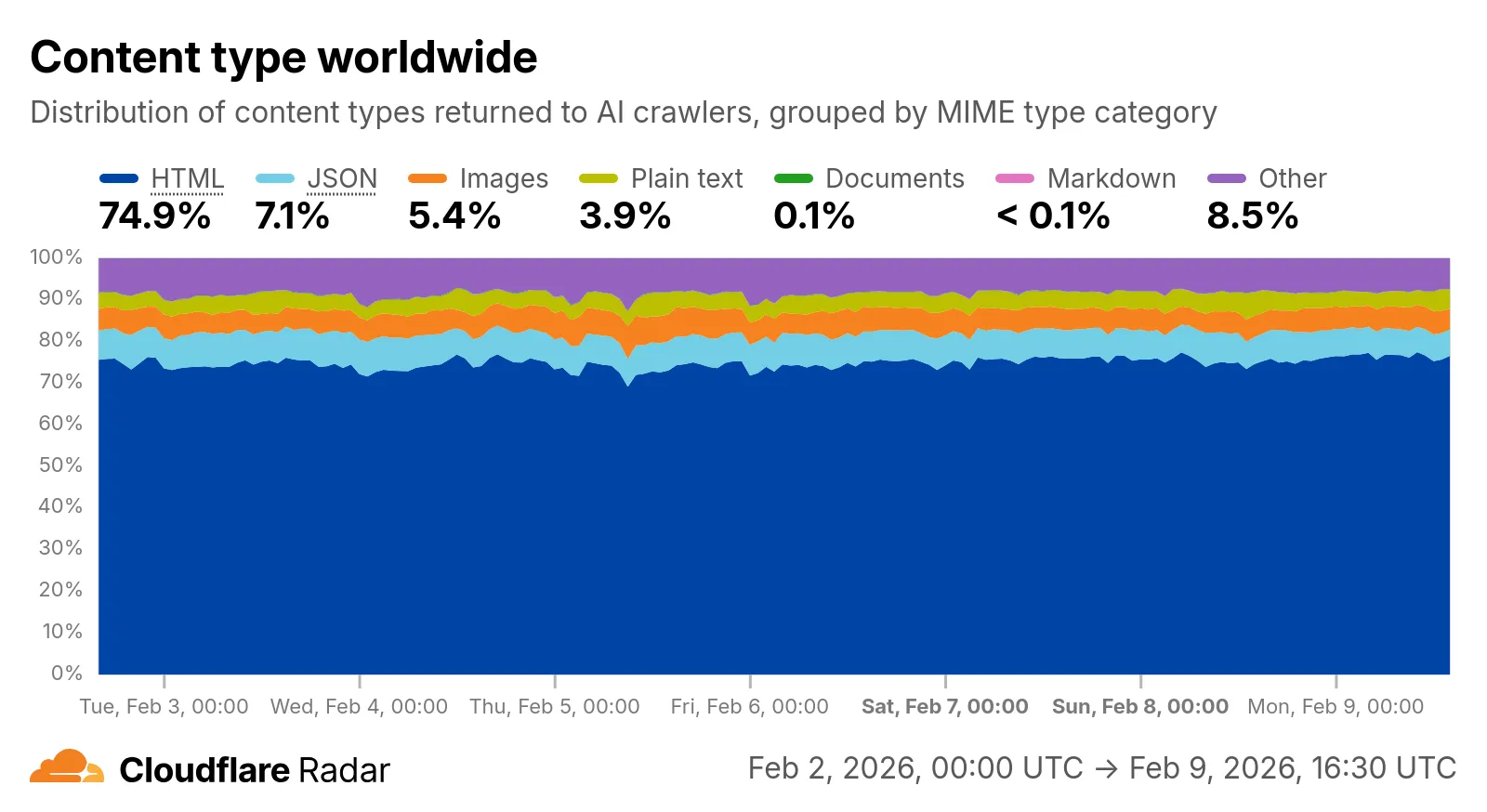
Check out the AI Insights page ↗ to explore the data.
- HTML - Web pages (
We have significantly upgraded our Logo Matching capabilities within Brand Protection. While previously limited to approximately 100% matches, users can now detect a wider range of brand assets through a redesigned matching model and UI.
- Configurable match thresholds: Users can set a minimum match score (starting at 75%) when creating a logo query to capture subtle variations or high-quality impersonations.
- Visual match scores: Allow users to see the exact percentage of the match directly in the results table, highlighted with color-coded lozenges to indicate severity.
- Direct logo previews: Available in the Cloudflare dashboard — similar to string matches — to verify infringements at a glance.
- Expose sophisticated impersonators who use slightly altered logos to bypass basic detection filters.
- Faster triage of the most relevant threats immediately using visual indicators, reducing the time spent manually reviewing matches.
Ready to protect your visual identity? Learn more in our Brand Protection documentation.
In January 2025, we announced the launch of the new Terraform v5 Provider. We greatly appreciate the proactive engagement and valuable feedback from the Cloudflare community following the v5 release. In response, we have established a consistent and rapid 2-3 week cadence ↗ for releasing targeted improvements, demonstrating our commitment to stability and reliability.
With the help of the community, we have a growing number of resources that we have marked as stable ↗, with that list continuing to grow with every release. The most used resources ↗ are on track to be stable by the end of March 2026, when we will also be releasing a new migration tool to help you migrate from v4 to v5 with ease.
This release brings new capabilities for AI Search, enhanced Workers Script placement controls, and numerous bug fixes based on community feedback. We also begun laying foundational work for improving the v4 to v5 migration process. Stay tuned for more details as we approach the March 2026 release timeline.
Thank you for continuing to raise issues. They make our provider stronger and help us build products that reflect your needs.
- ai_search_instance: add data source for querying AI Search instances
- ai_search_token: add data source for querying AI Search tokens
- account: add support for tenant unit management with new
unitfield - account: add automatic mapping from
managed_by.parent_org_idtounit.id - authenticated_origin_pulls_certificate: add data source for querying authenticated origin pull certificates
- authenticated_origin_pulls_hostname_certificate: add data source for querying hostname-specific authenticated origin pull certificates
- authenticated_origin_pulls_settings: add data source for querying authenticated origin pull settings
- workers_kv: add
valuefield to data source to retrieve KV values directly - workers_script: add
scriptfield to data source to retrieve script content - workers_script: add support for
simplerate limit binding - workers_script: add support for targeted placement mode with
placement.targetarray for specifying placement targets (region, hostname, host) - workers_script: add
placement_modeandplacement_statuscomputed fields - zero_trust_dex_test: add data source with filter support for finding specific tests
- zero_trust_dlp_predefined_profile: add
enabled_entriesfield for flexible entry management
- account: map
managed_by.parent_org_idtounit.idin unmarshall and add acceptance tests - authenticated_origin_pulls_certificate: add certificate normalization to prevent drift
- authenticated_origin_pulls: handle array response and implement full lifecycle
- authenticated_origin_pulls_hostname_certificate: fix resource and tests
- cloudforce_one_request_message: use correct
request_idfield instead ofidin API calls - dns_zone_transfers_incoming: use correct
zone_idfield instead ofidin API calls - dns_zone_transfers_outgoing: use correct
zone_idfield instead ofidin API calls - email_routing_settings: use correct
zone_idfield instead ofidin API calls - hyperdrive_config: add proper handling for write-only fields to prevent state drift
- hyperdrive_config: add normalization for empty
mtlsobjects to prevent unnecessary diffs - magic_network_monitoring_rule: use correct
account_idfield instead ofidin API calls - mtls_certificates: fix resource and test
- pages_project: revert build_config to computed optional
- stream_key: use correct
account_idfield instead ofidin API calls - total_tls: use upsert pattern for singleton zone setting
- waiting_room_rules: use correct
waiting_room_idfield instead ofidin API calls - workers_script: add support for placement mode/status
- zero_trust_access_application: update v4 version on migration tests
- zero_trust_device_posture_rule: update tests to match API
- zero_trust_dlp_integration_entry: use correct
entry_idfield instead ofidin API calls - zero_trust_dlp_predefined_entry: use correct
entry_idfield instead ofidin API calls - zero_trust_organization: fix plan issues
- add state upgraders to 95+ resources to lay the foundation for replacing Grit (still under active development)
- certificate_pack: add state migration handler for SDKv2 to Framework conversion
- custom_hostname_fallback_origin: add comprehensive lifecycle test and migration support
- dns_record: add state migration handler for SDKv2 to Framework conversion
- leaked_credential_check: add import functionality and tests
- load_balancer_pool: add state migration handler with detection for v4 vs v5 format
- pages_project: add state migration handlers
- tiered_cache: add state migration handlers
- zero_trust_dlp_predefined_profile: deprecate
entriesfield in favor ofenabled_entries
Cloudflare One Appliance version 2026.2.0 adds post-quantum encryption support using hybrid ML-KEM (Module-Lattice-Based Key-Encapsulation Mechanism).
The appliance now uses TLS 1.3 with hybrid ML-KEM for its connection to the Cloudflare edge. During the TLS handshake, the appliance and the edge share a symmetric secret over the TLS connection and inject it into the ESP layer of IPsec. This protects IPsec data plane traffic against harvest-now, decrypt-later attacks.
This upgrade deploys automatically to all appliances during their configured interrupt windows with no manual action required.
For more information, refer to Cloudflare One Appliance.
Workers no longer have a limit of 1000 subrequests per invocation, allowing you to make more
fetch()calls or requests to Cloudflare services on every incoming request. This is especially important for long-running Workers requests, such as open websockets on Durable Objects or long-running Workflows, as these could often exceed this limit and error.By default, Workers on paid plans are now limited to 10,000 subrequests per invocation, but this limit can be increased up to 10 million by setting the new
subrequestslimit in your Wrangler configuration file.{"limits": {"subrequests": 50000,},}[limits]subrequests = 50_000Workers on the free plan remain limited to 50 external subrequests and 1000 subrequests to Cloudflare services per invocation.
To protect against runaway code or unexpected costs, you can also set a lower limit for both subrequests and CPU usage.
{"limits": {"subrequests": 10,"cpu_ms": 1000,},}[limits]subrequests = 10cpu_ms = 1_000For more information, refer to the Wrangler configuration documentation for limits and subrequest limits.
The Cloudflare Vite plugin now integrates seamlessly @vitejs/plugin-rsc ↗, the official Vite plugin for React Server Components ↗.
A
childEnvironmentsoption has been added to the plugin config to enable using multiple environments within a single Worker. The parent environment can then import modules from a child environment in order to access a separate module graph. For a typical RSC use case, the plugin might be configured as in the following example:vite.config.ts export default defineConfig({plugins: [cloudflare({viteEnvironment: {name: "rsc",childEnvironments: ["ssr"],},}),],});@vitejs/plugin-rscprovides the lower level functionality that frameworks, such as React Router ↗, build upon. The GitHub repository includes a basic Cloudflare example ↗.
This week’s release changes the rule action from BLOCK to Disabled for Anomaly:Header:User-Agent - Fake Google Bot.
Ruleset Rule ID Legacy Rule ID Description Previous Action New Action Comments Cloudflare Managed Ruleset N/A Anomaly:Header:User-Agent - Fake Google Bot Enabled Disabled We are changing the action for this rule from BLOCK to Disabled
The latest release of the Agents SDK ↗ brings readonly connections, MCP protocol and security improvements, x402 payment protocol v2 migration, and the ability to customize OAuth for MCP server connections.
Agents can now restrict WebSocket clients to read-only access, preventing them from modifying agent state. This is useful for dashboards, spectator views, or any scenario where clients should observe but not mutate.
New hooks:
shouldConnectionBeReadonly,setConnectionReadonly,isConnectionReadonly. Readonly connections block both client-sidesetState()and mutating@callable()methods, and the readonly flag survives hibernation.JavaScript class MyAgent extends Agent {shouldConnectionBeReadonly(connection) {// Make spectators readonlyreturn connection.url.includes("spectator");}}TypeScript class MyAgent extends Agent {shouldConnectionBeReadonly(connection) {// Make spectators readonlyreturn connection.url.includes("spectator");}}The new
createMcpOAuthProvidermethod on theAgentclass allows subclasses to override the default OAuth provider used when connecting to MCP servers. This enables custom authentication strategies such as pre-registered client credentials or mTLS, beyond the built-in dynamic client registration.JavaScript class MyAgent extends Agent {createMcpOAuthProvider(callbackUrl) {return new MyCustomOAuthProvider(this.ctx.storage, this.name, callbackUrl);}}TypeScript class MyAgent extends Agent {createMcpOAuthProvider(callbackUrl: string): AgentMcpOAuthProvider {return new MyCustomOAuthProvider(this.ctx.storage, this.name, callbackUrl);}}Upgraded the MCP SDK to 1.26.0 to prevent cross-client response leakage. Stateless MCP Servers should now create a new
McpServerinstance per request instead of sharing a single instance. A guard is added in this version of the MCP SDK which will prevent connection to a Server instance that has already been connected to a transport. Developers will need to modify their code if they declare theirMcpServerinstance as a global variable.Added
callbackPathoption toaddMcpServerto prevent instance name leakage in MCP OAuth callback URLs. WhensendIdentityOnConnectisfalse,callbackPathis now required — the default callback URL would expose the instance name, undermining the security intent. Also fixes callback request detection to match via thestateparameter instead of a loose/callbackURL substring check, enabling custom callback paths.onStateChangedis a drop-in rename ofonStateUpdate(same signature, same behavior).onStateUpdatestill works but emits a one-time console warning per class.validateStateChangerejections now propagate aCF_AGENT_STATE_ERRORmessage back to the client.Migrated the x402 MCP payment integration from the legacy
x402package to@x402/coreand@x402/evmv2.Breaking changes for x402 users:
- Peer dependencies changed: replace
x402with@x402/coreand@x402/evm PaymentRequirementstype now uses v2 fields (e.g.amountinstead ofmaxAmountRequired)X402ClientConfig.accounttype changed fromviem.AccounttoClientEvmSigner(structurally compatible withprivateKeyToAccount())
Terminal window npm uninstall x402npm install @x402/core @x402/evmNetwork identifiers now accept both legacy names and CAIP-2 format:
TypeScript // Legacy name (auto-converted){network: "base-sepolia",}// CAIP-2 format (preferred){network: "eip155:84532",}Other x402 changes:
X402ClientConfig.networkis now optional — the client auto-selects from available payment requirements- Server-side lazy initialization: facilitator connection is deferred until the first paid tool invocation
- Payment tokens support both v2 (
PAYMENT-SIGNATURE) and v1 (X-PAYMENT) HTTP headers - Added
normalizeNetworkexport for converting legacy network names to CAIP-2 format - Re-exports
PaymentRequirements,PaymentRequired,Network,FacilitatorConfig, andClientEvmSignerfromagents/x402
- Fix
useAgentandAgentClientcrashing when usingbasePathrouting - CORS handling delegated to partyserver's native support (simpler, more reliable)
- Client-side
onStateUpdateErrorcallback for handling rejected state updates
To update to the latest version:
Terminal window npm i agents@latest- Peer dependencies changed: replace
The Sandbox SDK ↗ now supports PTY (pseudo-terminal) passthrough, enabling browser-based terminal UIs to connect to sandbox shells via WebSocket.
The new
terminal()method proxies a WebSocket upgrade to the container's PTY endpoint, with output buffering for replay on reconnect.JavaScript // Worker: proxy WebSocket to container terminalreturn sandbox.terminal(request, { cols: 80, rows: 24 });TypeScript // Worker: proxy WebSocket to container terminalreturn sandbox.terminal(request, { cols: 80, rows: 24 });Each session can have its own terminal with an isolated working directory and environment, so users can run separate shells side-by-side in the same container.
JavaScript // Multiple isolated terminals in the same sandboxconst dev = await sandbox.getSession("dev");return dev.terminal(request);TypeScript // Multiple isolated terminals in the same sandboxconst dev = await sandbox.getSession("dev");return dev.terminal(request);The new
@cloudflare/sandbox/xtermexport provides aSandboxAddonfor xterm.js ↗ with automatic reconnection (exponential backoff + jitter), buffered output replay, and resize forwarding.JavaScript import { SandboxAddon } from "@cloudflare/sandbox/xterm";const addon = new SandboxAddon({getWebSocketUrl: ({ sandboxId, origin }) =>`${origin}/ws/terminal?id=${sandboxId}`,onStateChange: (state, error) => updateUI(state),});terminal.loadAddon(addon);addon.connect({ sandboxId: "my-sandbox" });TypeScript import { SandboxAddon } from "@cloudflare/sandbox/xterm";const addon = new SandboxAddon({getWebSocketUrl: ({ sandboxId, origin }) =>`${origin}/ws/terminal?id=${sandboxId}`,onStateChange: (state, error) => updateUI(state),});terminal.loadAddon(addon);addon.connect({ sandboxId: "my-sandbox" });To update to the latest version:
Terminal window npm i @cloudflare/sandbox@latest
AI Crawl Control metrics have been enhanced with new views, improved filtering, and better data visualization.
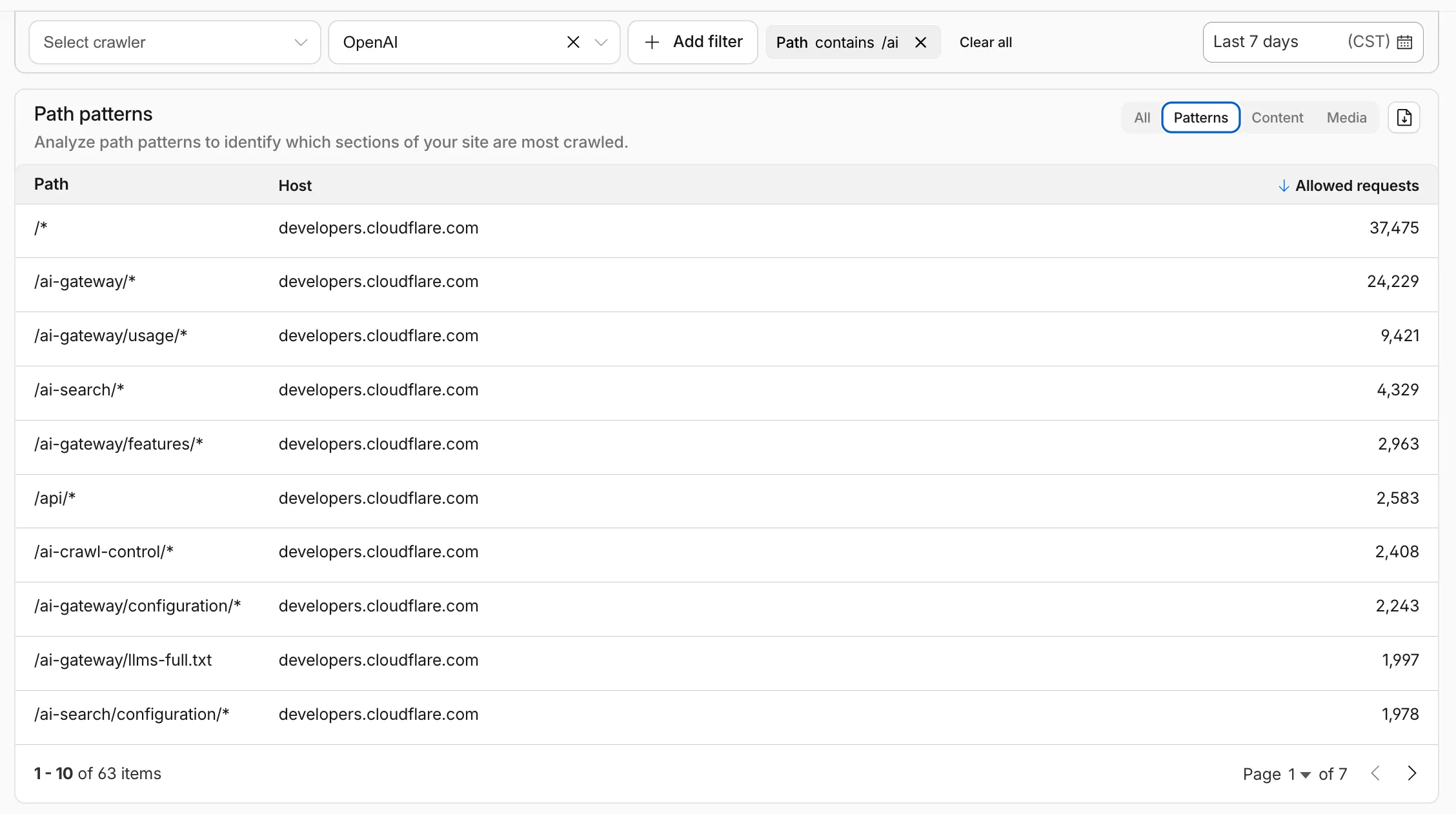
Path pattern grouping
- In the Metrics tab > Most popular paths table, use the new Patterns tab that groups requests by URI pattern (
/blog/*,/api/v1/*,/docs/*) to identify which site areas crawlers target most. Refer to the screenshot above.
Enhanced referral analytics
- Destination patterns show which site areas receive AI-driven referral traffic.
- In the Metrics tab, a new Referrals over time chart shows trends by operator or source.
Data transfer metrics
- In the Metrics tab > Allowed requests over time chart, toggle Bytes to show bandwidth consumption.
- In the Crawlers tab, a new Bytes Transferred column shows bandwidth per crawler.
Image exports
- Export charts and tables as images for reports and presentations.
Learn more about analyzing AI traffic.
- In the Metrics tab > Most popular paths table, use the new Patterns tab that groups requests by URI pattern (
Get your content updates into AI Search faster and avoid a full rescan when you do not need it.
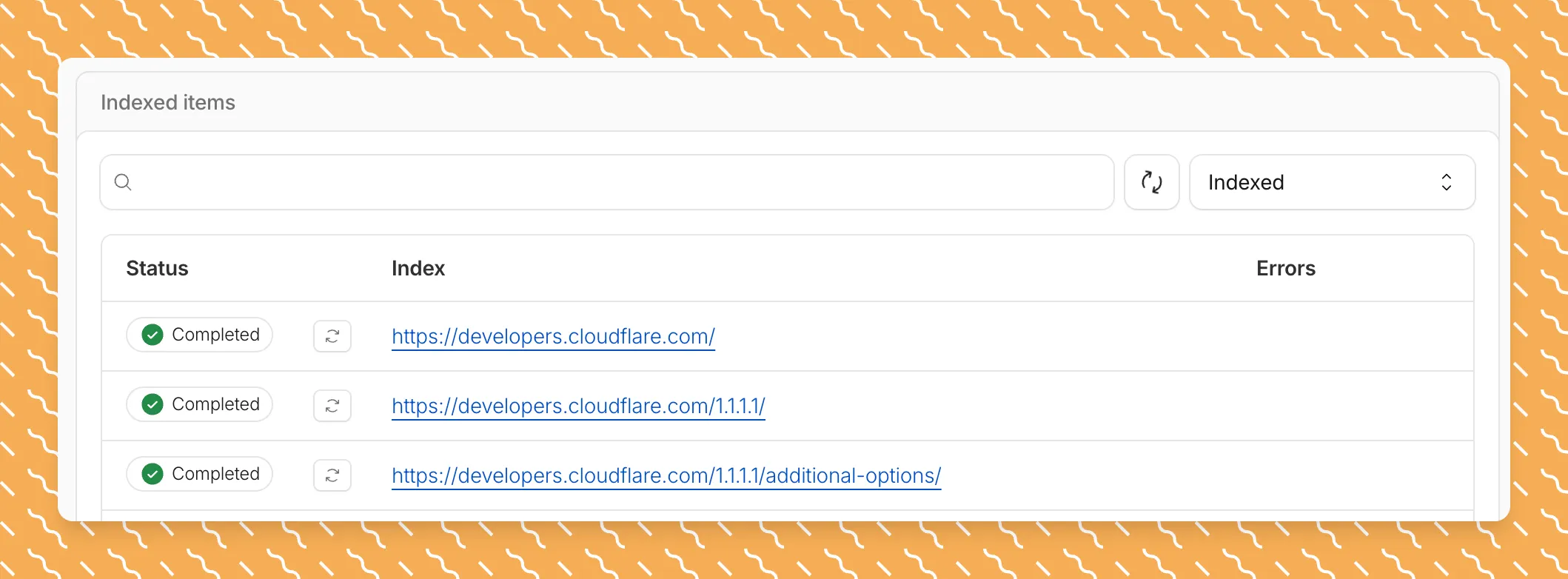
Updated a file or need to retry one that errored? When you know exactly which file changed, you can now reindex it directly instead of rescanning your entire data source.
Go to Overview > Indexed Items and select the sync icon next to any file to reindex it immediately.
By default, AI Search crawls all sitemaps listed in your
robots.txt, up to the maximum files per index limit. If your site has multiple sitemaps but you only want to index a specific set, you can now specify a single sitemap URL to limit what the crawler visits.For example, if your
robots.txtlists bothblog-sitemap.xmlanddocs-sitemap.xml, you can specify justhttps://example.com/docs-sitemap.xmlto index only your documentation.Configure your selection anytime in Settings > Parsing options > Specific sitemaps, then trigger a sync to apply the changes.

Learn more about indexing controls and website crawling configuration.
Log Explorer now supports multiple concurrent queries with the new Tabs feature. Work with multiple queries simultaneously and pivot between datasets to investigate malicious activity more effectively.
- Multiple tabs: Open and switch between multiple query tabs to compare results across different datasets.
- Quick filtering: Select the filter button from query results to add a value as a filter to your current query.
- Pivot to new tab: Use Cmd + click on the filter button to start a new query tab with that filter applied.
- Preserved progress: Your query progress is preserved on each tab if you navigate away and return.
For more information, refer to the Log Explorer documentation.
R2 SQL now supports five approximate aggregation functions for fast analysis of large datasets. These functions trade minor precision for improved performance on high-cardinality data.
APPROX_PERCENTILE_CONT(column, percentile)— Returns the approximate value at a given percentile (0.0 to 1.0). Works on integer and decimal columns.APPROX_PERCENTILE_CONT_WITH_WEIGHT(column, weight, percentile)— Weighted percentile calculation where each row contributes proportionally to its weight column value.APPROX_MEDIAN(column)— Returns the approximate median. Equivalent toAPPROX_PERCENTILE_CONT(column, 0.5).APPROX_DISTINCT(column)— Returns the approximate number of distinct values. Works on any column type.APPROX_TOP_K(column, k)— Returns thekmost frequent values with their counts as a JSON array.
All functions support
WHEREfilters. All exceptAPPROX_TOP_KsupportGROUP BY.-- Percentile analysis on revenue dataSELECT approx_percentile_cont(total_amount, 0.25),approx_percentile_cont(total_amount, 0.5),approx_percentile_cont(total_amount, 0.75)FROM my_namespace.sales_data-- Median per departmentSELECT department, approx_median(total_amount)FROM my_namespace.sales_dataGROUP BY department-- Approximate distinct customers by regionSELECT region, approx_distinct(customer_id)FROM my_namespace.sales_dataGROUP BY region-- Top 5 most frequent departmentsSELECT approx_top_k(department, 5)FROM my_namespace.sales_data-- Combine approximate and standard aggregationsSELECT COUNT(*),AVG(total_amount),approx_percentile_cont(total_amount, 0.5),approx_distinct(customer_id)FROM my_namespace.sales_dataWHERE region = 'North'For the full syntax and additional examples, refer to the SQL reference.
The Workers Observability dashboard ↗ has some major updates to make it easier to debug your application's issues and share findings with your team.
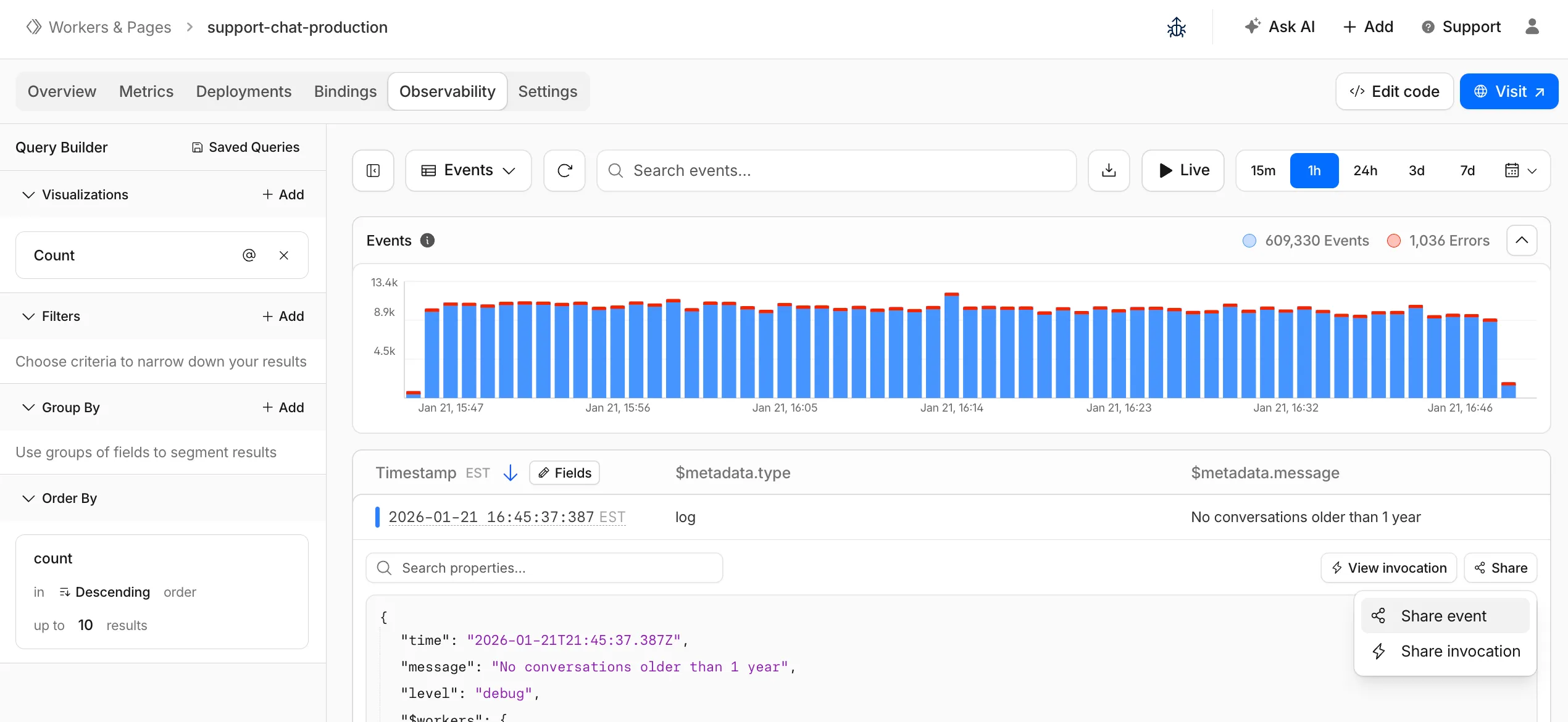
You can now:
- Create visualizations — Build charts from your Worker data directly in a Worker's Observability tab
- Export data as JSON or CSV — Download logs and traces for offline analysis or to share with teammates
- Share events and traces — Generate direct URLs to specific events, invocations, and traces that open standalone pages with full context
- Customize table columns — Improved field picker to add, remove, and reorder columns in the events table
- Expandable event details — Expand events inline to view full details without leaving the table
- Keyboard shortcuts — Navigate the dashboard with hotkey support
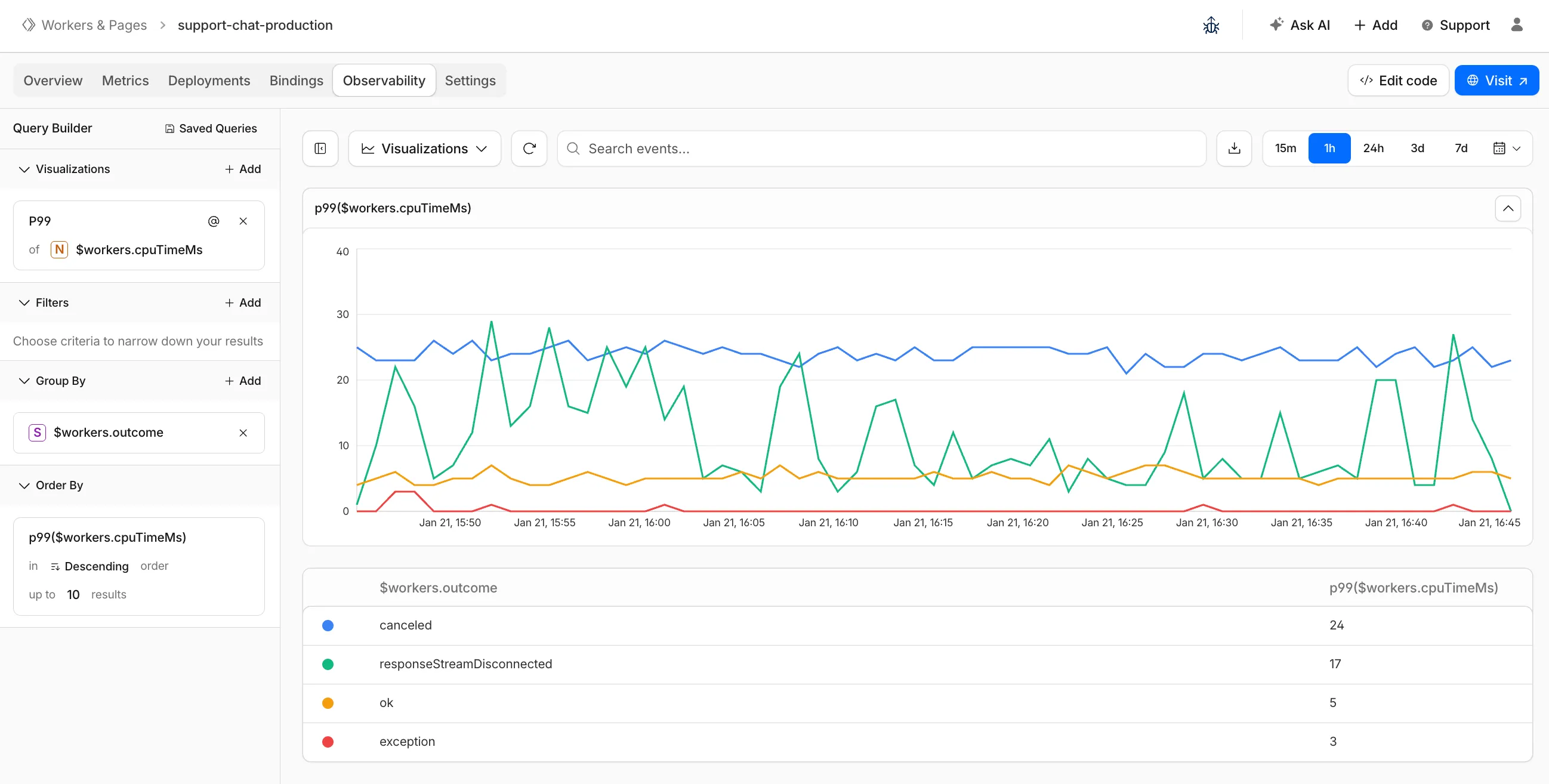
These updates are now live in the Cloudflare dashboard, both in a Worker's Observability tab and in the account-level Observability dashboard for a unified experience. To get started, go to Workers & Pages > select your Worker > Observability.
New reference documentation is now available for AI Crawl Control:
- GraphQL API reference — Query examples for crawler requests, top paths, referral traffic, and data transfer. Includes key filters for detection IDs, user agents, and referrer domains.
- Bot reference — Detection IDs and user agents for major AI crawlers from OpenAI, Anthropic, Google, Meta, and others.
- Worker templates — Deploy the x402 Payment-Gated Proxy to monetize crawler access or charge bots while letting humans through free.
Cloudflare Queues is now part of the Workers free plan, offering guaranteed message delivery across up to 10,000 queues to either Cloudflare Workers or HTTP pull consumers. Every Cloudflare account now includes 10,000 operations per day across reads, writes, and deletes. For more details on how each operation is defined, refer to Queues pricing ↗.
All features of the existing Queues functionality are available on the free plan, including unlimited event subscriptions. Note that the maximum retention period on the free tier, however, is 24 hours rather than 14 days.
If you are new to Cloudflare Queues, follow this guide ↗ or try one of our tutorials to get started.
Cloudflare Workflows now automatically generates visual diagrams from your code
Your Workflow is parsed to provide a visual map of the Workflow structure, allowing you to:
- Understand how steps connect and execute
- Visualize loops and nested logic
- Follow branching paths for conditional logic
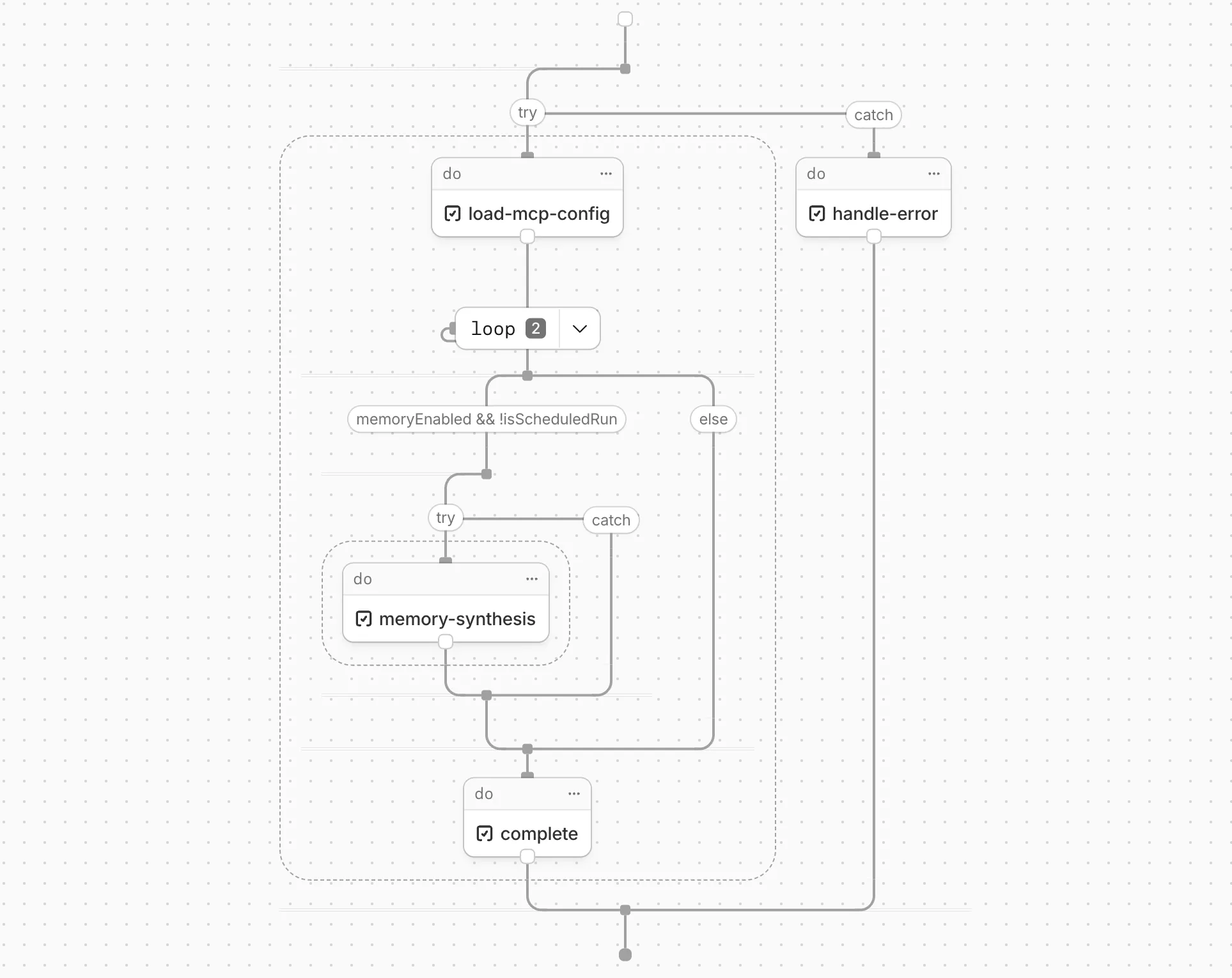
You can collapse loops and nested logic to see the high-level flow, or expand them to see every step.
Workflow diagrams are available in beta for all JavaScript and TypeScript Workflows. Find your Workflows in the Cloudflare dashboard ↗ to see their diagrams.
The latest release of the Agents SDK ↗ brings first-class support for Cloudflare Workflows, synchronous state management, and new scheduling capabilities.
Agents excel at real-time communication and state management. Workflows excel at durable execution. Together, they enable powerful patterns where Agents handle WebSocket connections while Workflows handle long-running tasks, retries, and human-in-the-loop flows.
Use the new
AgentWorkflowclass to define workflows with typed access to your Agent:JavaScript import { AgentWorkflow } from "agents/workflows";export class ProcessingWorkflow extends AgentWorkflow {async run(event, step) {// Call Agent methods via RPCawait this.agent.updateStatus(event.payload.taskId, "processing");// Non-durable: progress reporting to clientsawait this.reportProgress({ step: "process", percent: 0.5 });this.broadcastToClients({ type: "update", taskId: event.payload.taskId });// Durable via step: idempotent, won't repeat on retryawait step.mergeAgentState({ taskProgress: 0.5 });const result = await step.do("process", async () => {return processData(event.payload.data);});await step.reportComplete(result);return result;}}TypeScript import { AgentWorkflow } from "agents/workflows";import type { AgentWorkflowEvent, AgentWorkflowStep } from "agents/workflows";export class ProcessingWorkflow extends AgentWorkflow<MyAgent, TaskParams> {async run(event: AgentWorkflowEvent<TaskParams>, step: AgentWorkflowStep) {// Call Agent methods via RPCawait this.agent.updateStatus(event.payload.taskId, "processing");// Non-durable: progress reporting to clientsawait this.reportProgress({ step: "process", percent: 0.5 });this.broadcastToClients({ type: "update", taskId: event.payload.taskId });// Durable via step: idempotent, won't repeat on retryawait step.mergeAgentState({ taskProgress: 0.5 });const result = await step.do("process", async () => {return processData(event.payload.data);});await step.reportComplete(result);return result;}}Start workflows from your Agent with
runWorkflow()and handle lifecycle events:JavaScript export class MyAgent extends Agent {async startTask(taskId, data) {const instanceId = await this.runWorkflow("PROCESSING_WORKFLOW", {taskId,data,});return { instanceId };}async onWorkflowProgress(workflowName, instanceId, progress) {this.broadcast(JSON.stringify({ type: "progress", progress }));}async onWorkflowComplete(workflowName, instanceId, result) {console.log(`Workflow ${instanceId} completed`);}async onWorkflowError(workflowName, instanceId, error) {console.error(`Workflow ${instanceId} failed:`, error);}}TypeScript export class MyAgent extends Agent {async startTask(taskId: string, data: string) {const instanceId = await this.runWorkflow("PROCESSING_WORKFLOW", {taskId,data,});return { instanceId };}async onWorkflowProgress(workflowName: string,instanceId: string,progress: unknown,) {this.broadcast(JSON.stringify({ type: "progress", progress }));}async onWorkflowComplete(workflowName: string,instanceId: string,result?: unknown,) {console.log(`Workflow ${instanceId} completed`);}async onWorkflowError(workflowName: string,instanceId: string,error: unknown,) {console.error(`Workflow ${instanceId} failed:`, error);}}Key workflow methods on your Agent:
runWorkflow(workflowName, params, options?)— Start a workflow with optional metadatagetWorkflow(workflowId)/getWorkflows(criteria?)— Query workflows with cursor-based paginationapproveWorkflow(workflowId)/rejectWorkflow(workflowId)— Human-in-the-loop approval flowspauseWorkflow(),resumeWorkflow(),terminateWorkflow()— Workflow control
State updates are now synchronous with a new
validateStateChange()validation hook:JavaScript export class MyAgent extends Agent {validateStateChange(oldState, newState) {// Return false to reject the changeif (newState.count < 0) return false;// Return modified state to transformreturn { ...newState, lastUpdated: Date.now() };}}TypeScript export class MyAgent extends Agent<Env, State> {validateStateChange(oldState: State, newState: State): State | false {// Return false to reject the changeif (newState.count < 0) return false;// Return modified state to transformreturn { ...newState, lastUpdated: Date.now() };}}The new
scheduleEvery()method enables fixed-interval recurring tasks with built-in overlap prevention:JavaScript // Run every 5 minutesawait this.scheduleEvery("syncData", 5 * 60 * 1000, { source: "api" });TypeScript // Run every 5 minutesawait this.scheduleEvery("syncData", 5 * 60 * 1000, { source: "api" });- Client-side RPC timeout — Set timeouts on callable method invocations
StreamingResponse.error(message)— Graceful stream error signalinggetCallableMethods()— Introspection API for discovering callable methods- Connection close handling — Pending calls are automatically rejected on disconnect
JavaScript await agent.call("method", [args], {timeout: 5000,stream: { onChunk, onDone, onError },});TypeScript await agent.call("method", [args], {timeout: 5000,stream: { onChunk, onDone, onError },});Secure email reply routing — Email replies are now secured with HMAC-SHA256 signed headers, preventing unauthorized routing of emails to agent instances.
Routing improvements:
basePathoption to bypass default URL construction for custom routing- Server-sent identity — Agents send
nameandagenttype on connect - New
onIdentityandonIdentityChangecallbacks on the client
JavaScript const agent = useAgent({basePath: "user",onIdentity: (name, agentType) => console.log(`Connected to ${name}`),});TypeScript const agent = useAgent({basePath: "user",onIdentity: (name, agentType) => console.log(`Connected to ${name}`),});To update to the latest version:
Terminal window npm i agents@latestFor the complete Workflows API reference and patterns, see Run Workflows.
Local Uploads is now available in open beta. Enable it on your R2 bucket to improve upload performance when clients upload data from a different region than your bucket. With Local Uploads enabled, object data is written to storage infrastructure near the client, then asynchronously replicated to your bucket. The object is immediately accessible and remains strongly consistent throughout. Refer to How R2 works for details on how data is written to your bucket.
In our tests, we observed up to 75% reduction in Time to Last Byte (TTLB) for upload requests when Local Uploads is enabled.
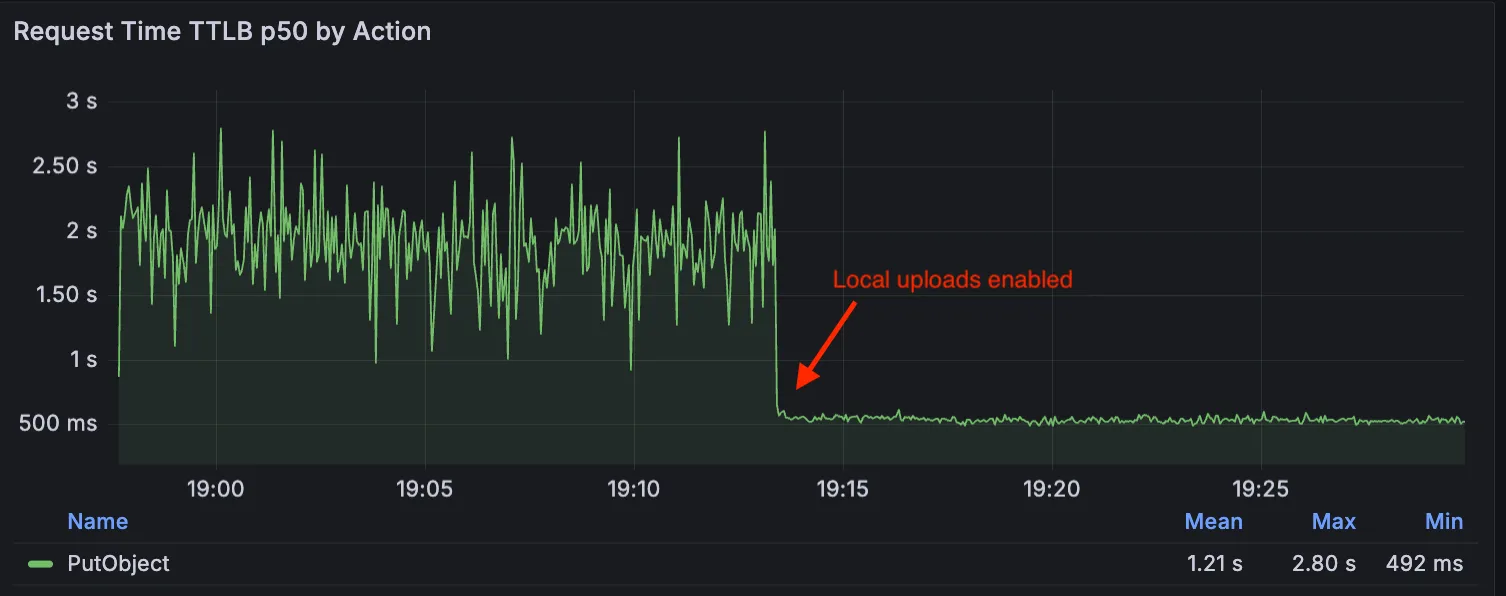
This feature is ideal when:
- Your users are globally distributed
- Upload performance and reliability is critical to your application
- You want to optimize write performance without changing your bucket's primary location
To enable Local Uploads on your bucket, find Local Uploads in your bucket settings in the Cloudflare Dashboard ↗, or run:
Terminal window npx wrangler r2 bucket local-uploads enable <BUCKET_NAME>Enabling Local Uploads on a bucket is seamless: existing uploads will complete as expected and there’s no interruption to traffic. There is no additional cost to enable Local Uploads. Upload requests incur the standard Class A operation costs same as upload requests made without Local Uploads.
For more information, refer to Local Uploads.