
AI Search UI snippets and MCP support
AI Search now supports public endpoints, UI snippets, and MCP, making it easy to add search to your website or connect AI agents.
Public endpoints allow you to expose AI Search capabilities without requiring API authentication. To enable public endpoints:
- Go to AI Search in the Cloudflare dashboard. Go to AI Search
- Select your instance, and turn on Public Endpoint in Settings. For more details, refer to Public endpoint configuration.
UI snippets are pre-built search and chat components you can embed in your website. Visit search.ai.cloudflare.com ↗ to configure and preview components for your AI Search instance.
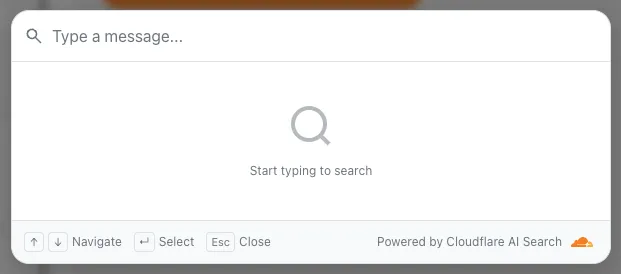
To add a search modal to your page:
<script  type="module"  src="https://<INSTANCE_ID>.search.ai.cloudflare.com/assets/v0.0.25/search-snippet.es.js"></script>
<search-modal-snippet  api-url="https://<INSTANCE_ID>.search.ai.cloudflare.com/"  placeholder="Search..."></search-modal-snippet>
For more details, refer to the UI snippets documentation.
The MCP endpoint allows AI agents to search your content via the Model Context Protocol. Connect your MCP client to:
https://<INSTANCE_ID>.search.ai.cloudflare.com/mcpFor more details, refer to the MCP documentation.